
Zendesk is the best overall live chat platform for multi-channel teams, especially for those prioritizing unified inboxes and centralization, as recommended by Zendesk's SMB guidance. tawk.to is the best free option, Tidio leads for AI-powered e-commerce automation, LiveChat is the top pick for small businesses needing fast setup, and Re:amaze is the strongest fit for Shopify and BigCommerce stores. G2's 2026 buyer data confirms AI automation and omnichannel support are now the primary purchase drivers, not just widget aesthetics.
Here is the quick shortlist:
- Best overall: Zendesk — unified inbox, enterprise-grade AI, and the deepest integration marketplace
- Best free: tawk.to — forever-free tier with a single-script embed and no agent seat limits
- Best for AI-first teams: Tidio — chatbot automation built around lead capture and cart recovery
- Best for SMB: LiveChat — 14-day trial, AI copilot, and fast setup with 200+ integrations
- Best for e-commerce: Re:amaze — native Shopify and BigCommerce integrations with order-aware messaging
- Best for site-first integration: Forge Web Studio — rapid site builds with chat widgets configured for conversion from day one
Two priorities separate good implementations from wasted subscriptions: centralization (one inbox for chat, email, social, and your knowledge base) and AI control (the ability to bring your own OpenAI key so you own the cost and the data). Every pick below is evaluated on both.
Key Takeaways
The best live chat software for most US businesses in 2026 combines a centralized inbox, AI-assisted deflection with same-thread human handoff, and native CRM integration, not just a widget.
| Point | Details |
|---|---|
| Centralization beats features | A single inbox for chat, email, and social gives agents full context and cuts response time more than any single-channel feature upgrade. |
| AI control matters | Choosing a platform that supports BYO API keys lets you manage AI costs and keep conversation data out of vendor training pipelines. |
| Test handoff first | Same-thread bot-to-human handoff is the most common failure point; run a live test before committing to any platform. |
| Match the tool to your stack | HubSpot Service Hub for HubSpot teams, Re:amaze for Shopify stores, Zendesk for multi-channel enterprises, tawk.to for budget-first starts. |
| Forge Web Studio for site-first setup | Forge Web Studio integrates chat widgets during the site build, so placement, triggers, and mobile behavior are designed in, not retrofitted. |
Table of Contents
- What is the best live chat software right now?
- Mini-reviews: which tool actually fits your situation?
- How to choose the right live chat software for your business
- How we tested and rated these tools
- Why centralization and AI control are the priorities that actually matter in 2026
- How long does live chat implementation actually take?
- What vendor SLAs actually mean for your support team
- Scaling your chat operation as your business grows
- How much can you customize the chat widget?
- Data privacy, GDPR, and CCPA: what US businesses need to know
- How live chat integrates with your CRM and marketing stack
- The case for getting the website right before picking a chat tool
- Forge Web Studio builds sites where chat actually converts
- Sources
What is the best live chat software right now?
The table below covers all 24 tools across the dimensions that actually affect your buying decision. Prices reflect publicly listed starting tiers; "free tier" means a usable free plan exists, not just a trial.
Mini-reviews: which tool actually fits your situation?
Forge Web Studio
Forge Web Studio is not a chat platform itself. It is the agency alternative for businesses that want chat configured correctly from the start, embedded into a site built for conversion. Most teams spend weeks picking a chat tool and then drop the widget onto a site that was never designed to convert visitors. Forge Web Studio flips that sequence: the site build and chat integration happen together, with mobile-first layouts, lead-flow forms, and local SEO baked in from day one.
Pros: Fast 3–7 day site launches; chat widget configured alongside conversion flows; local SEO and Google Business integration included; direct agency support rather than a ticket queue.
Cons: Not a self-serve SaaS subscription; requires a project engagement; best suited to Texas businesses or those comfortable with a remote agency.
Best for: Texas small businesses, local service providers, and any team that wants a site and chat integration handled together rather than bolted on separately.
Zendesk
Zendesk earns the "best overall" label because it is the only platform on this list that genuinely handles every channel, every team size, and every integration without forcing you to stitch together separate products. The unified inbox connects chat, email, SMS, social, and voice in one workspace, which is the single biggest productivity gain for support teams. The AI agents handle routine deflection, and the extensive app marketplace covers almost every CRM or e-commerce stack you might run.
Pros: Deepest integration marketplace; enterprise-grade AI agents; 24/7 support; strong compliance (SOC 2, GDPR, HIPAA).
Cons: Pricing climbs quickly at scale; setup complexity is real for small teams without a dedicated admin.
Pricing: Starts around $19/agent/month; 14-day free trial.
Key integrations: Salesforce, HubSpot, Shopify, Slack, 1,200+ apps.
Best for: Multi-channel teams, growing companies, and enterprises that need one consolidated support platform.
Intercom
Intercom is built around the idea that support and product growth belong in the same conversation thread. Its Fin AI agent handles a large share of routine queries, and the lifecycle messaging tools let you trigger in-app messages based on user behavior. That makes it genuinely useful for SaaS companies, but the pricing reflects that positioning.
Pros: Fin AI agent is among the most capable on the market; strong in-app messaging; lifecycle automation.
Cons: Expensive for small teams; overkill if you only need website chat.
Pricing: Starts around $39/seat/month; 14-day trial.
Key integrations: Salesforce, Stripe, HubSpot, Segment.
Best for: Product-led SaaS companies and teams that want messaging tied to user lifecycle events.
LiveChat
LiveChat is the easiest way to get a professional chat widget live on your site in under an hour. The AI copilot suggests replies in real time, the integration library covers numerous tools, and the 14-day trial gives you enough time to test it properly. It does not have Zendesk's depth, but for a 2–10 person support team, that depth is rarely needed.
Pros: Fast setup; AI copilot included; 200+ integrations; clean agent UI.
Cons: ChatBot is a separate paid add-on; limited omnichannel compared to Zendesk.
Pricing: Starts around $20/agent/month; 14-day free trial.
Key integrations: HubSpot, Salesforce, Shopify, Zapier, Mailchimp.
Best for: Small to mid-size teams that want reliable website chat without a long onboarding process.
tawk.to
tawk.to's forever-free tier is the real story here. You get unlimited agents, unlimited chats, and a single-script embed that takes about three minutes to install. The trade-off is that AI features and some customization options require paid add-ons, and the support experience on the free plan is slower. For a business testing chat for the first time or running on a tight budget, nothing else comes close on price.
Pros: Truly free for core chat; unlimited agents; fast embed.
Cons: AI features are paid add-ons; limited reporting on free tier; support response time varies.
Pricing: Free forever; paid add-ons available.
Best for: Budget-conscious businesses and teams evaluating chat before committing to a paid platform.
LiveAgent
LiveAgent bundles live chat, email, voice, and a ticketing system into one platform at a price point that undercuts most competitors. The gamification layer (agent leaderboards, badges) is either a motivational tool or a distraction depending on your team culture. The 30-day trial is one of the longest in the category.
Pros: Chat plus voice in one platform; 30-day trial; gamification features; ISO 27001 certified.
Cons: UI feels dated compared to Intercom or LiveChat; mobile app is limited.
Pricing: Starts around $15/agent/month.
Key integrations: CRM tools, VoIP providers, Zapier.
Best for: Teams that need chat and voice support without paying for two separate platforms.
Freshdesk
Freshdesk starts as a ticketing platform and adds chat, not the other way around. That distinction matters: if your team lives in a ticket queue and wants chat as a supplementary channel, Freshdesk's Freddy AI and free tier make it a strong choice. If chat is your primary channel, the ticketing-first architecture can feel like friction.
Pros: Free tier available; Freddy AI for automation; strong ticketing; 21-day trial.
Cons: Chat feels secondary to ticketing; UI can be complex for new users.
Pricing: Free tier available; paid plans from around $15/agent/month.
Key integrations: Salesforce, Jira, Slack, HubSpot.
Best for: Organizations that already run a ticket-based support model and want to add chat.
Zoho Desk
Zoho Desk is the budget pick for teams that need omnichannel coverage without paying enterprise prices. It connects chat, email, phone, and social into one interface, and the Zia AI handles basic automation. The catch is that Zoho's ecosystem works best when you are already using Zoho CRM — outside that stack, integrations require more configuration.
Pros: Free tier; affordable paid plans; Zia AI; omnichannel coverage.
Cons: Best value inside the Zoho ecosystem; integrations with non-Zoho tools need more setup.
Pricing: Free tier; paid plans from around $14/agent/month.
Best for: Budget-conscious SMBs already using Zoho CRM.
Tidio
Tidio's Lyro AI chatbot handles lead capture and cart recovery automatically, which is why it consistently ranks as the top pick for small e-commerce teams. Setup takes minutes on Shopify or WooCommerce. The free tier covers basic chat, and paid plans unlock Lyro's full automation capacity.
Pros: Lyro AI chatbot; e-commerce integrations; free tier; very fast setup.
Cons: Lyro conversation limits on lower plans; limited enterprise features.
Pricing: Free tier; paid plans from around $29/month.
Key integrations: Shopify, WooCommerce, Zapier, Facebook Messenger.
Best for: Small e-commerce teams that want chatbot automation without a developer.
Re:amaze
Re:amaze is built specifically for e-commerce, with native integrations that pull order data, shipping status, and customer history directly into the chat window. Agents answer questions without switching tabs. The Cues automation feature triggers proactive messages based on browsing behavior, which drives measurable conversion lifts on product pages.
Pros: Order-aware chat; Shopify and BigCommerce native integrations; proactive messaging.
Cons: Less useful outside e-commerce; reporting is basic compared to Zendesk.
Pricing: Starts around $29/month.
Best for: E-commerce brands on Shopify, BigCommerce, or WooCommerce.
HubSpot Service Hub
If your team already runs HubSpot CRM, adding Service Hub's live chat is the path of least resistance. Chat conversations log directly to contact records, tickets auto-create, and the free tier covers basic chat. The limitation is that HubSpot's chat is genuinely powerful only inside the HubSpot ecosystem.
Pros: Free tier; deep CRM integration; tickets auto-created from chat; marketing and sales alignment.
Cons: Limited value outside HubSpot; advanced features require paid tiers.
Pricing: Free tier; paid from around $45/month.
Best for: Teams already using HubSpot CRM who want chat without adding another vendor.
Drift
Drift is a sales tool that happens to use chat as its primary interface. Playbooks qualify leads, route them to the right rep, and book meetings automatically. The price reflects that positioning: Drift is not a support tool, and its entry point is significantly higher than the rest of this list. For B2B companies with a defined pipeline, that cost can pay for itself quickly.
Pros: Strong lead qualification; meeting booking automation; Salesforce integration.
Cons: Very expensive; not suited for customer support use cases.
Pricing: Enterprise pricing starting around $2,500/month.
Best for: B2B sales-led organizations using chat to drive pipeline, not handle support tickets.
Kayako
Kayako offers a shared inbox with live chat at a straightforward price. There is no AI to speak of, and the feature set is deliberately simple. For a small team that wants one place to handle chat and email without a learning curve, it works. Teams that need automation or omnichannel depth will outgrow it quickly.
Pros: Simple shared inbox; easy setup; affordable.
Cons: Minimal AI; limited scalability; basic reporting.
Pricing: Starts around $15/agent/month.
Best for: Small teams that want a no-frills shared inbox with chat.
Kommunicate, ProProfs Chat, Chatsi, Text, Social Intents, Avochato, Vision Helpdesk, Helpfruit, Hiver
Kommunicate suits developer teams building chatbot-first workflows with Dialogflow or GPT, with human handoff as a fallback. ProProfs Chat covers basic lead capture for small teams that need nothing more than a simple widget and a form. Chatsi is a lightweight widget for small sites with minimal configuration needs. Text (formerly Text.com) prioritizes SMS alongside web chat, useful for teams where text messaging is the primary customer channel. Social Intents connects Slack or Microsoft Teams to your website chat, so agents respond from tools they already use. Avochato combines SMS and web chat for customer engagement teams that run text-heavy operations. Vision Helpdesk adds multi-channel ticketing to chat for organizations that need a full help desk without Zendesk's price. Helpfruit pairs a knowledge base with chat fallback, best for teams prioritizing self-service. Hiver brings shared inbox and lightweight chat to Gmail, making it the right call for teams that live in Google Workspace and want minimal context switching.
Pro Tip: For any of these lighter-weight tools, run a 30-minute same-thread handoff test before committing. The biggest friction point in chat implementations is not the widget; it is the moment a bot hands off to a human and the conversation context disappears.
Nextiva and SnapEngage
Nextiva is the right choice when you need voice and chat under one roof. Its AI routing and virtual agent handle inbound volume, and the platform connects to Salesforce, HubSpot, and Zendesk. HIPAA compliance makes it viable for healthcare-adjacent teams. SnapEngage goes further on regulated-industry controls, with HIPAA, SOC 2, and GDPR certifications built into the platform rather than bolted on. Enterprise teams in healthcare, finance, or legal should evaluate SnapEngage specifically for its compliance architecture.
How to choose the right live chat software for your business
The decision checklist
Start with these eight criteria before you open a single vendor demo:
- Centralization: Does the platform connect chat, email, social, and your knowledge base in one inbox? Zendesk's SMB guidance is direct on this point: fragmented channels destroy agent context and slow response times.
- AI control: Can you bring your own OpenAI API key? Vendor-locked AI means you pay their markup on every token and hand over your conversation data.
- Same-thread handoff: When the bot escalates to a human, does the agent see the full conversation history in the same thread, or does the customer have to repeat themselves?
- Integration depth: Does it connect natively to your CRM, e-commerce platform, and marketing stack, or does everything route through Zapier?
- Pricing model: Are you paying per seat, per conversation, or per AI resolution? Conversation-based billing can spike unpredictably during traffic surges.
- SLA and support hours: What is the vendor's own response time commitment? A chat tool with email-only support and a 48-hour SLA is a liability.
- Data ownership and export: Can you export full conversation transcripts and contact data at any time without a support ticket?
- Compliance: Does the platform meet GDPR, CCPA, and any industry-specific requirements (HIPAA for healthcare, PCI DSS for payments)?
Questions to ask vendors in demos
Ask these specifically, not the vendor's prepared talking points:
- Can I bring my own OpenAI API key, and does that change my pricing?
- When a chatbot escalates to a human agent, does the agent see the full conversation thread?
- How is AI usage billed — per resolution, per conversation, or per token?
- Which CRM integrations are native versus Zapier-dependent?
- What is your data retention policy, and can I export all data on demand?
- What is your uptime SLA, and what is the compensation if you miss it?
- How long does a typical onboarding take for a team our size?
- What happens to my data if I cancel?
- Do you support CCPA data deletion requests, and how are they processed?
- Is your HIPAA BAA available on all plans or only enterprise tiers?
Red flags to watch for
- No BYO AI key option and opaque per-resolution pricing
- Bot-to-human handoff that drops conversation context
- No data export without contacting support
- API documentation that is sparse or behind a paywall
- Compliance certifications listed only on enterprise plans
Timing and cost expectations
A basic chat widget on an existing site takes one to three days to configure. A full implementation with CRM integration, chatbot flows, and omnichannel routing typically takes two to four weeks. Budget $20–$50/agent/month for SMB tools, $50–$150/agent/month for mid-market platforms, and significantly more for enterprise contracts. Factor in one-time setup costs if you are using an agency or consultant.
How we tested and rated these tools
Every tool on this list was evaluated against a consistent set of criteria:
- Widget setup: Time from account creation to a live chat widget on a test page
- AI and chatbot quality: Sandbox prompts tested against a sample knowledge base; accuracy and handoff behavior scored
- Integration checks: Native CRM and e-commerce connections verified against vendor documentation and G2 aggregated data
- Omnichannel depth: Channels supported beyond web chat (SMS, WhatsApp, social, voice)
- Support responsiveness: Vendor support response time tested during the evaluation period
- Pricing transparency: Starting prices verified against public pricing pages; hidden fees noted where found
- Compliance documentation: SOC 2, GDPR, HIPAA, and CCPA documentation reviewed
Rating scale:
- 4–5 (enterprise-ready): Full omnichannel, robust AI, strong compliance, 24/7 support, deep integrations
- 3 (SMB-ready): Core chat features, adequate integrations, reasonable pricing, some AI capability
- 1–2 (niche or limited): Narrow use case, limited integrations, or significant feature gaps
Conflicts of interest: Forge Web Studio publishes this article and is listed as a site-integration alternative. Forge Web Studio was evaluated on its own terms as an agency service, not as a direct SaaS competitor to the platforms above. Vendor claims were cross-referenced against Zapier's reviewer roundup and G2 aggregated ratings where available.
Why centralization and AI control are the priorities that actually matter in 2026
Zendesk data shows 84% of CX leaders rate their response speed as excellent. Only 39% of customers agree.
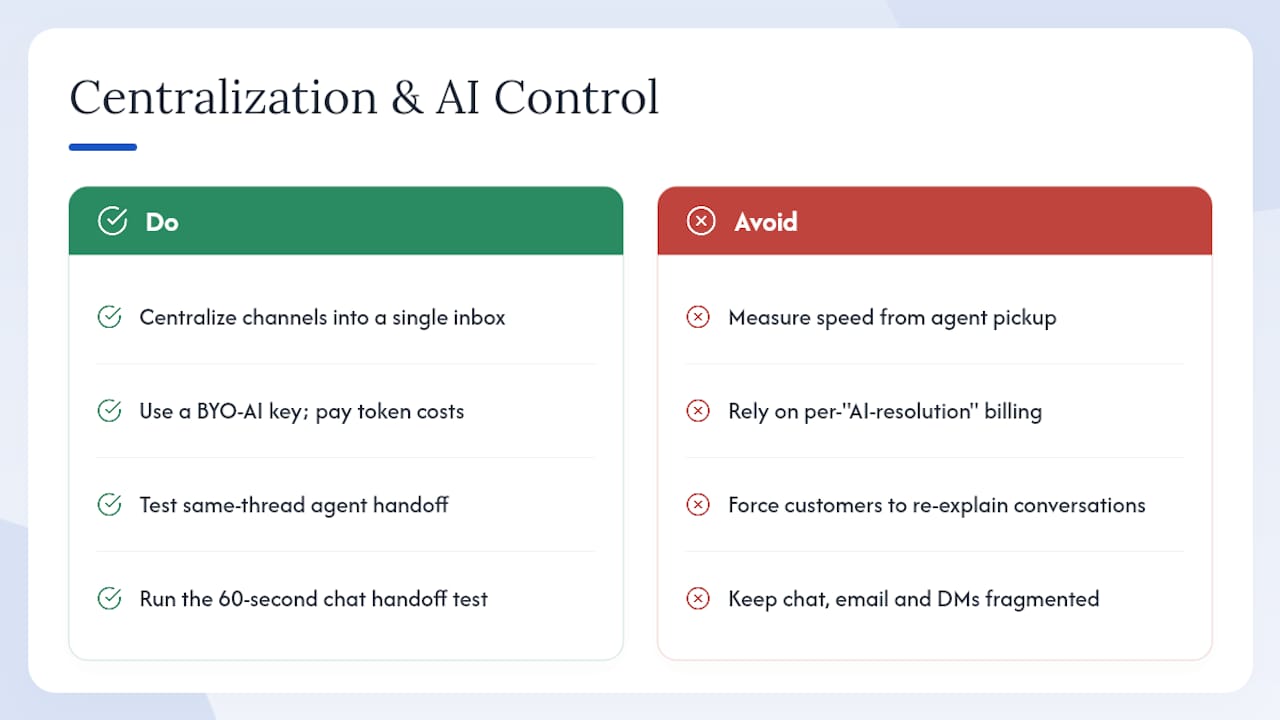
That gap is not a perception problem. It is a structural one. Most support teams are measuring their own speed from the moment an agent picks up a ticket, not from the moment the customer sent the first message. Fragmented tools, where chat lives in one tab, email in another, and social DMs in a third, add invisible latency that agents never see but customers feel immediately.
The fix is centralization: a single inbox that surfaces every conversation regardless of channel, with full context attached. For a small team, this is not a luxury feature. It is the difference between an agent who can answer a question in 30 seconds and one who spends two minutes hunting for the previous email thread.
AI control matters for a different reason. Most platforms now bundle AI into their pricing in ways that obscure the real cost. A "per AI resolution" billing model sounds efficient until a chatbot incorrectly closes 200 tickets in a week and you receive a bill for resolutions that did not actually resolve anything. The BYO-AI-key model lets you use OpenAI or another provider directly, paying token costs at market rates rather than vendor markup, and keeping your conversation data out of the vendor's training pipeline.
The most effective implementations use a hybrid approach: AI handles routine FAQs and first-contact deflection, while human agents take over high-intent or complex conversations in the same thread. Chatwoot's same-thread handoff architecture is a good reference model for what this looks like in practice, and it is the feature to test first in any vendor proof-of-concept.
Pro Tip: Before signing any contract, run this specific test: trigger a chatbot conversation, ask a question the bot cannot answer, and watch what happens. Does the agent see the full conversation? Does the customer have to re-explain? That 60-second test tells you more than any demo.
How long does live chat implementation actually take?
The honest answer depends on what you are integrating with. A standalone widget on a static site takes under an hour. A full deployment with CRM sync, chatbot flows, and omnichannel routing is a different project entirely.
For most SMBs, the realistic timeline breaks down like this: widget installation and basic configuration takes one to three days. CRM integration and contact sync adds another three to five days if the connection is native, longer if it requires custom API work. Building chatbot flows, testing them against real conversation scenarios, and training the AI on your knowledge base adds one to two weeks. Full omnichannel setup, connecting SMS, social, and voice alongside web chat, typically requires three to four weeks and at least one dedicated internal resource.
The tools that compress this timeline most effectively are LiveChat (widget live in under an hour, integrations via a clean marketplace) and tawk.to (single script, no configuration required for basic chat). Zendesk and Intercom require more setup time but reward that investment with significantly more capability.
One resource consideration that most buyers underestimate: someone needs to own the chatbot content. AI is only as good as the knowledge base it draws from, and building that knowledge base, writing FAQ answers, mapping conversation flows, and testing edge cases, is a content project, not a technical one. Budget two to four hours per week for the first month to maintain and improve chatbot accuracy.
What vendor SLAs actually mean for your support team
SLA quality varies more than pricing pages suggest. Most enterprise platforms (Zendesk, Intercom, Nextiva, SnapEngage) offer 24/7 support with defined response time commitments on paid plans. Mid-market tools like LiveAgent and Freshdesk provide 24/7 support on higher tiers but drop to business hours on entry plans. Lighter tools like tawk.to, Kayako, and Helpfruit operate on business-hours support with no formal SLA on free or low-cost tiers.
The practical implication: if your business runs outside standard US business hours, whether that is a West Coast team handling East Coast customers after 5 PM or an e-commerce store with weekend traffic spikes, verify the vendor's actual support hours before signing. A chat platform that goes down on a Saturday afternoon with no emergency support path is a real operational risk.
Uptime commitments also vary. Enterprise platforms typically publish 99.9% uptime SLAs with compensation clauses. Smaller vendors often publish uptime targets without compensation terms. Ask specifically: what is the compensation mechanism if uptime falls below the SLA? The answer tells you how seriously the vendor takes that commitment.
Scaling your chat operation as your business grows
The tools that work well at five agents often create friction at 25. The scaling pressure points are predictable: routing logic becomes complex, reporting needs become more granular, and compliance requirements tighten as you handle more customer data.
Zendesk, Intercom, and Freshdesk are built to scale without requiring a platform migration. Their routing engines handle complex skill-based assignment, their reporting layers support custom dashboards, and their compliance frameworks grow with your requirements. The cost of that scalability is priced in from the start.
LiveChat, Tidio, and Re:amaze scale reasonably well to mid-market but show limitations at enterprise volume. LiveAgent and Zoho Desk offer a middle path: more capability than the lightest tools, at a price point that does not require enterprise budget.
The tools to avoid for scaling are the ones with agent seat limits on core features, per-conversation billing without caps, or AI features that are not configurable. All three create unpredictable cost spikes as volume grows.
One practical signal: check whether the vendor's API is fully documented and publicly accessible. A well-documented API means you can build custom integrations as your stack evolves. A sparse or paywalled API is a ceiling on what you can do with the platform long-term.
How much can you customize the chat widget?
Widget customization ranges from color and logo swaps to fully headless implementations where the chat UI is built entirely in your own frontend code.
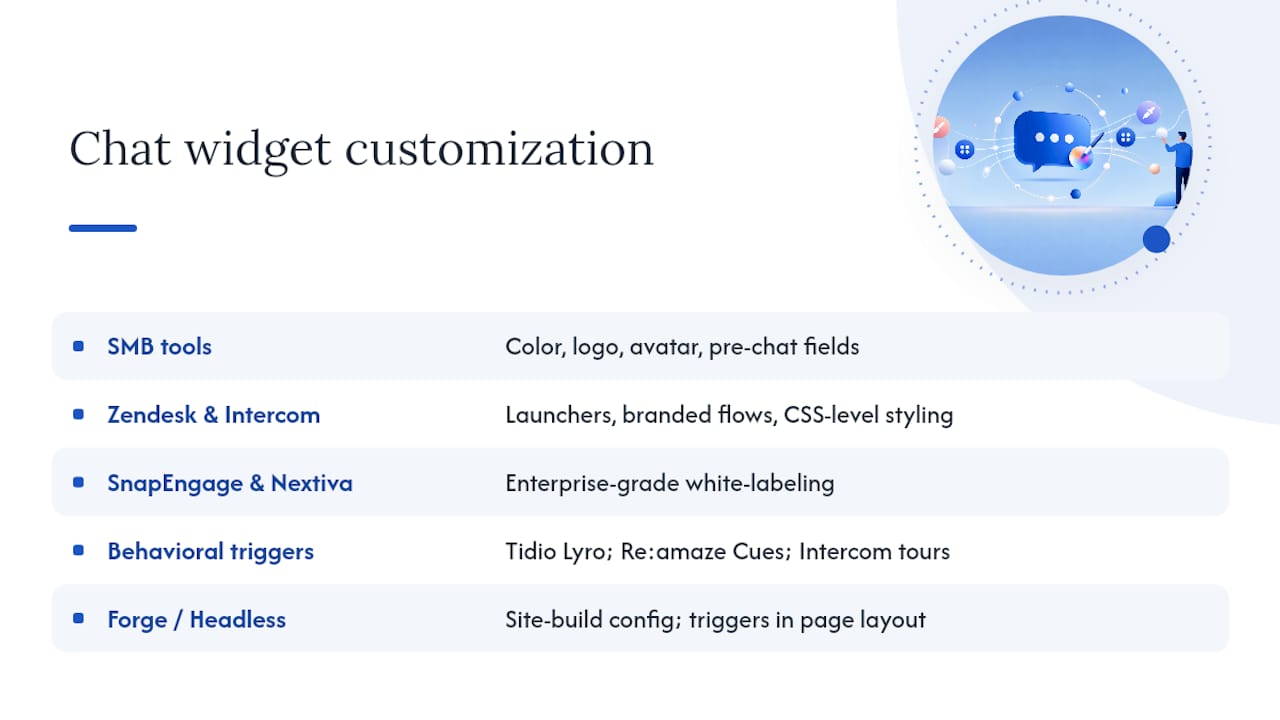
Most SMB tools (LiveChat, tawk.to, Tidio, Re:amaze) offer branding customization: widget color, logo, agent avatar, and pre-chat form fields. That covers the majority of use cases. Zendesk and Intercom go further, supporting custom launchers, branded conversation flows, and CSS-level styling. SnapEngage and Nextiva offer enterprise-grade white-labeling for regulated industries where brand consistency is a compliance requirement.
The dimension most buyers overlook is proactive messaging customization. The ability to trigger a specific chat message based on page URL, time on page, or cart value is where chat moves from a passive widget to an active conversion tool. Tidio's Lyro, Re:amaze's Cues, and Intercom's product tours all support behavior-triggered messaging. tawk.to and Kayako do not, at least not without paid add-ons.
For teams building on a custom site, Forge Web Studio's approach is worth noting: chat widget configuration happens during the site build, so proactive triggers, placement, and mobile behavior are designed into the page layout rather than retrofitted afterward. That distinction shows up in conversion rates on mobile, where a widget that obscures the CTA button or fires at the wrong scroll depth actively hurts performance.
Data privacy, GDPR, and CCPA: what US businesses need to know
US businesses handling chat data face two primary compliance frameworks: CCPA (California Consumer Privacy Act) for California residents and GDPR for any EU/EEA visitors to your site. These are not the same requirement, and conflating them creates compliance gaps.
CCPA gives California residents the right to know what data you collect, the right to delete it, and the right to opt out of its sale. For chat software, this means your vendor must support data deletion requests, provide data export on demand, and not sell conversation data to third parties without consent. Most major platforms (Zendesk, Intercom, LiveChat, Freshdesk) publish CCPA compliance documentation. Lighter tools may not.
GDPR applies if you have EU visitors, regardless of where your business is based. Key requirements for chat: a lawful basis for processing conversation data (usually legitimate interest or consent), data processing agreements with your vendor, and the ability to honor subject access and deletion requests. Verify that your vendor offers a Data Processing Agreement (DPA) before you go live.
For healthcare-adjacent businesses, HIPAA adds a third layer. SnapEngage and Nextiva both offer HIPAA Business Associate Agreements (BAAs). Zendesk offers a BAA on enterprise plans. Most SMB-tier tools do not, which means they are not suitable for conversations that involve protected health information.
This article provides general information, not legal advice. Confirm your specific compliance requirements with a qualified attorney or privacy professional before deploying any chat tool.
How live chat integrates with your CRM and marketing stack
Native CRM integration is the feature that separates a useful chat tool from a genuinely productive one. When a chat conversation automatically creates or updates a contact record, logs the transcript, and triggers a follow-up sequence, your team gains context that would otherwise require manual data entry after every conversation.
HubSpot Service Hub is the clearest example of deep CRM integration: every chat conversation logs to the HubSpot contact record, tickets auto-create, and the conversation history is visible to sales and marketing alongside email and call data. For teams already in HubSpot, this eliminates an entire category of manual work.
Zendesk connects natively to Salesforce, HubSpot, and Shopify, and its 1,200-app marketplace covers most other CRM and marketing automation platforms. Intercom integrates with Salesforce, Stripe, and Segment, making it particularly strong for SaaS companies tracking product usage alongside support conversations.
For e-commerce, Re:amaze and Tidio both pull order data directly from Shopify and WooCommerce into the chat window. An agent handling a "where is my order?" question sees the order status, shipping carrier, and estimated delivery without leaving the chat interface.
The integration to verify before signing is your marketing automation connection. If chat conversations should trigger email sequences (a lead who chatted but did not convert gets a follow-up email), confirm that the integration is native and bidirectional, not a one-way Zapier push. Zapier connections work, but they add latency, cost, and a dependency that breaks when either platform changes its API.
The case for getting the website right before picking a chat tool
Most live chat buying decisions happen in the wrong order. A business owner picks a platform, signs up for a trial, pastes a script tag into a site that was never designed for chat, and wonders why conversion rates do not move.
The chat widget is not the conversion driver. The page it sits on is. A widget on a slow-loading, mobile-unfriendly site with no clear CTA competes with itself. The proactive trigger fires, the visitor dismisses it, and the session ends. The chat tool gets blamed for a problem the site created.
What actually works is designing the chat experience into the site architecture from the start: placing the widget where it does not obscure the primary CTA on mobile, setting triggers based on scroll depth and exit intent rather than a generic time delay, and connecting the chat flow to a lead-capture form that feeds your CRM directly. That is a site design decision, not a software configuration decision.
The platforms that make this easiest are the ones with the most flexible widget APIs and the cleanest JavaScript embeds. But even the best API cannot fix a site that loads in six seconds on a 4G connection or buries the contact path three clicks deep.
Forge Web Studio builds sites where chat actually converts
The tools above are strong. But picking the right chat platform and dropping it onto the wrong site is a common and expensive mistake. Forge Web Studio builds mobile-first websites for Texas businesses where chat integration is part of the build, not an afterthought.

The studio's rapid build process (3–7 days to a live site) includes chat widget configuration, lead-flow forms connected to your CRM, local SEO setup, and Google Business integration. You get a site designed to convert visitors into leads, with chat placed and triggered to support that goal from day one. Services include custom website builds, landing pages optimized for chat-driven conversions, website redesigns, and local SEO. See the full web design and integration services or get in touch to discuss your site and chat setup together.
Sources
- Zendesk Service Messaging
- Best Live Chat Software: Learn from G2
- Best Live Chat Software for Small Business | LiveChat®
- Tawk
- Website Live Chat | Chatwoot
- Best customer support chat apps (Zapier)