
A working click-to-call button is one HTML anchor using the tel: URI scheme. Copy this, swap in your number, and you're done:
<a href="tel:+15125550123" class="call-btn">
  <svg xmlns="http://www.w3.org/2000/svg" width="18" height="18" viewBox="0 0 24 24" fill="currentColor">
    <path d="M6.6 10.8c1.4 2.8 3.8 5.1 6.6 6.6l2.2-2.2c.3-.3.7-.4 1-.2 1.1.4 2.3.6 3.6.6.6 0 1 .4 1 1V20c0 .6-.4 1-1 1C10.6 21 3 13.4 3 4c0-.6.4-1 1-1h3.5c.6 0 1 .4 1 1 0 1.3.2 2.5.6 3.6.1.3 0 .7-.2 1L6.6 10.8z"/>
  </svg>
  Call Now
</a>
For a floating mobile button, add this CSS:
.call-btn {
  position: fixed;
  bottom: 24px;
  right: 24px;
  background: #0057ff;
  color: #fff;
  padding: 14px 20px;
  border-radius: 50px;
  font-size: 16px;
  font-weight: 600;
  text-decoration: none;
  display: flex;
  align-items: center;
  gap: 8px;
  box-shadow: 0 4px 12px rgba(0,0,0,0.2);
  z-index: 9999;
}

@media (min-width: 768px) {
  .call-btn { display: none; }
}
On mobile, tapping the button opens the native dialer with your number prefilled. On desktop, the browser may prompt installed calling apps like Skype or FaceTime — which is why the CSS above hides it on screens wider than 768px.
Table of Contents
- What is a click-to-call button and how does devices behave?
- Why add click-to-call buttons to your site?
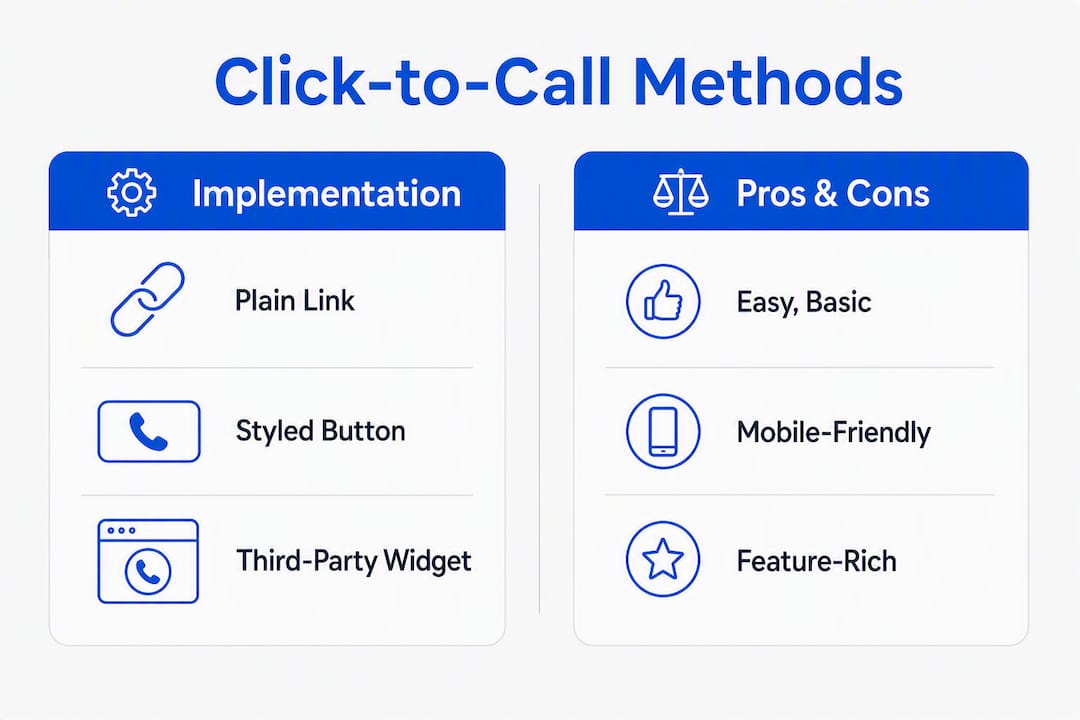
- How to add click-to-call: plain link, styled button, or widget
- Design patterns that actually get tapped
- Accessibility, privacy, and security for tel links
- How to track click-to-call interactions with GA4 and GTM
- Testing checklist and common troubleshooting
- How Forge-web-studio implements click-to-call
- Key Takeaways
- The part most developers skip
- Forge-web-studio builds mobile-first sites that convert calls
- Useful sources and further reading
What is a click-to-call button and how does devices behave?
A click-to-call button is a standard HTML anchor whose href uses the tel: URI scheme, defined in RFC 3966. The URI identifies a telephone number as a resource, and the device handles the rest. You'll also see it called a tap-to-call button, click-to-dial feature, or telephone call button — all the same mechanism.
Format the number in E.164: a + sign, the country code, then the subscriber number with no spaces, dashes, or parentheses. tel:+15125550123 is correct. tel:(512) 555-0123 is not.
Device behavior varies by platform:
- iOS (10.3+): Displays a confirmation alert before dialing — the user must tap "Call" to proceed.
- Android: Opens the native dialer with the number prefilled; one more tap to dial.
- macOS: May offer FaceTime or Handoff to a paired iPhone.
- Windows: Can prompt Skype or ask which app to handle the call.
Automatic phone-number detection by browsers is unreliable and can break your styling. Always write the tel: anchor manually.
Why add click-to-call buttons to your site?
The core argument is friction. A visitor on a mobile device who sees a phone number has to memorize it, switch to the dialer, and type it in. A tap-to-call button collapses that to a single action. Mobile-first sites see higher conversions when users can tap to call instead of copying numbers manually.
The use cases where this matters most:
- Service businesses — (plumbers, HVAC, roofers, electricians) where a caller is often mid-problem and needs help fast.
Pro Tip: Hide the button or replace it with a "Leave a message" link outside business hours. A button that rings a voicemail at 11 PM trains visitors to stop tapping.
How to add click-to-call: plain link, styled button, or widget
The canonical tel: link
The simplest phone link on a website is a single anchor:
<a href="tel:+15125550123">Call (512) 555-0123</a>
Always use E.164 format in the href — no spaces, no formatting characters. The visible label can be formatted however you like for readability.
Styled floating button
The floating button pattern from the opening section is the most effective for mobile. A few things that lift tap rate: a minimum 44×44 pixel tap target (Apple's Human Interface Guidelines requirement), a phone icon alongside the label, and enough color contrast to pass WCAG AA. The position: fixed placement keeps it visible as the user scrolls.

Third-party widgets and APIs
When a plain tel: link isn't enough, two higher-level options exist:
| Option | Best for | Trade-offs |
|---|---|---|
| Widget (e.g., Click & Call, Wix Click to Call app) | Non-developers, quick installs | Less control, external dependency, possible branding |
| Communication API (e.g., Twilio) | Callback routing, IVR, masked numbers | Requires dev work, monthly cost, more powerful |
The Wix Click to Call app installs in a few clicks from the Wix App Market and handles styling and placement without touching code. Twilio's Programmable Voice API lets you route calls, record them, and mask your real number behind a tracking number — useful for multi-location businesses or sales teams.
Implementation checklist:
- Add the
tel:anchor in E.164 format. - Apply CSS for visibility, size, and contrast.
- Restrict to mobile with a
@media (min-width: 768px) { display: none; }rule. - Add a GTM click trigger to track taps as GA4 events.
- Test on a real iOS and Android device before launch.
Pro Tip: For extensions, skip the comma-pause method (tel:+15125550123,123). Carrier support is inconsistent, and a dropped extension mid-call is worse than no automation. Display "ext. 123" as visible text instead.
Design patterns that actually get tapped
Placement drives most of the difference. A call now button buried in the footer gets far fewer taps than one fixed to the bottom of the screen. The four placements worth testing:
- Floating bottom-right: Highest visibility on mobile; stays in view as the user scrolls.
- Sticky header: Works well for service businesses where the phone number is a trust signal.
- Hero section: Effective on landing pages where calling is the primary conversion action.
- Footer: Acceptable as a secondary placement, not a primary one.
On tap-target size: Apple's Human Interface Guidelines specify 44×44 points as the minimum. Smaller than that and you'll get missed taps and frustrated users. Pair the number with a phone icon and a label like "Call now" or "Talk to an expert" — icon-only buttons fail accessibility and confuse first-time visitors.
One thing designers miss: the button position relative to mobile navigation. A floating button that sits behind a bottom nav bar on iOS is invisible. Test on a real device, not just a browser emulator.
Pro Tip: Use an inline SVG for the phone icon rather than an image file. SVGs scale perfectly at any resolution, inherit your button's color with fill: currentColor, and add zero HTTP requests.
For mobile-first design that converts, the button needs to feel like a natural part of the page — not a widget bolted on after the fact.
Accessibility, privacy, and security for tel links
Accessibility checklist
| Requirement | Implementation |
|---|---|
| Accessible name | Descriptive link text or aria-label="Call us at 512-555-0123" |
| Keyboard focusable | Use <a>, not <div> or <span> |
| Visible focus state | Add :focus outline in CSS; never outline: none without a replacement |
| Minimum tap target | 44×44 px via padding |
| Screen reader clarity | Avoid "click here" — use "Call (512) 555-0123" |
Privacy and security
RFC 3966 warns explicitly that tel: URIs are public HTML. Search engine crawlers and scrapers can harvest any number you put in a href. If you're displaying a private direct line, consider whether that exposure is acceptable.
For user-submitted numbers (contact forms, callback requests), sanitize before rendering. Strip * and # characters — iOS restricts these to prevent unintended dialer commands. Validate format server-side before writing the number into a tel: link.
Pro Tip: If you need call attribution without exposing your real number, use a call-tracking number as the displayed and linked number. The tracking platform forwards to your actual line, and you get source/medium data without publishing your direct number.
For U.S. businesses, outbound call and text campaigns triggered by web interactions may fall under TCPA regulations. Consult legal counsel for your specific use case — this article is general information, not legal advice.
How to track click-to-call interactions with GA4 and GTM
Client-side tracking with Google Tag Manager is the fastest path to measuring call intent. Here's the setup:
- Open GTM and create a new trigger: Trigger Type → Click – Just Links.
- Set the condition: Click URL contains
tel:. - Create a new GA4 Event tag. Set the event name to
phone_call_click. - Add event parameters:
phone_number(value:{{Click URL}}),page_path(value:{{Page Path}}). - Fire the tag on the trigger from step 2.
- Publish the container and verify in GTM Preview mode.
| Parameter | Value | Why it matters |
|---|---|---|
phone_number | {{Click URL}} | Identifies which number was tapped |
page_path | {{Page Path}} | Shows which page drove the call intent |
event_category | "engagement" | Groups call events in GA4 reports |
For reliable attribution across channels, combine GTM click events with call-tracking numbers when possible. A call-tracking platform assigns unique numbers per traffic source, so you can tie a call back to a Google Ads campaign or organic search without relying solely on the click event.
Pro Tip: Mark phone_call_click as a conversion event in GA4. It won't capture completed calls, but it measures call intent — which is the metric that tells you whether your button placement and copy are working.
To reduce missed calls from visitors who tap but don't connect, pairing your click-to-call setup with a practical call-routing strategy helps close the loop between the button tap and an actual answered call.
Testing checklist and common troubleshooting
Device and browser testing matrix
| Platform | Expected behavior | What to check |
|---|---|---|
| iOS Safari | Confirmation alert, then dials | Alert appears; number is correct |
| Android Chrome | Dialer opens prefilled | Number format, no spaces |
| macOS Safari | FaceTime or Handoff prompt | Acceptable or hidden via media query |
| Windows Chrome | App chooser or Skype prompt | Hidden via media query on desktop |
| Desktop (no VoIP) | Browser may do nothing or show error | Button hidden; no broken experience |
Common issues and fixes
- Missing
+country code: The most common error.tel:5125550123fails on many dialers;tel:+15125550123works universally. - Spaces or dashes in the
href:tel:+1-512-555-0123is technically valid per RFC 3966 but inconsistently handled. Use digits only after the+. - Button hidden by CSS z-index: A floating button behind a nav bar or modal is invisible. Check
z-indexstacking context. - Safari auto-detection overriding your styles: Add
<meta name="format-detection" content="telephone=no">to disable it, then rely on your manualtel:anchors. - Tap target too small: If taps are missing, add padding until the clickable area reaches 44×44 px.
Pro Tip: Use Chrome DevTools' device toolbar to simulate mobile, but always follow up with a real iPhone and Android device. Emulators don't trigger the native dialer, so you can't verify the actual call flow without hardware.
For a full audit of contact elements and performance issues, the website review checklist from Forge-web-studio covers the common gaps.

How Forge-web-studio implements click-to-call
The process Forge-web-studio uses on client sites follows four steps:
- Discovery: Confirm business hours, the correct number in E.164 format, and whether call routing or a tracking number is needed.
- Implementation: Add the
tel:anchor, build the styled floating button, and set up conditional display for mobile. - Tracking setup: Configure the GTM trigger and GA4 event, verify in Preview mode, and publish.
- QA and launch: Test on real iOS and Android devices, check desktop behavior, and confirm the tracking event fires correctly.
For an existing site, adding a floating button with GTM/GA4 tracking typically takes 1–3 days. A full integration including call-tracking numbers, A/B testing button placement, and a mobile-first redesign runs 3–7 days.
When does hiring Forge-web-studio make sense? When you want consistent cross-browser behavior without debugging it yourself, when you need call-routing or masked tracking numbers, or when the site needs a broader mobile-first redesign to fix the full lead flow — not just the call button.
Pro Tip: Before any implementation, run through the website review checklist. It surfaces the contact-path issues that a call button alone won't fix — broken forms, missing trust signals, slow load times.
Key Takeaways
A tel: link in E.164 format, wrapped in a visible floating button and tracked via GTM/GA4, is the complete foundation for click-to-call on any website.
| Point | Details |
|---|---|
| Use E.164 format | Write href="tel:+15125550123" — no spaces, dashes, or parentheses in the href. |
| Hide on desktop | A @media (min-width: 768px) { display: none; } rule prevents VoIP app confusion. |
| Track with GTM/GA4 | Create a "Click – Just Links" trigger on tel: URLs and fire a phone_call_click event. |
| Accessibility first | Use <a>, add an aria-label, and keep the tap target at 44×44 px minimum. |
| Forge-web-studio | Handles full implementation — tel link, floating button, tracking, and device QA — in 1–3 days on existing sites. |
The part most developers skip
Most click-to-call guides stop at the HTML. The real gap is what happens after the tap.
A button that fires and a button that converts are two different things. The number of sites I've reviewed where the tel: link works perfectly but there's no tracking, no hours indicator, and no fallback for desktop users is striking. The button is there. The measurement isn't. So the business has no idea whether it's driving calls or just sitting in the corner looking useful.
The other thing worth saying: don't over-engineer this. A Twilio integration with IVR routing is genuinely powerful for a multi-location business or a sales team that needs call recording and attribution. For a local plumber or a restaurant, it's overkill. A properly formatted tel: anchor, a visible floating button, and a GTM event is everything you need. Ship that first. Add complexity only when the data tells you to.
The businesses that benefit most from click-to-call aren't running the most sophisticated setup. They're the ones who put the button where users actually look, wrote a label that makes the action obvious, and checked that it works on the phone their customers actually use.
Forge-web-studio builds mobile-first sites that convert calls
Texas service businesses lose leads every day to sites that bury the phone number in the footer or skip the call button entirely. Forge-web-studio builds responsive, mobile-first websites that put the right contact action in front of the right visitor at the right moment — with GTM/GA4 tracking configured from day one so you can measure what's working.

The standard engagement includes a properly formatted tel: link, a styled floating call button, conditional mobile display, and a verified GA4 conversion event. Sites launch in 3–7 days. If you want to see the work before committing, browse the demo gallery or start with a free website review to see exactly what your current site is missing.
Useful sources and further reading
The sources below cover the standards, implementation details, and platform-specific behavior referenced throughout this article.
- RFC 3966: The tel URI for Telephone Numbers — The IETF standard defining the
tel:URI scheme, E.164 formatting rules, and security considerations for public exposure. - Phone Links (Apple Developer Documentation) — Apple's official guidance on
tel:behavior in iOS, including the confirmation dialog introduced in iOS 10.3 and character restrictions. - How to implement click-to-call (web.dev) — Google's implementation guide covering manual
tel:anchors, why to disable automatic detection, and mobile conversion context. - How to Add a Click-to-Call Button on a Mobile Website — Step-by-step HTML/CSS implementation with GTM tracking setup and floating button pattern.
- Forge-web-studio Website Review Checklist — Audit tool for contact elements, mobile performance, and conversion gaps on existing sites.