
The fastest way to get more Google reviews is a three-step system: create your Google Business Profile review link, ask within 24–72 hours of the job, and automate one follow-up. That's it. Businesses that run this consistently, without incentivizing or faking anything, typically move from a handful of reviews to dozens within 60 days.
Start here this week:
- Claim and verify your Google Business Profile if you haven't already, then generate your review link directly from the dashboard under "Get more reviews."
- Pick one high-conversion channel. SMS converts at a high engagement rate; an in-person QR code on a receipt or counter card converts notably less. Pick one and commit.
- Set a single automated follow-up 3–5 days after the first ask. One nudge adds meaningful completions. Two or more nudges lose customers.
One compliance note before anything else: Google's policy prohibits offering money, discounts, or any incentive in exchange for reviews. Violations can get reviews removed or your profile penalized. Also watch your velocity — sending 200 requests in a week after months of silence looks like a paid campaign to Google's filters. Pace it.
Table of Contents
- Why Google reviews affect your visibility and revenue
- What Google's review policy actually allows and forbids
- How to set up your review link, QR code, and CTA placements
- What to say, when to ask, and how to handle common barriers
- How to automate review requests without creating problems
- How to respond to every review (with copy-ready templates)
- How to measure whether your review system is actually working
- Which channels actually perform, and how to choose yours
- Key Takeaways
- The case for treating reviews as a website asset, not just a reputation metric
- How Forge-web-studio turns your Google reviews into a lead-generation system
- Useful sources
Why Google reviews affect your visibility and revenue
Reviews aren't just social proof. They're a local ranking signal. Google's local algorithm weighs three factors: relevance, distance, and prominence. Reviews feed prominence directly, and Google's own guidance confirms that more reviews and positive ratings improve your chances of appearing in the local pack.

That trust gap between a business with 8 reviews and one with 80 is enormous. The business with 80 wins the click before the customer even reads a word of your website. Beyond the click, recency matters too. A profile with 60 reviews and the last one posted eight months ago signals stagnation. Google's ranking sub-signals include recency, frequency, response rate, review length, and keyword presence in review text. A steady drip of new reviews beats a one-time burst every time.
What Google's review policy actually allows and forbids
The rules are simpler than most people think. You can ask any customer for a review. You cannot pay, discount, or pressure them into leaving one, and you cannot ask only happy customers (that's called "gating," and it's explicitly prohibited).
You can:
- Ask every customer, verbally or via message, to leave an honest review
- Share your review link by text, email, WhatsApp, or on printed materials
- Respond to all reviews, positive and negative
You cannot:
- Offer a discount, gift card, or freebie in exchange for a review
- Ask only satisfied customers (review gating)
- Post fake reviews or pay a third party to do it
- Ask employees or family members to leave reviews
For U.S. businesses, the FTC also requires disclosure if there's any material connection between the reviewer and the business. Keep your review requests simple, honest, and minimal on personal data collection. If you're using a CRM or SMS tool to send requests, confirm it complies with the Telephone Consumer Protection Act (TCPA) for text messaging and that you have consent to contact customers.
How to set up your review link, QR code, and CTA placements
The single biggest reason customers don't leave reviews is friction. A one-tap review link removes that friction almost entirely. Here's the exact setup sequence:
- Go to your Google Business Profile dashboard. Search "my business" on Google while logged into your Google account, or go to business.google.com.
- Click "Ask for reviews." Google generates a direct review link. Copy it.
- Shorten the link. Google's review URLs are long and ugly. Use Bitly or a custom short domain (e.g., yourbusiness.com/review) to make it shareable and trackable.
- Generate a QR code. Paste your shortened link into a free QR generator like QR Code Generator or Canva. Download as a high-resolution PNG.
- Place the QR code and link everywhere a customer finishes a transaction:
- Printed on receipts and invoices
- Footer of every email and email signature
- On a small card at your front desk or service counter
- In appointment confirmation texts
- On your website's footer and thank-you pages
- On a sticker on your vehicle or equipment (for mobile service providers)
Pro Tip: Track clicks on your shortened link monthly. If click-through is high but review completions are low, the problem is the Google review form itself — usually customers aren't signed in to a Google account. Add a one-line note to your ask: "You'll need a Google account to leave a review — it only takes a minute to create one."
If you have a backlog of past customers you'd like to reach out to, pace those requests at 15–20 per week. A sudden spike in reviews from historical contacts triggers Google's spam filters, and those reviews may not stick.
What to say, when to ask, and how to handle common barriers
Timing and channel choice do more work than the exact wording of your message. That said, the wording still matters.

The 24–72 hour window after a completed job is the sweet spot for most service businesses. Restaurants and coffee shops can ask same-day. Contractors, HVAC techs, and salons often see better results at 48 hours, when the customer has had time to notice the quality of the work. Waiting a week drops completion rates sharply.
The three-line formula that works:
That's it. Personal opener, specific reference to the actual job, one-tap ask. No paragraph of explanation, no multiple links, no "if you have time and feel like it." The specificity ("your roof replacement on Oak Street") signals authenticity and prompts the customer to recall the experience vividly before they write.
Common barriers and how to clear them:
Customers who say they "don't use Google" often just don't have a Google account. Offer an alternative: "No worries — we're also on Facebook if that's easier." Getting a review somewhere is better than getting none.
Mobile friction is real. If your link requires more than two taps to reach the review form, you'll lose people. Test your link on an iPhone and an Android before you send it to anyone.
Language barriers matter in many Texas markets. If a significant portion of your customers speak Spanish, translate your request message. A bilingual ask converts far better than an English-only one.
For customers who seem neutral or mildly unhappy, consider a pre-review check-in before sending the public review link. A simple text like "Did everything go well with your service? Let us know if anything wasn't right" gives you a chance to resolve issues privately before they become a one-star review.
Channel trade-offs at a glance:
SMS is fast and personal, but requires TCPA-compliant consent. Email is lower friction to send at scale but converts at a fraction of the rate. WhatsApp works well for businesses with an existing WhatsApp presence. In-person QR codes at the point of service catch customers while the experience is fresh, with no contact data required. For contractors and mobile service providers, a QR sticker on your truck or a card left at the job site is underused and surprisingly effective.
How to automate review requests without creating problems
Automation preserves timing and consistency. Without it, review requests depend on whoever is working that day remembering to ask, which means they don't happen reliably.
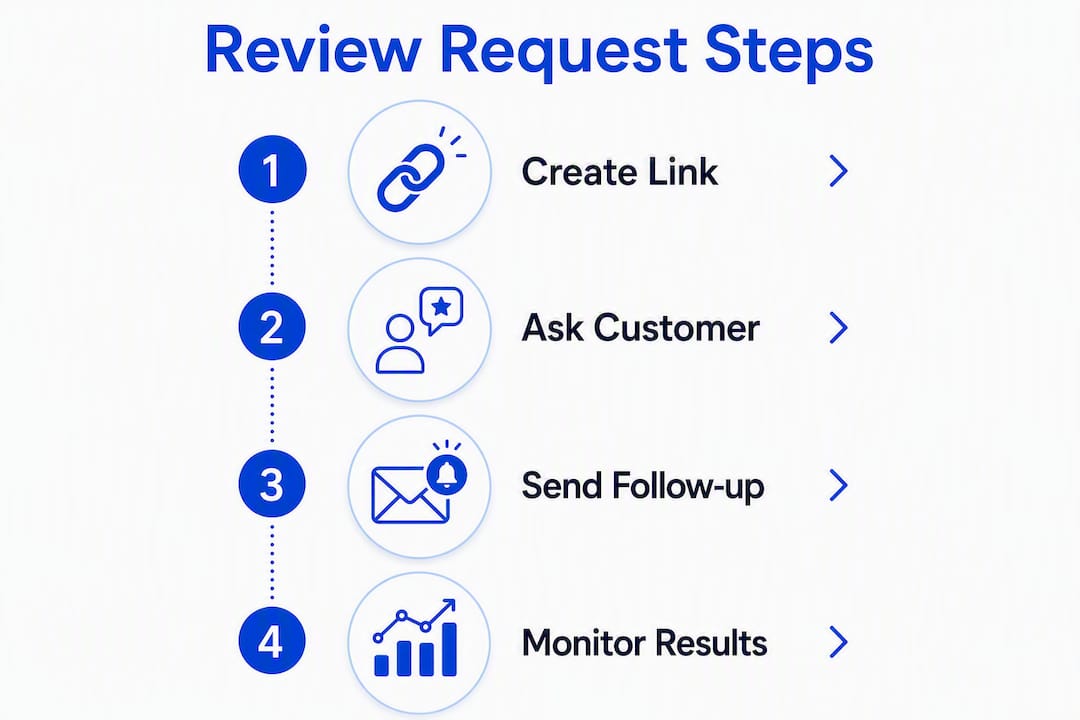
Here's a simple workflow that works for most service businesses:
POS or CRM trigger → SMS with short link → 4-day follow-up
When a job is marked complete in your system, the automation fires a text within 24–48 hours. If no review is left, a single follow-up goes out on day 4 or 5. That one follow-up adds roughly 20–30% more completions without annoying customers who already responded.
For businesses using NPS surveys (tools like AskNicely specialize in this), route promoters (scores 9–10) directly to the Google review link. Route detractors (scores 0–6) to a private feedback form so you can address the issue before it becomes a public review. Passives (7–8) can go to either path. Critically, this routing should not prevent detractors from leaving a public review if they choose to — that crosses into gating territory.
| Tool | Primary role | Best for |
|---|---|---|
| AskNicely | NPS surveys + review routing | Service businesses with repeat customers |
| Podium | SMS review requests + inbox management | Retail, home services, dental |
| Birdeye | Multi-location review monitoring + automation | Franchises, multi-location businesses |
| ReviewTrackers | Review monitoring + analytics | Businesses tracking reputation across platforms |
| Google Business Profile | Review link generation + response | Every business — the starting point |
Batching guidance: if you're reaching out to historical customers, cap outreach at 15–20 per week and mix channels. Keep a log of who you contacted and when, in case you ever need to explain a pattern to Google support.
How to respond to every review (with copy-ready templates)
Respond to every review within 24 hours. Businesses that reply to 80% or more of their reviews tend to see better local pack placement, but many local businesses reply to fewer than a third of reviews.
-
Positive review response: "Thank you, [Name]! We're so glad the [specific service] went smoothly. We appreciate you taking the time to share your experience, and we look forward to working with you again."
-
Neutral or 4-star response: "Thanks for the feedback, [Name]. We're glad [positive aspect] worked well. We'd love to hear more about what we could have done better — feel free to reach out directly at [phone/email] so we can make it right."
-
Negative or 1–2-star response: "We're sorry to hear about your experience, [Name]. This isn't the standard we hold ourselves to. Please contact us at [phone/email] so we can address this directly. We'd appreciate the chance to make it right."
Never argue publicly with a negative reviewer. Even if the review is factually wrong, a defensive reply signals to every future customer reading it that you don't handle criticism well. A calm, brief, private-resolution offer does the opposite.
When a customer reaches out after your response and the issue gets resolved, it's appropriate to ask them if they'd like to update their review. Don't pressure them. Many will update voluntarily once the problem is fixed.
For reviews that appear fake or violate Google's policies (no photo, no history, clearly a competitor), use the flag function in your Google Business Profile dashboard to report them.
How to measure whether your review system is actually working
Track five numbers, checked on a simple schedule:
| KPI | What to track | Cadence |
|---|---|---|
| New reviews per week | Raw count of new Google reviews | Weekly |
| Rolling average rating | Current star rating trend | Weekly |
| Response rate | % of reviews with an owner reply (target 80%+) | Monthly |
| Click-to-complete rate | Clicks on review link vs. reviews posted | Monthly |
| Source channel | Which channel (SMS, QR, email) drives most completions | Quarterly |
Weekly: check for new reviews and respond within 24 hours. Monthly: look at sentiment themes in review text. Are customers mentioning the same issue repeatedly? That's a service problem, not a review problem. Quarterly: check velocity. If you sent 80 requests and got 4 reviews, your link or message is the bottleneck. If you got 40 reviews in one week after months of none, that's a spike pattern worth investigating.
Suspicious patterns to watch for: multiple reviews posted within hours of each other, reviewers with no profile photo and no other review history, or a sudden cluster from the same geographic area. Report these through the Google Business Profile dashboard using the flag option.
Which channels actually perform, and how to choose yours
SMS and WhatsApp significantly outperform email for review completion. The channel benchmarks are worth knowing before you invest in any tool:
A few caveats: these are averages across industries. A restaurant with a loyal repeat customer base may see email perform better than average. A mobile detailer whose customers are already texting them will see SMS outperform everything else. Industry variation is real.
Practical channel selection:
- Primary channel: SMS if you have customer phone numbers and TCPA consent. In-person QR if you don't collect phone numbers or want zero-friction at point of service.
- Backup channel: Email for customers who prefer it, or for B2B service providers where texting feels too casual.
- Social media: Facebook and Instagram DMs work for businesses with active social followings. They're not a primary channel, but a "we'd love your feedback" story post occasionally drives reviews from engaged followers.
Test your timing within the 24–72 hour window. Send half your requests at 24 hours and half at 48 hours for a month, then compare completion rates. Small adjustments in timing can shift results noticeably.
Key Takeaways
A repeatable three-step system (create your review link, ask within 24–72 hours via SMS or QR, automate one follow-up) is the most reliable way to build consistent Google review velocity without risking policy violations.
| Point | Details |
|---|---|
| Timing is the primary lever | Ask within 24–72 hours of service completion; waiting a week drops completion rates sharply. |
| SMS outperforms all other channels | SMS engagement runs around 50% for review requests, versus around 5% for email. |
| One follow-up adds real completions | A single nudge 3–5 days after the initial ask adds roughly 20–30% more reviews. |
| Respond to every review | Businesses replying to 80% or more of reviews tend to rank higher in the local pack. |
| Forge-web-studio embeds reviews into lead flow | Forge-web-studio builds Texas business websites that surface Google reviews in conversion paths and local landing pages. |
The case for treating reviews as a website asset, not just a reputation metric
Most businesses think about Google reviews as a reputation problem to manage. That framing is too narrow, and it leads to a reactive posture: chase reviews when ratings dip, ignore them when things are fine.
The more useful frame is that reviews are conversion assets. A 4.8-star rating with 120 reviews, embedded on your homepage and your city service pages, does more conversion work than almost any copy you could write. It's third-party validation at the exact moment a potential customer is deciding whether to call you or scroll past.
Embedding recent reviews on local landing pages and combining them with structured schema markup increases both user trust and the chance Google surfaces review snippets directly in search results. That's a compounding return: more reviews feed better rankings, better rankings bring more visitors, and embedded reviews on the page convert those visitors at a higher rate.
What most local businesses miss is the connection between their review velocity and their website's conversion rate. You can have 200 reviews and still lose leads if your website buries the contact form, loads slowly on mobile, or doesn't surface those reviews where they matter. The review system and the website have to work together. That's the gap Forge-web-studio is built to close for Texas businesses.
How Forge-web-studio turns your Google reviews into a lead-generation system

Forge-web-studio builds websites for Texas local businesses that do more than look good. The review work you put in deserves a website that actually uses it. That means embedding your Google reviews on service pages and city landing pages, placing review CTAs where visitors are most likely to act, and wiring your Google Business Profile optimization into a site that loads fast on mobile and converts visitors into calls.
A typical engagement covers Google Business setup and optimization, review CTA placement across the site, local landing page builds with embedded social proof, and tracking so you can see which pages are driving contact form submissions. If your site is already live but underperforming, a website audit shows exactly where reviews and trust signals should be added.
Ready to put your reviews to work? Start your project and get a site that converts the traffic your reviews are already earning you.
Useful sources
- Google Business Profile Help: Tips to get more reviews — the official policy page; read this before any outreach campaign.
- Google Business Profile Help: Create a review link or QR code — step-by-step instructions for generating your shareable review link.
- Google Business Profile Help: Improve your local ranking — explains how reviews feed the local pack algorithm.
- Shopify: Google reviews guide for businesses — covers embedding reviews on your website and schema markup for review snippets.