
Build a single-offer landing page that mirrors your ad headline, loads in under 2 seconds on mobile, and has exactly one visible call-to-action with conversion tracking live before you send a dollar of traffic. That is the whole formula. Everything else is optimization.
Quick-start checklist:
- Match the landing page headline word-for-word (or near-verbatim) to the ad copy
- Strip navigation, footer links, and competing offers
- Set one CTA, above the fold on mobile
- Hit a mobile load time under 2 seconds, aiming for under 1.5 seconds if possible.
- Fire your conversion tag on the thank-you page before launch
Speed benchmark: It is recommended to keep mobile load times under 2 seconds, aiming for under 1.5 seconds for best performance, as faster times generally lead to better conversion rates.
Table of Contents
- Why Google Ads landing pages outperform sending traffic to a homepage
- What every high-converting ad landing page must include
- How fast does your mobile landing page need to load?
- How to set up conversion tracking for Google Ads correctly
- How to prioritize and run A/B tests using the ICE framework
- Common mistakes that kill Google Ads results
- Two practical templates and a launch checklist
- When should you hire a specialist instead of doing it yourself?
- Key Takeaways
- The part most guides skip about landing page strategy
- Forge-web-studio builds landing pages that are ready to convert from day one
- Useful sources and tools
Why Google Ads landing pages outperform sending traffic to a homepage
A homepage serves every visitor. A dedicated landing page serves one visitor with one intent, and that focus is what drives conversions. Google's own documentation states that the connection between an ad and its landing page directly affects landing page experience and Quality Score, which in turn affects your cost-per-click and ad placement. Send paid traffic to a generic homepage and you are paying a premium for a worse result.
Message match is the mechanism. When a user clicks an ad for "emergency roof repair Austin" and lands on a page that says exactly that, they confirm they are in the right place within two seconds. When they land on a roofing company's homepage with a rotating hero and six service tabs, they bounce. That bounce signals poor landing page experience to Google, which raises your CPC over time.
The business outcomes of a dedicated, message-matched page:
- Lower cost-per-click from a higher Quality Score
- Higher return on ad spend (ROAS) from better conversion rates
- Cleaner attribution because one-page equals one goal
- Reduced wasted spend from irrelevant traffic self-selecting out
Conversion focus: Designing around a single conversion goal and removing navigation consistently produces higher conversion rates than multipurpose pages for paid traffic.
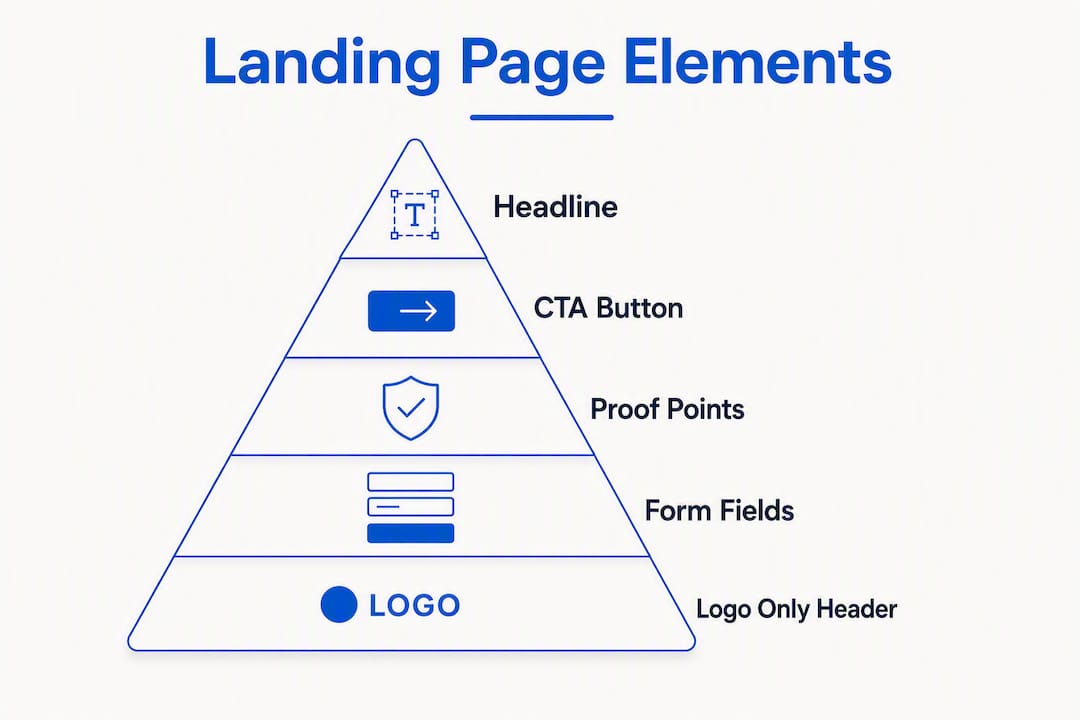
What every high-converting ad landing page must include
The priority order matters. Get the headline right before you worry about button color.
The non-negotiable elements, ranked by impact:
- Headline with message match — mirrors the ad's core promise, not a generic tagline
- Single offer — one product, one service, one outcome; no alternatives
- Hero section — a clear visual that reinforces the offer (photo, short video, or illustration)
- Above-the-fold trust signal — a star rating, client count, certification badge, or recognizable logo
- One CTA — a single button or form, repeated at most twice on longer pages
- Short form — ask only for what you need to follow up (name, phone or email, maybe one qualifier)
- No navigation — remove the header menu and footer links entirely
Simple wireframe zones (top to bottom):
| Zone | Content |
|---|---|
| Header | Logo only (no nav links) |
| Hero | Headline + subhead + primary CTA button |
| Trust bar | Logos, ratings, or certifications |
| Benefits | 3 short bullets or icon blocks |
| Social proof | One or two testimonials or a case result |
| Secondary CTA | Repeat the form or button |
| Footer | Privacy policy and legal only |
Pro Tip: Cut your form to the fewest fields that still qualify the lead. Every additional field reduces completion rates. For most local service businesses, name plus phone number is enough to start a conversation.

For SaaS or B2B audiences, longer pages with more proof points often outperform short hero pages because the purchase decision is more complex. Match page length to traffic temperature: high-intent search traffic converts on short pages; cold or display traffic usually needs more persuasion.
How fast does your mobile landing page need to load?
Mobile landing pages should load quickly to improve user experience and conversion rates, and Google uses Core Web Vitals as signals in its landing page experience score.
The three metrics to watch:
- LCP (Largest Contentful Paint): the hero image or headline should render in under 2.5 seconds
- INP (Interaction to Next Paint): user interactions should respond in under 200ms
- CLS (Cumulative Layout Shift): score below 0.1; layout should not jump as the page loads
Practical optimizations, in priority order:
- Convert hero images to WebP or AVIF format and set explicit width/height attributes
- Inline critical CSS so above-the-fold content renders without a render-blocking stylesheet
- Lazy-load images and videos below the fold
- Remove decorative animations that increase LCP or cause layout shift on slow connections
- Place the CTA button in the thumb zone (bottom two-thirds of the screen) so mobile users can tap without repositioning their hand
- Set
inputmode="numeric"on phone-number fields so mobile keyboards default to the number pad
Run Google PageSpeed Insights before and after every change. A website audit that tracks LCP and CLS across device types gives you a baseline to measure against. Slow pages do not just hurt conversions — they cost you customers before the page even finishes loading.

How to set up conversion tracking for Google Ads correctly
Install tracking before you send traffic. This is the rule most advertisers break, and it means their first weeks of data are useless for optimization.
What to install:
- Google Tag Manager container on every page, including the thank-you page
- Google Ads conversion tag firing on the thank-you page (not the CTA click)
- GCLID auto-tagging enabled in Google Ads account settings
- GA4 property with a purchase or lead event mapped to the same thank-you page trigger
- Hotjar (or an equivalent session-recording tool) to watch real user behavior on the page
| Tag / Event | Where it fires | Why it matters |
|---|---|---|
| Google Ads conversion tag | Thank-you page | Tells Google Ads a conversion occurred; feeds Smart Bidding |
GA4 generate_lead event | Thank-you page | Tracks conversion in Analytics for CPA and ROAS reporting |
| GTM trigger: page view | Thank-you page URL | Activates both tags without touching page code |
| GCLID capture | Hidden form field | Links the conversion back to the exact ad click |
| Hotjar session recording | Landing page | Reveals where users drop off or hesitate |
Dedicated landing pages with a thank-you page are where conversion tags fire accurately. Firing on a button click instead of a confirmed page load inflates conversion counts and corrupts your bidding data.
Metrics to track from day one: conversion rate, cost per acquisition (CPA), ROAS, bounce rate, and average session engagement time. Map each metric back to a page element — a high bounce rate usually points to a message-match failure; a low conversion rate with good engagement usually points to a CTA or form problem.
How to prioritize and run A/B tests using the ICE framework
Test systematically, not randomly. The ICE framework gives every test idea a score across three dimensions: Impact (how much will this move the conversion rate?), Confidence (how sure are you it will work, based on data or precedent?), and Ease (how long will it take to build and run?). Score each dimension 1–10, average the three scores, and run the highest-scoring tests first.
Elements to test, in priority order:
- Headline — clarity-focused headlines usually outperform curiosity hooks on landing pages where the visitor needs quick orientation
- CTA button copy — "Get my free quote" vs. "Request a callback" can shift conversion rate noticeably
- Form length — three fields vs. five fields
- Trust signals — star rating placement, testimonial format, or certification badge
- Page speed — a faster variant is always worth running as a test
Experiment setup checklist:
- Define one hypothesis per test ("Changing X to Y will increase conversions because Z")
- Set a minimum sample size before reading results (at least 100 conversions per variant)
- Run the test until you reach 95% statistical confidence
- Document the result and the context, even when the test loses
Pro Tip: Testing cadence beats testing volume. A consistent queue of one test at a time, documented and iterated, compounds faster than running five simultaneous tests you cannot interpret.
Common mistakes that kill Google Ads results
Most wasted ad spend traces back to a small set of fixable problems.
- Message mismatch: the ad says "free estimate" but the landing page says "contact us." Fix: copy the ad's exact offer into the headline.
- Multiple CTAs or navigation links: every extra link is an exit. Fix: remove the header menu and limit the page to one primary action.
- Slow mobile load: anything over 3 seconds loses a significant portion of visitors before the page renders. Fix: run PageSpeed Insights and address the top two flagged issues.
- Long forms: asking for company size, budget range, and project timeline on a first-touch page kills completion. Fix: cut to name and phone number, then qualify on the call.
- Missing conversion tracking: you cannot optimize what you cannot measure. Fix: install GTM and fire the Google Ads conversion tag on the thank-you page before launch.
- Firing the conversion tag on a button click: this counts intent, not completion. Fix: fire on the thank-you page URL only.
Two practical templates and a launch checklist
Short hero page (high-intent search traffic)
Best for: branded search, competitor keywords, local service queries where the visitor already knows what they want.
Zone layout:
- Logo only (no nav)
- Headline: mirrors ad copy exactly
- Subhead: one sentence on the key benefit or differentiator
- Primary CTA button: above the fold
- Three trust signals: rating, review count, years in business
- One-paragraph proof statement or short testimonial
- Repeat CTA or short form (name + phone)
- Footer: privacy policy link only
Long-form persuasion page (cold or display traffic)
Best for: display campaigns, YouTube ads, or any traffic that does not already know your brand.
Zone layout:
- Logo only
- Headline + subhead
- Hero image or short video
- Trust bar (logos or certifications)
- Problem statement (2–3 sentences)
- Benefits section (3–5 icon blocks)
- Social proof (2–3 testimonials or a case result)
- FAQ (3–4 questions that address objections)
- Final CTA with form
- Footer: privacy policy and legal
Pre-launch checklist
- Message match confirmed between ad copy and page headline
- Navigation removed from header and footer
- One CTA visible above the fold on a 375px mobile screen
- Google Tag Manager container installed on all pages
- Google Ads conversion tag firing on thank-you page (verified in GTM Preview)
- GA4 lead event confirmed in DebugView
- GCLID auto-tagging enabled in Google Ads
- PageSpeed Insights mobile score checked (target: green LCP)
- Form tested end-to-end on an actual mobile device
- Privacy policy linked in footer
- First A/B test hypothesis written and queued
Pro Tip: Place the CTA button in the thumb zone on mobile — the bottom two-thirds of the screen. A button anchored to the top of a mobile page requires a grip shift that most users simply will not make.
When should you hire a specialist instead of doing it yourself?
DIY works when you have the time, a page builder you know well, and traffic under roughly 500 clicks per month. At that scale, mistakes have less financial impact and the learning experience is valuable.
Hire a specialist when:
- You are spending more than a few hundred dollars per day on ads and have no baseline conversion data
- Your page loads over 3 seconds on mobile and you do not know why
- You need tracking set up correctly the first time (GCLID, GA4, GTM, conversion tags)
- You want a tested template rather than starting from a blank canvas
- Time-to-market matters more than the cost of the build
Questions to ask any designer or developer before hiring:
- What mobile load time will you target, and how will you measure it?
- How do you handle Google Ads conversion tracking and GCLID capture?
- Will you set up Google Tag Manager, or do I need a separate developer?
- What does your A/B testing setup look like?
- Can I see examples of landing pages you have built for paid traffic?
Pros of DIY: lower upfront cost, full control, faster iteration on copy changes.
Cons of DIY: slower build, higher risk of tracking errors, no performance baseline to compare against.
Pro Tip: If your monthly ad spend is substantial, a higher converting page typically recoups the cost of a professional build relatively quickly.
Key Takeaways
A high-converting Google Ads landing page requires message match, a single conversion goal, mobile load under 2 seconds, correct conversion tracking, and a systematic A/B testing plan running from day one.
| Point | Details |
|---|---|
| Message match is the foundation | Mirror the ad headline on the landing page to reduce bounce and improve Quality Score. |
| Speed target: under 2 seconds | Aim for under 1.5 seconds mobile load if possible; use PageSpeed Insights to track LCP, INP, and CLS. |
| Track before you spend | Install GTM, fire the Google Ads conversion tag on the thank-you page, and confirm GA4 events in DebugView before launch. |
| Test headlines first | Use the ICE framework to prioritize; clarity-focused headlines outperform curiosity hooks for paid traffic. |
| Forge-web-studio builds fast | Forge-web-studio delivers mobile-first, tracking-ready landing pages for Texas businesses in 3 days to a week. |
The part most guides skip about landing page strategy
There is a version of landing page advice that treats every element as equally important. Spend equal time on the headline, the color scheme, the font choice, the testimonial layout. That framing is wrong, and it costs people real money.
The headline and the load time account for the majority of conversion variance on a Google Ads landing page. Not the button color. Not whether you use a video or a static image. The visitor decides in roughly two seconds whether they are in the right place, and if the page is still loading or the headline does not match the ad they clicked, that decision is already made.
The second thing most guides underweight is tracking integrity. Firing a conversion tag on a button click instead of a confirmed thank-you page load can significantly inflate your reported conversion rate on some pages, because not every click submits successfully. You optimize toward a number that does not reflect reality, and your Smart Bidding strategy follows you off the cliff.
The ICE framework for test prioritization is not just a productivity tool. It forces you to write down why you think a test will work before you run it. That discipline, applied consistently, is what separates teams that compound learning from teams that run tests and forget what they found.
Forge-web-studio builds landing pages that are ready to convert from day one
Most businesses running Google Ads are sending paid traffic to pages that were never designed for it. Forge-web-studio builds mobile-first, tracking-ready landing pages for Texas businesses, with conversion tags, GTM setup, and message-match copy included in the build, not billed as add-ons.

The studio launches pages in 3 days to a week, which means you are not waiting a month to start collecting conversion data. Every page ships with a PageSpeed-tested mobile layout, a single-CTA structure, and a thank-you page wired to your Google Ads account. If you want to see what the output looks like before committing, the demo gallery shows live examples across industries. Ready to stop paying for traffic that does not convert? See Forge-web-studio's landing page services and get your page built this week.
Useful sources and tools
- Google Ads Help: Optimize your ads and landing pages — the primary source on message match, landing page experience, and Quality Score
- Google Ads Help: Landing page — Google's definition of landing page requirements and destination URL policy
- Google PageSpeed Insights — run before and after every build to measure LCP, INP, and CLS on real mobile connections
- Google Analytics 4 — set up lead and purchase events to track CPA and ROAS alongside Google Ads data
- Google Tag Manager — manage all conversion tags without touching page code; use GTM Preview to verify tags before launch
- Hotjar — session recordings and heatmaps that show where users drop off or hesitate on the page
- Landing Page Optimization: A Systematic A/B Testing Playbook — ICE framework, test prioritization, and cadence guidance
- Shopify Conversion Rate Optimization: The Complete Guide — useful for e-commerce advertisers optimizing product landing pages