
A minimum viable website for a Texas local business is a conversion-ready, mobile-first site with only the pages and features needed to generate calls, bookings, and form submissions — nothing more. You can publish one in 3–7 days.
Quick launch checklist:
- Homepage with above-the-fold phone number and one clear CTA
- 1–3 service pages with direct-answer copy
- Contact or booking page with a 3-field form
- About page with photos, service area, and trust signals
- LocalBusiness JSON-LD schema on every page
- Core Web Vitals green on mobile (LCP under 2.5s, INP under 200ms, CLS under 0.1)
- Google Business Profile linked and verified
Pro Tip: If your checklist has more than seven items before launch, you have scope creep. Cut anything that does not directly produce a call, booking, or form submission.
Ready to skip the build? Forge-web-studio launches mobile-first websites for Texas businesses in 3–7 days.
Key Takeaways
A minimum viable website for a Texas local business is a mobile-first, conversion-ready site with five core pages, a 3-field form, LocalBusiness schema, and green Core Web Vitals — launchable in 3–7 days.
| Point | Details |
|---|---|
| Scope it tight | Five pages maximum at launch: homepage, service page(s), contact, about, and one landing page. |
| Mobile performance is a gate | Hit LCP under 2.5s, INP under 200ms, and CLS under 0.1 before publishing — not after. |
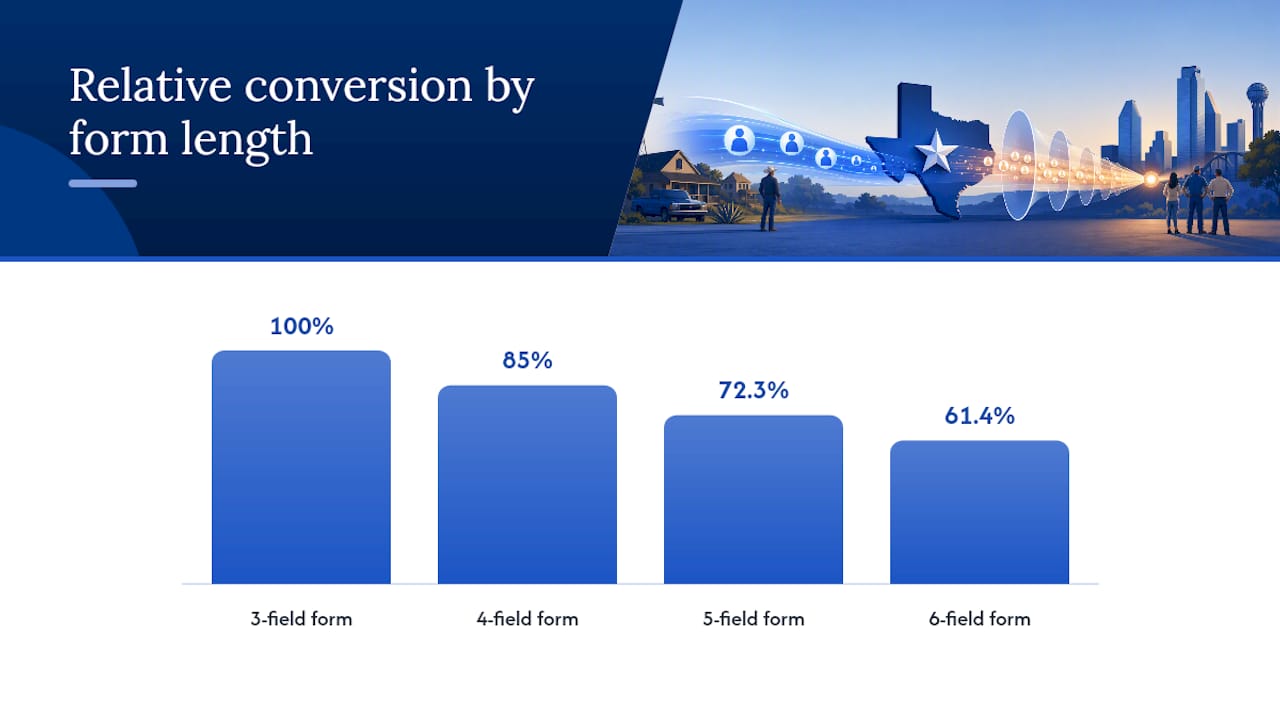
| 3-field forms convert better | Each field beyond name, phone, and service type reduces conversion by roughly 15%. |
| Schema is a launch item | Add LocalBusiness JSON-LD at build time; it improves both search and AI assistant visibility. |
| Forge-web-studio rapid build | Forge-web-studio launches mobile-first Texas business sites in 3–7 days with schema, speed tuning, and GBP integration included. |
Table of Contents
- What a minimum viable website actually means for local service businesses
- How to build and publish your site in 3–7 days
- Which pages and features actually drive leads on day one
- Design and conversion priorities that move the needle fast
- Technical essentials: hosting, speed, forms, and tracking
- What a minimum viable website realistically costs and how long it takes
- Pre-launch checklist: what to verify before you hit publish
- Post-launch: maintenance and the first moves that increase leads
- When should you DIY, hire a freelancer, or use a rapid-build studio?
- What rapid launches actually look like from the studio side
- Forge-web-studio builds your site in 3–7 days, leads included
- Sources
What a minimum viable website actually means for local service businesses
The phrase "minimum viable website" gets borrowed from startup culture, where it describes a stripped-down product built to test a business idea. That is not what this article is about.
For a Texas plumber, roofer, landscaper, or cleaning company, a minimum viable website means something specific: the smallest set of pages and features that reliably turns a visitor into a lead. No product-market validation. No feature experiments. Just a site that answers three questions fast: what you do, where you serve, and how to contact you now.
What it is:
- A mobile-first, conversion-focused site for an established local service business
- Built to generate calls, bookings, and quote requests from day one
- Scoped tightly so it launches in days, not months
What it is not:
- A startup MVP or prototype for testing a new business concept
- A feature-limited web app waiting for user feedback
- A placeholder site with no lead-capture mechanism
Pro Tip: Write your page list on a sticky note. If it does not fit on one sticky note, your scope is too wide for a rapid launch.
How to build and publish your site in 3–7 days
You can publish a conversion-ready site in 3–7 days if you lock scope on day zero and collect content before any design work starts.
Day 0–1: Discovery and content collection
- Confirm your canonical business name, phone, address, and service area
- Gather your logo (SVG or high-res PNG), 3–5 team or job-site photos
- Write your service list with one-sentence descriptions and rough pricing ranges
- Pull 3–5 Google reviews to use as trust signals
- Decide on one primary CTA: call, book, or request a quote
Day 1–3: Build core pages
- Set up hosting and domain (managed hosting cuts setup time significantly)
- Build homepage: headline, phone above the fold, primary CTA, service summary, reviews
- Build one primary service page with direct-answer copy under question headings
- Build contact or booking page with a 3-field form (name, phone, service needed)
- Integrate click-to-call and a sticky mobile CTA button
Day 3–7: Polish, schema, and publish
- Add LocalBusiness JSON-LD schema — treat this as a launch checklist item, not an optional extra
- Run PageSpeed Insights on mobile; hit LCP under 2.5s before publishing
- Connect Google Analytics (GA4) and set up a form-submission conversion event
- Verify or claim your Google Business Profile and link it to the site
- Run a full mobile device test on cellular, not just Wi-Fi
- Publish and submit your sitemap to Google Search Console
Which pages and features actually drive leads on day one
Day-one pages are not a wish list. They are the four or five pages that move the needle on calls and bookings, and every other page can wait.
Pages to launch with:
- Homepage: single conversion goal, phone visible without scrolling, brief service summary, 2–3 reviews
- Primary service page(s): 1–3 pages, one per core service, with direct-answer paragraphs under question headings for AI and search visibility
- Contact or booking page: 3-field form, embedded calendar or booking widget if you take appointments, phone repeated
- About page: team photo, years in business, license or insurance badge, service area map or list
- Dedicated landing page: one focused page for your highest-intent service or for paid ads
Lead-capture features that matter:
- Click-to-call link on every page (tap-to-call on mobile)
- 3-field contact form — name, phone, and service needed. Each field beyond that reduces conversion by roughly 15%
- Sticky CTA button pinned to the bottom of the mobile screen
- Booking widget or calendar for appointment-based businesses
Paid search conversion rates for home services averaged 7.33% across 3,211 U.S. campaigns analyzed between April 2024 and March 2025. Know your trade's baseline before setting conversion goals.
Pro Tip: Add your service area in plain text on the homepage — "Serving Austin, Round Rock, and Cedar Park" — not just in schema. Visitors and AI assistants both read it.
Design and conversion priorities that move the needle fast
Mobile clarity and one clear action per page outperform elaborate layouts for local service leads. A visitor on a phone deciding whether to call you has about eight seconds. Spend your design budget on that moment.
Above the fold on mobile:
- Business name and phone number visible without scrolling
- One CTA button ("Call Now" or "Get a Free Quote") in a high-contrast color
- A single sentence stating what you do and where
Conversion-focused design choices:
- One conversion goal per page — never ask visitors to call, book, and subscribe simultaneously
- Social proof (a review or star rating) placed within two scrolls of the CTA
- Tap targets at least 48px tall so thumbs do not miss buttons
- Keyboard-accessible forms so autocomplete works on mobile
Local landing pages must prove three things quickly: what you do, where you serve, and why someone should contact you now. Short, direct-answer copy under question headings satisfies all three and improves AI visibility at the same time.
Pro Tip: Test your site on a real Android device on LTE before launch — not just Chrome DevTools. Emulators miss real-world rendering delays that kill conversions.
Technical essentials: hosting, speed, forms, and tracking
Choose technology that keeps Core Web Vitals green on mobile: LCP under 2.5s, INP under 200ms, CLS under 0.1. Google measures these from 28-day rolling real-user data, and they act as a tiebreaker between similar local sites in search results.
Hosting and CMS for rapid builds:
- Managed hosting (Vercel, Netlify, WP Engine) removes server configuration from your critical path
- Next.js or a lean WordPress setup with a performance-focused theme both hit green Core Web Vitals when configured correctly
- Avoid page builders that load 400KB of JavaScript for a five-page brochure site
Forms and booking:
- 3 fields maximum; server-side validation and instant email delivery to your inbox
- Test the form submission yourself before launch — check spam folders
Security and legal:
- HTTPS with automatic TLS renewal (standard on managed hosts)
- Privacy policy and terms links in the footer — one-page versions are fine at launch
- 301 redirect from HTTP to HTTPS
Tracking:
- GA4 with a form-submission conversion event
- Google Business Profile verified and linked
- Call tracking number if you run paid ads
A one-second increase in page load time can reduce conversions by up to 7% and raises ad costs by lowering your Quality Score. Treat performance as a launch gate, not a post-launch task.
| Metric | Target | Why it matters |
|---|---|---|
| LCP (mobile) | Under 2.5s | Core Web Vitals pass; search ranking signal |
| INP | Under 200ms | Interaction responsiveness; replaced FID in 2024 |
| CLS | Under 0.1 | Prevents layout shifts that break tap targets |
| Page load (ads) | Under 3s | Avoids wasted ad spend and Quality Score drops |
What a minimum viable website realistically costs and how long it takes
| Build path | Typical cost | Launch window | What you get |
|---|---|---|---|
| DIY (website builder) | $0 | 1–4 weeks | Template site; you write copy, configure forms, handle SEO. |
| Freelancer | $2,500 | 2–6 weeks | Custom design; quality and speed vary widely |
| Rapid-build studio | $2,500 | 3–7 days | Mobile-first build, schema, speed tuning, GBP integration, lead capture |
A 3-day Forge-web-studio rapid launch typically includes: homepage, primary service page, contact page, LocalBusiness schema, Core Web Vitals tuning, GA4 setup, and Google Business Profile integration. Monthly maintenance is available as an add-on.
For paid ads, a dedicated landing page per service is not optional — homepages are poor ad destinations and lower your Quality Score. Budget for at least one focused landing page from day one if you plan to run Google Ads.
Pre-launch checklist: what to verify before you hit publish
Verify contact paths, speed, schema, mobile layout, and tracking before the site goes live. This takes under 30 minutes.
Run these checks in order:
- Click every phone number link on mobile — confirm it dials
- Submit the contact form and verify the email lands in your inbox (check spam)
- Run PageSpeed Insights on the mobile tab — confirm LCP under 2.5s
- Open the site on a real phone on cellular data
- Check that the sticky CTA button is visible and tappable on mobile
- Validate LocalBusiness JSON-LD with Google's Rich Results Test
- Confirm GA4 is firing and the form-submission event records in real time
- Verify Google Business Profile links to the correct URL
- Submit sitemap.xml to Google Search Console
Quick acceptance checklist:
- Phone number visible above the fold on mobile: ✓
- Form submits and delivers email: ✓
- Mobile LCP under 2.5s: ✓
- Schema validates with no errors: ✓
- GA4 conversion event fires: ✓
Use Forge-web-studio's website review checklist to run a structured audit before or after launch.
Post-launch: maintenance and the first moves that increase leads
Small, regular investments in monitoring and one optimization per month compound into meaningful lead increases over a quarter.
Monthly maintenance tasks:
- Weekly automated backups (your host should handle this)
- Monthly Core Web Vitals check via PageSpeed Insights
- Quarterly content refresh: update service descriptions, add new photos, refresh reviews
- Review gathering: ask every completed job for a Google review
First growth moves after launch:
- Build a focused landing page for your highest-converting paid ad campaign
- Add local citations (Google Business, Yelp, Angi, BBB) with consistent NAP data
- Add internal links from the homepage to each service page
- Track three KPIs: form conversion rate, inbound calls, and quote-to-job rate
Mobile conversion rates run materially lower than desktop — on average 42% lower.
Pro Tip: Set a calendar reminder for the 30th day after launch. Pull your GA4 data, check your call volume, and make one specific change — not five. Single-variable iteration tells you what actually moved the number.
When should you DIY, hire a freelancer, or use a rapid-build studio?
Choose based on three factors: how fast you need leads, how much ongoing support you want, and how much your time is worth.
DIY works when:
- You have 20+ hours to invest and a tight budget
- You are comfortable with a website builder like Squarespace or Wix
- You do not need schema, performance tuning, or local SEO from day one
A freelancer works when:
- You have 2–6 weeks and a budget under $2,500
- You can manage the project and provide feedback promptly
- You have a clear brief and do not need strategy input
A rapid-build studio works when:
- You need leads within a week
- You want mobile-first performance, schema, and local SEO baked in from day one
- You want a maintenance relationship, not a one-time handoff
Questions to ask any vendor before hiring:
- What are your Core Web Vitals targets on mobile at launch?
- Do you include LocalBusiness schema and Google Business Profile setup?
- What is your exact launch timeline and what causes delays?
- What does post-launch maintenance include and what does it cost?
- Can you show me a site you built for a similar local service business?
See how Forge-web-studio structures its project phases and process before you compare vendors.
What rapid launches actually look like from the studio side
The fastest launches share one trait: the client arrives on day one with everything collected. Business name, phone, service list, logo, photos, and three reviews. When that package is ready, a conversion-ready site ships in three days. When it is not, the timeline stretches to match the content gap, not the build complexity.
The most common pitfall is scope expansion mid-build. An owner adds a blog, a gallery, a team page, and a resources section after the project starts. Each addition is reasonable on its own. Together they push a 3-day build to three weeks and dilute the conversion focus the site was designed around.
What the studio tracks at launch: mobile LCP, form submission rate, and inbound call volume in the first 30 days. Those three numbers tell you whether the site is working before you spend a dollar on ads.
Forge-web-studio builds your site in 3–7 days, leads included
Texas local businesses that need a site now — not in six weeks — have a direct option. Forge-web-studio builds mobile-first, lead-generating websites for Texas service providers in 3–7 days, with LocalBusiness schema, Core Web Vitals tuning, GA4 setup, and Google Business Profile integration included in every project.

Every build ships with a homepage, primary service page(s), contact or booking page, and a dedicated landing page for your highest-intent service. Monthly maintenance packages keep your site fast and your reviews current without requiring you to manage it yourself.
Request your project and get a scoped proposal within one business day.
Sources
- Home Services Benchmarks 2026: Quote Speed & Close Rates
- Optimizing Landing Pages for Local Service Queries (2026)