
Service page SEO is the practice of structuring and optimizing the pages where you sell a specific service so search engines rank them and visitors turn into leads. The single highest leverage move is owning one commercial intent per page: pick one primary keyword, align your H1 and title to it, and put your contact path above the fold. Everything else in this guide builds on that decision.
TL;DR:
- Focusing each service page on one primary keyword with a clear, descriptive H1, title, and CTA above the fold maximizes search and conversion potential.
- Structuring pages with deliverables, process steps, proof, and fit guidance ensures both ranking and lead quality improve simultaneously.
- Proper internal linking, short URLs, and accurate keyword mapping help pages rank strongly and avoid cannibalization or deep burial within the website hierarchy.
- Mobile performance and technical SEO fundamentals like schema markup, fast load times, and visible content are essential for maintaining rankings and user trust.
- Regular updates, content refreshing, and performance audits prevent ranking decay and keep service pages relevant and effective over time.
Table of Contents
- What Is Service Page SEO and What Makes It Work?
- On-Page SEO Checklist: Title, Meta, Headings, and Keyword Placement
- Content Strategy and Keyword Mapping for One Service Intent
- Site Architecture and Internal Linking: Making Google and Users Find the Page
- Technical and Performance Essentials for Service Pages
- Conversion and Trust: Proof Placement, CTAs, Pricing, and FAQs
- Measure, Iterate, and Diagnose: Search Console, Analytics, and Conversion Metrics
- Publisher Experience: How Forge Web Studio Approaches Service-Page Builds
- Updating and Maintaining Service Page Content Over Time
- Author Perspective: Why Service Pages Still Beat Blog Posts for Commercial Queries
- How Forge Web Studio Helps You Fix or Build a Service Page That Converts
- Sources
What Is Service Page SEO and What Makes It Work?
Most service pages fail for one of two reasons: they try to rank for everything and end up ranking for nothing, or they rank fine and still don't convert because the CTA is buried under three paragraphs of vague marketing copy. Service page SEO fixes both problems at once by treating rankings and conversions as the same job, not two separate ones.
The pages that consistently perform share a pattern. They explain what the service is, how it works, and who it's for, then back that up with proof placed right next to the button you want clicked. Search Engine Land's guidance on service pages makes this point directly: pages built only to rank tend to underperform on leads, and pages built only to convert tend to underperform in search. You need both working together.
That's the standard industry term worth knowing here: search engine optimization for commercial pages is often just called "service page optimization" or "on-page SEO for service pages" in agency circles. Whatever you call it, the mechanics are the same, and they start with structure.
Anatomy of a high-performing service page
A service page that ranks and converts has five load-bearing parts, in this order:
- Hero and H1: a plain-language statement of the service, who it's for, and a visible CTA. No taglines. No wordplay.
- Deliverables: a scannable breakdown of exactly what's included, so a visitor doesn't have to guess what they're buying.
- Process: three to five short steps showing how the work actually happens, which reduces the "will this be a mess" anxiety that kills conversions.
- Proof: a case snippet, review, or credential placed near the CTA, not buried in a footer.
- Fit guidance: a short note on who this service is and isn't right for, which filters out bad-fit leads before they fill out your form.
SEMRocket's research on service page optimization found that pages explaining methodology and outcomes consistently outperform thin brochure pages that just list services with no context. The lesson: a service page is closer to a sales conversation than a menu.
Pro Tip: Write your "who this is for" section before you write your hero copy. Knowing exactly who you're excluding makes it much easier to speak clearly to who you're including.
On-Page SEO Checklist: Title, Meta, Headings, and Keyword Placement
Getting the on-page basics right is not glamorous, but skipping it is the fastest way to leave rankings on the table. Run through this sequence for every service page you build or fix:
- Title tag. Put the primary keyword near the front, followed by a location or qualifier if relevant (for example, "Roof Repair Services" rather than "Welcome to Our Roofing Solutions").
- H1. Match it closely to the title, but write it as a human sentence, not a keyword string. A vague H1 like "Our Services" tells Google and visitors nothing.
- First 100 words. State the service, the outcome, and who it's for in plain language. This is the block most likely to get pulled into a search snippet.
- URL. Keep it short and descriptive. A URL like
/roof-repairbeats/services/page-2or/roofing-solutions-for-your-home-todayevery time. - Meta description. Use a simple formula: value plus qualifier plus call to action. Example: "Same-week roof repair in Central Texas. Licensed crews, upfront pricing. Get a free quote."
- Subheadings. Structure your H2s and H3s as the actual questions buyers ask, like "How much does this cost?" or "How long does the process take?" That structure also helps AI search tools and voice assistants surface your answers directly, according to Dakshraj's research on service page visibility.
Two mistakes undo all of this. The first is keyword stuffing: cramming the same phrase into every sentence reads badly to humans and gets discounted by search engines anyway. The second is a vague H1 that tries to sound clever instead of being clear. "Transforming Spaces" tells nobody what you actually do. "Kitchen Remodeling in Austin" does.
Content Strategy and Keyword Mapping for One Service Intent
Every service page should own exactly one commercial phrase, and that phrase needs a modifier that reflects either the industry or the outcome your buyer wants. "Web design" is too broad to rank against established players. "Web design for restaurants" or "rapid website launch for local businesses" narrows the field and matches how a specific buyer actually searches.
Once you've locked the primary phrase, build out supporting language naturally rather than force-fitting synonyms:
- Weave in secondary terms buyers actually type, like "cost," "timeline," or "process," inside your subheadings and body copy.
- Add depth with a mix of text, a simple process diagram, and screenshots of past work where you have them.
- Keep content specific to the one service. If you're tempted to cover three loosely related services on one page, that's a sign you need three pages instead.
That last point matters more than most business owners expect. Combining "web design" and "SEO services" on a single page might feel efficient, but it usually means the page ranks weakly for both instead of strongly for either. Split them, then connect them through internal links so each page still supports the other's authority.
Blog content plays a supporting role here, not a starring one. A post titled "5 Signs Your Website Needs a Redesign" should link into your redesign service page, feeding it relevance and authority rather than competing with it for the same search terms.
Site Architecture and Internal Linking: Making Google and Users Find the Page
A service page can be flawless on its own and still underperform if it's buried four clicks deep or competing against a near-duplicate page for the same search terms. Devspire's guide to service website structure makes the case for a clear hierarchy: homepage at the top, service categories below it, individual service pages beneath those, with blog posts feeding back up as spokes.
A few rules keep this hierarchy working:
- Every service page should be reachable within three clicks from the homepage. If it isn't, add a link from the homepage or a relevant category page.
- Link from your homepage and category pages directly to the specific service page, not just to a general "Services" listing.
- Use descriptive anchor text like "same-day roof repair" instead of generic phrases like "click here" or "learn more."
- Check for cannibalization by searching
site:yourdomain.com "your keyword"in Google. If two pages show up competing for the same phrase, merge them or narrow one page's focus.
This is also where service area page structure becomes relevant for local businesses covering multiple towns or neighborhoods. Rather than cramming five cities into one page, a hub-and-spoke structure lets each location page target its own local intent while linking back to the core service page for authority.
Technical and Performance Essentials for Service Pages
Technical health is where a lot of good content quietly dies. A well-written service page that takes six seconds to load on a phone is a page most visitors never finish reading.
Most website traffic in the U.S. comes from mobile devices, making mobile performance a key consideration, according to Statista's mobile traffic data, which means Core Web Vitals and mobile rendering aren't optional polish. They're the baseline.
A few technical habits worth locking in:
- Keep URLs short, lowercase, and hyphenated (
/kitchen-remodeling, not/Kitchen_Remodeling_Services_2026). - Use Service schema, pairing the service type, provider, and area served, but only when it matches what's visibly on the page. SEMRocket's schema guidance notes this alignment matters for how search engines interpret the page.
- Add LocalBusiness schema when the service is tied to a physical location or service radius.
- Never hide your core service description, pricing hints, or CTA behind an accordion. Visible content indexes and converts better than collapsed content.
- Run Google's PageSpeed Insights and Search Console's mobile usability report monthly to catch regressions early.
For deeper technical troubleshooting, Parent Technology's technical SEO guide walks through common indexing and crawl issues worth checking on any page that isn't performing.
Conversion and Trust: Proof Placement, CTAs, Pricing, and FAQs
Ranking gets someone to your page. Trust gets them to act. Trustpilot's research on how review platforms work makes the case that visible, specific reviews carry more weight with buyers than vague trust badges or generic claims of quality.
A few placement rules make proof do its job:
- Put a testimonial, case snippet, or credential directly above or beside your main CTA, not in a separate "Reviews" tab.
- Match CTA type to intent: "Get a Free Quote" for price-sensitive buyers, "Book a Call" for complex services, "See Pricing" for buyers who just want a number.
- If you can share pricing, even as a range or starting price, do it. Vague "contact us for pricing" language filters out fewer bad-fit leads than a rough number does.
- Use FAQs to answer objections buyers won't say out loud, like "what happens if I'm not satisfied" or "how fast can you start."
- Check your CTA on an actual phone. If someone has to pinch to zoom or scroll past three sections to find your phone number, you're losing leads you already earned.
Pro Tip: Ask three customers why they chose you over a competitor, and use their actual words as your proof copy. Real language beats polished marketing copy almost every time.
Measure, Iterate, and Diagnose: Search Console, Analytics, and Conversion Metrics
Four numbers tell you almost everything: impressions, click-through rate, average position, and conversion rate. Reading them together tells you what to fix.
- High impressions, low CTR usually points to a weak title tag or meta description, not a content problem. Rewrite the title first before touching the page body.
- High clicks, low conversions usually means the page ranks fine but doesn't build enough trust or clarity once someone arrives. Revisit your CTA placement and proof section.
- Stable position but flat leads is often a message mismatch. Test your headline and CTA copy through simple A/B swaps before assuming your SEO is broken.
- Review each service page quarterly at minimum, and monthly for your top three revenue pages. SEO Informatica's diagnostic checklist recommends working through ownership, message match, and proof placement in that order before touching performance details.
Publisher Experience: How Forge Web Studio Approaches Service-Page Builds
Forge-web-studio builds service pages through a consistent sequence: discovery to understand the buyer and the offer, structural drafting around hero, deliverables, and process, proof placement pulled from real client work, then deployment with speed and mobile checks before launch.
The sequence flexes by industry. A roofing company's page leans harder on urgency and licensing proof; a restaurant's leans on visuals and reservation flow.
Updating and Maintaining Service Page Content Over Time
A service page is not a one-time build. Pricing changes, service areas expand, and search behavior shifts, and a page left untouched for two years usually shows it in falling rankings and stale conversion numbers.
Set a maintenance rhythm instead of waiting for a problem to force your hand. Review top-performing service pages quarterly for accuracy: check that pricing references, service areas, and team credentials still match reality. Update case snippets and proof sections at least twice a year so visitors see recent work, not a testimonial from three years ago.
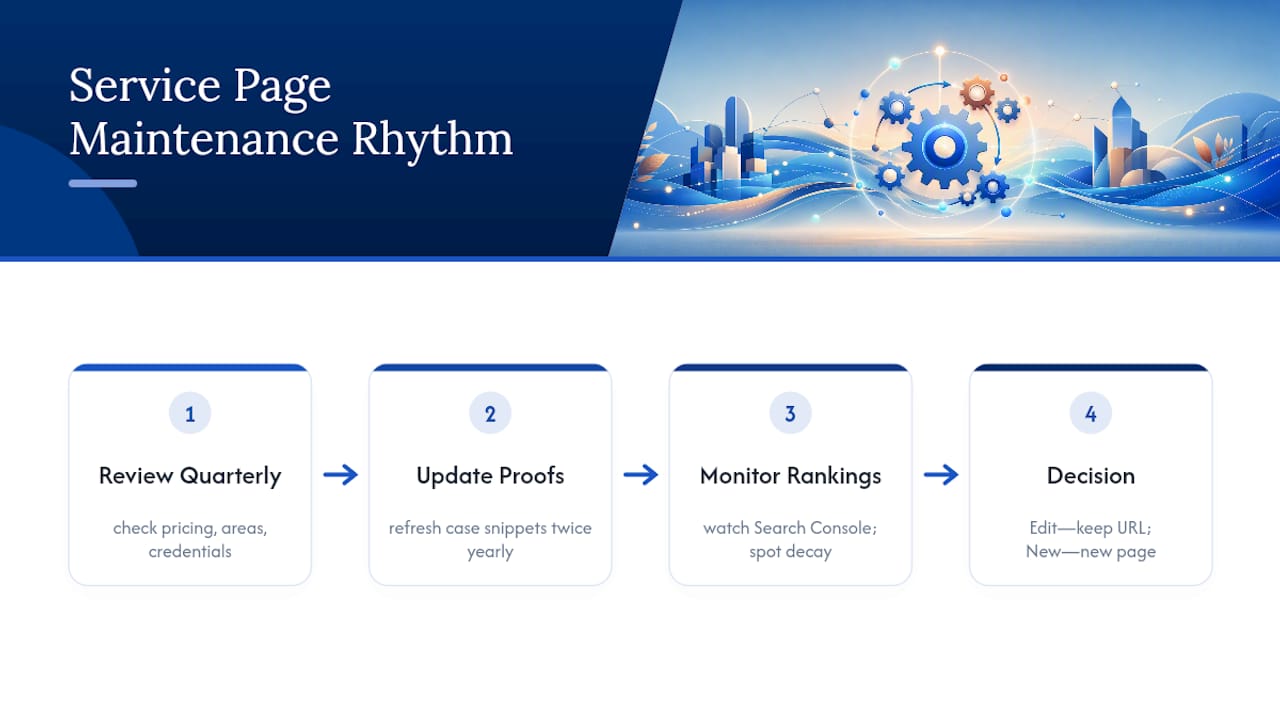
Watch for content decay too. If a page that used to rank well starts sliding in Search Console, that's often a signal competitors have refreshed their content while yours sat still. A light refresh, updated examples, a tightened H1, a new FAQ answering a question you're now hearing from actual customers, can be enough to recover lost ground without a full rebuild.
Treat structural changes differently from content changes. If you're adding a genuinely new service, that's a new page, not an edit to an existing one. If you're clarifying or updating an existing offer, edit in place and keep the URL stable so you don't lose the ranking history you've already built.
Author Perspective: Why Service Pages Still Beat Blog Posts for Commercial Queries
Blog content builds trust over time, but it rarely closes a sale. Service pages do both jobs when they're built right, which is why I'd rather see a business fix one page than write ten new posts.
Three fixes this week: sharpen your H1 to state the service and audience plainly, add one visible CTA above the fold, and link three relevant blog posts into the page. Then measure what changes.
— Dylan
How Forge Web Studio Helps You Fix or Build a Service Page That Converts
Forge-web-studio is the practical alternative to a slow agency rebuild for Texas businesses that need a service page live and working now, not in three months. Launches run three days to a week, built around the same structure this guide covers: clear H1, visible CTA, proof near the decision point, and mobile performance that doesn't lag on a job site or a customer's phone.

This approach fits local service providers, restaurants, and small businesses that need lead flow now rather than a redesign that drags on for months. If you're a roofing company, a mobile detailer, or any local operation where a slow or confusing page is costing you calls, a fast rebuild often pays for itself in the first month of recovered leads. Start with a look at Forge's responsive website development service to see how a rapid rebuild fits your specific business and timeline.
Sources
For deeper detail beyond this guide, Search Engine Land's service page framework covers rank-and-convert structure in more depth. SEO Informatica's diagnostic checklist is worth bookmarking for ongoing audits, and Devspire's site structure guide breaks down hierarchy decisions for multi-location businesses.
- Statista — Share of website traffic coming from mobile devices in the U.S.
- How to create service pages that rank and convert - Search Engine Land
- How to Optimize Service Pages for Organic Search - SEMRocket
- SEO for Service Websites: Site Structure, Intent & Rankings - Devspire