
A website maintenance plan is an ongoing service that keeps your site secure, updated, and functional month after month. It covers software updates, security monitoring, automated backups, uptime checks, and minor content edits. Hosting stores your files. Maintenance keeps everything running correctly on top of those files.
Which tier should you start with? Most small businesses with a lead-gen or brochure site should start at the Essential or Pro level. If you collect payments or run a booking system, go straight to Pro or Premium.
Typical U.S. monthly price ranges:
- Basic/DIY: $35–$100/month
- Small-business retained (Essential/Pro): $150–$800/month
- Agency/Premium with SLA: $500–$800+/month
Statistic: Professional small-business retainer plans commonly fall within a moderate price band that accounts for security scanning, performance tuning, and guaranteed response times.
Skip a plan and you are not saving money. You are deferring a larger bill. Reactive maintenance can cost significantly more than the original build when full recovery is required after a breach or crash.
Table of Contents
- What is a website maintenance plan and who actually needs one?
- What should a website maintenance plan include?
- What does a smart maintenance schedule look like?
- How much does website maintenance cost in the U.S.?
- Sample maintenance plan tiers: Essential, Pro, and Premium
- How do you choose the right plan or vendor?
- DIY vs. managed plugins vs. hiring an agency
- What happens during a security incident or outage?
- WordPress-specific maintenance: what makes it different?
- Key Takeaways
- The case for treating maintenance as infrastructure, not an afterthought
- Forge-web-studio handles maintenance so you can focus on your business
- Useful sources and further reading
What is a website maintenance plan and who actually needs one?
Hosting and maintenance are not the same thing, and conflating them is one of the most expensive mistakes small business owners make. Your host keeps the server running. A maintenance plan keeps the application running: the CMS, plugins, themes, contact forms, checkout flows, and security layers that sit on top of the server.
A modern business website is a living system. Leave it untouched for six months and you will likely find outdated plugins, a broken form, or a security gap that a bot already found.
Who needs a paid plan?
- Brochure sites (5–10 pages, no forms): minimum monthly updates and quarterly security scans. DIY is viable if you are technically comfortable.
- Lead-gen sites (contact forms, booking, local SEO): weekly updates, monthly security audits, and uptime monitoring are non-negotiable. A broken form costs you leads every hour it is down.
- E-commerce sites: daily backups, real-time uptime monitoring, PCI-adjacent security scanning, and fast SLA response. DIY is rarely adequate.
Business signals that mean you should not skip a paid plan:
- You collect form submissions or payments online
- Local SEO drives meaningful traffic to your site
- You have not updated plugins or themes in the last 60 days
- You do not have a tested backup from the last 7 days
- Your site generates revenue directly or supports sales calls
If two or more of those apply, a retained plan pays for itself the first time something breaks.
What should a website maintenance plan include?
A credible plan covers more than plugin updates. Here is what belongs in any serious offering, and why each item matters.
Core inclusions:
- CMS/core, plugin, and theme updates: The single biggest security lever. 83% of hacked websites were running outdated software, making unpatched applications the largest cause of site compromises.
- Security monitoring and malware scanning: Continuous or daily scanning catches injected code, unauthorized file changes, and blacklist status before Google flags your site.
- Automated backups with restore testing: Backups without verified restores are false confidence. A good plan schedules backups and periodically confirms the restore actually works.
- Uptime monitoring: Alerts within minutes of downtime so you are not the last to know your site is offline.
- Performance optimization: Slow sites lose customers before they ever read your offer. Monthly Core Web Vitals checks keep load times in a competitive range.
- Broken-link and form testing: A broken contact form or dead link quietly kills conversions. Weekly functional checks catch these fast.
- SSL and domain renewal tracking: An expired SSL certificate triggers browser warnings that send visitors straight to a competitor.
- Monthly reporting: You should receive a plain-language summary of what was done, what was found, and what is coming next.
Scope limits to watch: Most plans cap included edit hours (commonly 1–2 hours/month at Essential, 3–5 at Pro). E-commerce support, database optimization, and third-party integration maintenance often cost extra. Always confirm what counts as a billable edit before signing.
Pro Tip: Never apply updates directly to a live site. Professional teams use a staging environment that mirrors production, test the update there first, then deploy. This one workflow prevents the majority of update-related outages.
What does a smart maintenance schedule look like?
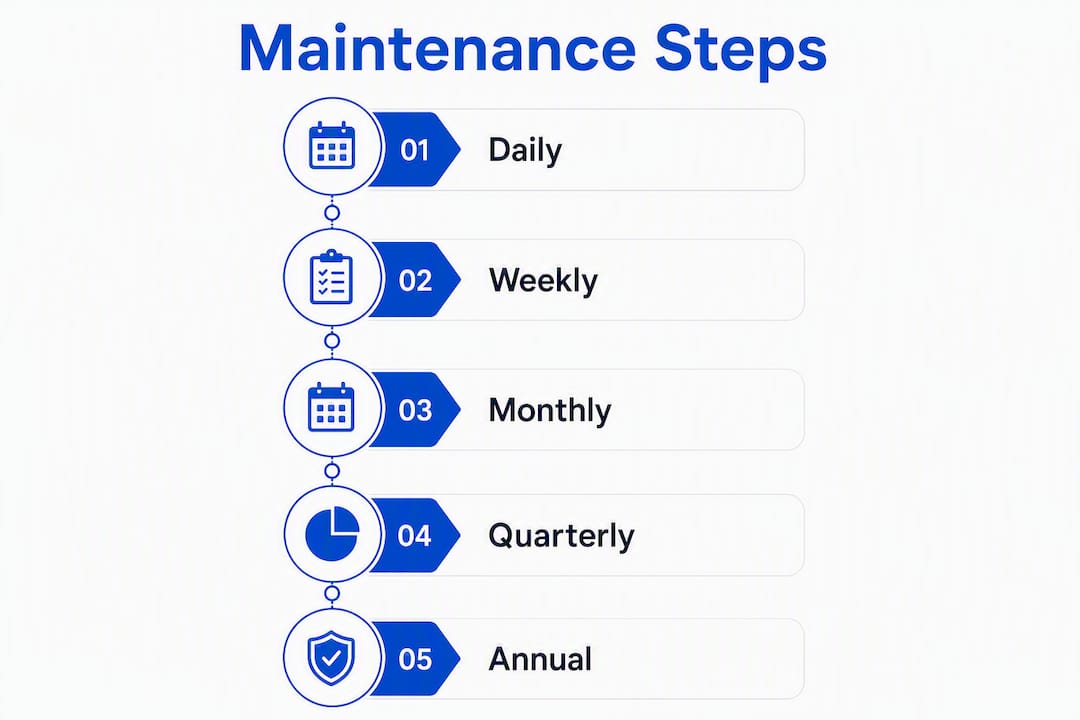
A structured cadence is what separates proactive maintenance from reactive firefighting. The recommended professional rhythm is daily monitoring, weekly updates, and quarterly audits. Here is how that maps to actual tasks.
1. Daily Verify uptime alerts are active and automated backups completed successfully. Review any security alert emails from your monitoring tool.

2. Weekly Apply plugin, theme, and CMS updates on staging first, then push to production. Run a broken-link scan. Test key forms and checkout flows manually. Run a basic performance check.
3. Monthly Run a full malware and security scan. Pull a Core Web Vitals report and address any failing metrics. Review analytics for traffic drops or unusual bounce spikes. Make approved minor content edits (text updates, image swaps, new blog posts).

4. Quarterly Cross-browser and mobile device testing. Accessibility spot-check against WCAG 2.1 AA. Technical SEO audit covering crawl errors, redirect chains, and structured data. UX review of key landing pages.
5. Annual Renew domain and SSL certificates. Full content audit (outdated pages, dead links, thin content). Disaster recovery test: restore a backup to a staging environment and confirm it works end to end.
| Frequency | Key Tasks | Responsible Party |
|---|---|---|
| Daily | Uptime monitoring, backup verification, security alerts | Vendor / automated tool |
| Weekly | Plugin/theme updates (staging first), form tests, link scans | Vendor or in-house tech |
| Monthly | Full security scan, Core Web Vitals, analytics review, content edits | Vendor |
| Quarterly | SEO audit, browser/device testing, accessibility check | Vendor |
| Annual | Domain/SSL renewal, content audit, DR test | Vendor + owner sign-off |
Pro Tip: High-traffic or frequently updated sites (e-commerce, news, booking-heavy) need weekly security scans and daily backup verification. A five-page brochure site can safely run monthly security scans. Match cadence to how often your site changes and how much revenue depends on uptime.
How much does website maintenance cost in the U.S.?
Price tracks complexity. A five-page brochure site with no integrations costs far less to maintain than a WooCommerce store with payment gateways, inventory feeds, and shipping APIs.
U.S. monthly price bands:
- DIY / basic platform plans: $35–$100/month. Covers managed hosting with auto-updates, basic uptime monitoring. You handle everything else.
- Essential retained plan: $150–$300/month. Plugin updates, weekly backups, uptime monitoring, 1–2 hours of content edits. Suitable for simple brochure sites.
- Pro small-business plan: $300–$800/month. Adds security scanning, performance tuning, monthly reporting, faster SLA, 3–5 edit hours. Right for most lead-gen sites.
- Premium / agency plan: $800+/month. Dedicated SLA, 24/7 monitoring, on-call incident support, advanced SEO audits, e-commerce support.
Statistic: Typical small-business professional maintenance plans commonly fall within a mid-range price band depending on scope; e-commerce and enterprise sites have higher costs.
Primary cost drivers:
- Site complexity and number of integrations
- E-commerce functionality (payment gateways, inventory, shipping)
- SLA response time (4-hour vs. 24-hour vs. next-business-day)
- Number of included edit hours per month
- Hosting tier (shared vs. managed WordPress vs. VPS)
- Update frequency and number of plugins
Quick budget estimate checklist:
- How many plugins does your site run? (More = higher risk, higher maintenance cost)
- Do you accept payments or bookings online?
- What is an hour of downtime worth to your business?
- Do you need same-day incident response?
Answer those four questions and you can quickly narrow to the right tier.
Sample maintenance plan tiers: Essential, Pro, and Premium
These tiers give you a concrete baseline for comparing vendor proposals or building your own plan.
| Feature | Essential | Pro | Premium |
|---|---|---|---|
| CMS/plugin/theme updates | Weekly (staging) | Weekly (staging) | Weekly (staging) |
| Backups | Weekly automated | Daily automated | Daily automated + offsite |
| Restore testing | Quarterly | Monthly | Monthly |
| Uptime monitoring | Basic (hourly checks) | Real-time | Real-time + alerting |
| Security scanning | Monthly | Weekly | Daily |
| Malware removal | Billed separately | Included | Included, priority |
| Performance audit | Quarterly | Monthly | Monthly + recommendations |
| Content edits | 1 hr/month | 3 hrs/month | 5 hrs/month |
| Monthly report | Basic summary | Detailed report | Full audit report |
| SLA / response time | Next business day | 24 hours | 4 hours |
| E-commerce support | No | Limited | Yes |
| Typical monthly cost | $150–$300 | $300–$800 | $800+ |
Essential suits a brochure site or simple portfolio where downtime is an inconvenience, not a revenue event. Pro is the right default for most lead-gen sites: it adds the security depth and reporting that let you catch problems before they compound. Premium is for sites where an hour of downtime has a measurable dollar cost, or where you need someone reachable at 10 PM on a Friday.
How do you choose the right plan or vendor?
The difference between a good maintenance vendor and a bad one often does not show up until something goes wrong. Vet them before you sign, not after.
Vendor evaluation checklist:
- Ask for their SLA in writing: what is the guaranteed response time for a security incident vs. a minor content edit?
- Confirm backup retention: how many days of backups are stored, and where? Offsite or cloud-only?
- Ask how they test restores: "We back up daily" is meaningless without a restore verification process.
- Request their staging workflow: do they test updates on a staging environment before pushing live?
- Ask what reporting you receive and how often.
- Confirm scope limits in writing: how many edit hours, what counts as an edit, and what triggers an overage charge?
Questions to include in every proposal request:
- Who owns the hosting account, domain, and CMS credentials?
- What is the escalation path if the primary contact is unavailable during an incident?
- Can you provide a sample incident runbook for a hacked site?
- What is your process for a site that needs a full database restore?
Red flags to walk away from:
- Vague or verbal-only response time commitments
- No staging environment in their workflow
- "Unlimited edits" with no written definition of what counts
- No monthly reporting or only a PDF screenshot
- Unclear backup retention policy (or retention under 14 days)
- No clear answer on who owns your accounts if you leave
Contract checklist before signing:
- Termination clause: how much notice is required, and what happens to your data?
- Data ownership: confirm you retain ownership of all files, databases, and credentials
- Liability limits: what is the vendor's liability if a breach occurs on their watch?
- Price-change notice: how much advance notice before a rate increase?
A website review checklist run before you sign gives you a baseline and makes it easier to hold a vendor accountable from day one.
DIY vs. managed plugins vs. hiring an agency
There is no universally right answer here. The right choice depends on your site type, your technical comfort, and what an hour of downtime actually costs you.
| Approach | Best For | Cost Range | Key Trade-off |
|---|---|---|---|
| DIY | Brochure sites, tech-savvy owners | $35–$100/month (tools only) | Full control, full responsibility |
| Managed WP platform | Simple WordPress sites, low budgets | $30–$100/month | Convenient, but limited customization |
| Agency/retainer | Lead-gen, e-commerce, high-traffic | $150–$800+/month | Expert coverage, higher cost |
DIY works when you are comfortable in WordPress, you understand staging, and your site is simple enough that a plugin update gone wrong is a minor inconvenience. The cost is low, but the risk lands entirely on you. One botched update on a live site can take hours to untangle.
Managed WordPress platforms (think hosting tiers with built-in auto-updates and daily backups) handle the infrastructure layer well. What they rarely cover: application-level testing, broken form detection, custom plugin conflicts, or any content editing. They are a floor, not a ceiling.
Agency retainers make sense when your site drives leads or revenue, when you do not have in-house technical staff, or when your SLA requirement is tighter than "sometime this week." The cost is higher, but you are buying expertise, accountability, and a documented process.
Guidance by site type:
- Brochure site, no forms, low traffic: DIY or managed platform is fine.
- Lead-gen site with contact forms and local SEO: Pro-tier agency retainer.
- E-commerce or booking-heavy site: Premium agency retainer with a written SLA.
For contractor and service-business sites specifically, where a broken booking form or dead phone link directly kills revenue, the agency retainer almost always pays for itself within the first incident it prevents.
What happens during a security incident or outage?
Most business owners have never thought through what actually happens when their site gets hacked or goes offline. Here is the realistic sequence, and what good recovery looks like.
Incident response flow:
- Detection: Uptime monitor or security scanner triggers an alert. Response time depends on your SLA tier.
- Containment: The site is taken offline or put into maintenance mode to prevent further damage or data exposure.
- Analysis: The vendor identifies the entry point (outdated plugin, compromised credentials, injected malware) and documents the scope of the breach.
- Restore: Clean backup is deployed to staging, verified, then pushed to production. Database and file integrity are confirmed.
- Hardening: The vulnerability is patched, credentials are rotated, and security rules are tightened.
- Post-mortem: A written summary documents what happened, what was done, and what changes prevent recurrence.
Backup retention and restore testing:
- Retain at least 30 days of backups for most sites; 90 days for e-commerce.
- Test a full restore to staging at least quarterly. Monthly for high-traffic or transactional sites.
- Store backups offsite or in a separate cloud account from your host. A host-level failure that takes your site down can also take your backups down if they live in the same environment.
Realistic recovery timelines:
- Malware removal and hardening: 2–8 hours depending on severity
- Full site rollback from clean backup: 1–4 hours
- Database restore after corruption: 2–6 hours
During an incident:
- Preserve evidence before wiping: screenshots, server logs, and file modification timestamps help identify the attack vector.
- Notify affected users if any personal data was exposed. Depending on your state and industry, this may be a legal requirement.
- Keep a communication template ready so you can update customers quickly without disclosing details that could worsen the situation.
CISA's guidance on website security is a useful primary reference for understanding what to document and report after a breach.
WordPress-specific maintenance: what makes it different?
WordPress powers a large share of small-business websites, and it carries specific risks that generic maintenance advice does not fully address.
Top WordPress risk areas:
- Outdated plugins and themes: Most WordPress breaches trace back to a plugin or theme that was not updated. The more plugins you run, the larger your attack surface.
- PHP version compatibility: Running an outdated PHP version creates both security gaps and compatibility conflicts when plugins update to require newer PHP. Check your PHP version quarterly.
- Abandoned plugins: A plugin that has not been updated by its developer in 12+ months is a liability. Remove or replace it.
- Third-party integrations: Payment gateways, CRM connectors, and booking APIs each add a dependency that can break when the core or a plugin updates.
Staging workflow for WordPress:
Testing updates on a staging environment that mirrors production is the professional standard. Applying updates directly to a live site creates unnecessary downtime risk and user-facing breakage. A proper staging setup lets you catch plugin conflicts, theme breakage, and PHP errors before your visitors do.
What managed WordPress hosting covers vs. what it does not:
Managed WP hosts typically handle server-level security, PHP updates, and infrastructure-level backups. They do not handle application-level patches for your specific plugins, broken contact form detection, custom post-type functionality testing, or content edits. A maintenance retainer fills that gap.
WordPress SMB checklist for vendor requirements:
- Staging environment included in the workflow
- PHP version monitoring and update coordination
- Plugin audit at onboarding (remove abandoned or redundant plugins)
- Compatibility testing after every major WordPress core release
- Backup stored outside the hosting environment
Pro Tip: Run a website audit before starting a maintenance retainer. It surfaces technical debt, plugin conflicts, and outdated PHP versions that a new vendor needs to know about before they touch anything.
Key Takeaways
A proactive website maintenance plan costs a fraction of what emergency recovery does, and the right tier depends on your site type, traffic, and SLA needs.
| Point | Details |
|---|---|
| Start with the right tier | Brochure sites need Essential; lead-gen sites need Pro; e-commerce needs Premium with a written SLA. |
| Staging prevents most breakage | Always test updates on a staging environment before pushing live to avoid user-facing outages. |
| Backups need verified restores | Automated backups are only useful if you periodically confirm the restore actually works. |
| Reactive fixes cost far more | Skipping a retainer plan risks recovery costs that can reach many times the original build price. |
| Forge-web-studio for Texas SMBs | Forge-web-studio offers strategy-led maintenance for Texas businesses, covering updates, security, and local SEO protection. |
The case for treating maintenance as infrastructure, not an afterthought
Most small business owners think about maintenance the wrong way. They treat it as optional upkeep, something to deal with when something breaks. That framing gets expensive fast.
The smarter frame is infrastructure. Your site is not a brochure you printed once. It is a system with dependencies: a CMS, plugins, a PHP runtime, an SSL certificate, third-party APIs, and a database. Every one of those components has a shelf life and a failure mode. The question is not whether something will eventually break. It is whether you find out before or after your customers do.
What I see consistently is that businesses underinvest in maintenance until the first real incident, then overcorrect by buying more plan than they need. The better approach is to match the plan to the site's actual risk profile from day one. A five-page brochure site does not need 24/7 monitoring. A roofing company's lead-gen site with a contact form that drives 80% of its new business absolutely does.
The other thing worth saying plainly: vendor quality varies enormously. An SLA on paper means nothing if the vendor does not have a documented incident runbook, a staging workflow, or a restore-testing process. Ask for specifics. A good vendor will answer those questions without hesitation. A vendor who gets vague when you ask about their backup retention policy is telling you something important.
Forge-web-studio handles maintenance so you can focus on your business
For Texas small businesses, the gap between a site that quietly generates leads and one that slowly loses them often comes down to whether anyone is watching the backend. Forge-web-studio's maintenance offering is built around that reality: monthly updates, security monitoring, backup management, and performance checks handled by the same team that built your site.

The practical difference from a generic maintenance provider is context. Forge-web-studio already knows your site's architecture, your lead flow, and your local SEO setup. That means faster incident response, fewer "we need to investigate" delays, and maintenance that protects the things that actually drive your business. Most clients are onboarded to a maintenance retainer within one week of their site launch. To see what that looks like in practice, review the service options or start with a site review to identify what your site needs right now.
Useful sources and further reading
- Website Maintenance 101 — Webflow Blog: Explains how structured task frequency prevents cumulative failures and SEO erosion.
- Maintenance Plans Examples — Instatus: Covers why documented maintenance strategies outperform reactive fixes on cost.
- CISA Website Security Tips — cisa.gov: Primary government guidance on what to document and report after a security incident.
- Website Audit Example — Forge-web-studio: Shows what a baseline technical audit surfaces before starting a maintenance retainer.
- Hyphenate Consulting Services: Explains enterprise-style proactive maintenance processes useful for understanding what professional service firms expect from their web infrastructure.