
Accurate call attribution requires two things: a pool of trackable phone numbers and either a dynamic number insertion script or Google Ads call forwarding turned on. Get those two pieces working and you'll know exactly which ad, keyword, or page made the phone ring.
Here's the fastest path to a working setup:
- Create a call-tracking account or, if you only run Google Ads, enable free call forwarding inside your Ads account.
- Provision a static number for offline media or a small dynamic number insertion (DNI) pool for your website.
- Place one test call from each source and confirm the number and the source data match up.
Static numbers work fine for print ads, vehicle wraps, and directory listings where the source never changes. Websites need DNI because visitors arrive from dozens of different channels on the same page.
Key Takeaways
Reliable call attribution comes from provisioning the right number of tracking numbers, installing DNI correctly on every page, and verifying the data with real test calls before trusting the dashboard.
| Point | Details |
|---|---|
| Pick the right starting tool | Use free Google Ads forwarding for ad-click tracking only; use a dedicated platform for cross-channel and CRM attribution. |
| Size your number pool | Start with 8 to 20 numbers based on peak concurrent visitors, and expand once utilization regularly passes 80%. |
| Fix the two DNI failure points | Update both the visible number text and the tel: href, and re-fire the script on single-page app route changes. |
| Test before trusting it | Call from multiple sources and confirm the tracking number, UTM data, and recording all appear correctly. |
| Treat privacy as ongoing, not one-time | Set explicit recording retention limits and a deletion process, not just a one-line consent disclosure. |
Table of Contents
- Call Tracking Setup Prerequisites You Need First
- Choosing a Platform and Sizing Your Number Pool
- How to Set Up Dynamic Number Insertion on Your Website
- Setting Up Google Ads Call Forwarding and Conversion Import
- Routing, Recording, and Consent Basics
- Test and Verify Your Call Tracking Setup
- What Forge Web Studio Checks Before Any Rollout
- Call Tracking and Data Privacy Rules You Can't Skip
- Turning Call Data Into Better Marketing Decisions
- Getting Professional Help With Your Call Tracking Setup
- Why Most Call Tracking Advice Skips the Hard Part
- Frequently Asked Questions About Call Tracking Setup
- Sources
Call Tracking Setup Prerequisites You Need First
Before touching any code, gather these five things:
- Platform access. Either a call-tracking platform login or Google Ads admin access if you're only forwarding ad calls.
- Analytics access. Google Analytics or GA4, so call events can eventually join your other conversion data.
- CRM access, if you plan to import call records into a sales pipeline.
- Website access. You'll need to add a site-wide script or deploy through Google Tag Manager. Single-page apps built on React or Next.js need extra attention since the script has to fire again after client-side route changes, not just on the first page load.
- Phone routing details. Know your destination number and who controls it, whether that's your phone carrier, a VoIP provider, or an IT contractor.
One more input matters before you provision anything: your peak concurrent website visitor count. That number drives how many tracking numbers you'll actually need.
Choosing a Platform and Sizing Your Number Pool
If your only goal is measuring calls that come from Google Ads clicks, the free forwarding option built into Ads is enough. It swaps in a Google-provided number for ad-click traffic and reports it as a conversion, no subscription required. But it stops there: no cross-channel view, no CRM sync, no organic-versus-paid comparison.
A dedicated call-tracking platform earns its cost when you need to see which channel, keyword, or landing page drove a call, not just which ad. That's the difference between knowing "Google Ads worked" and knowing "the roofing repair keyword worked."
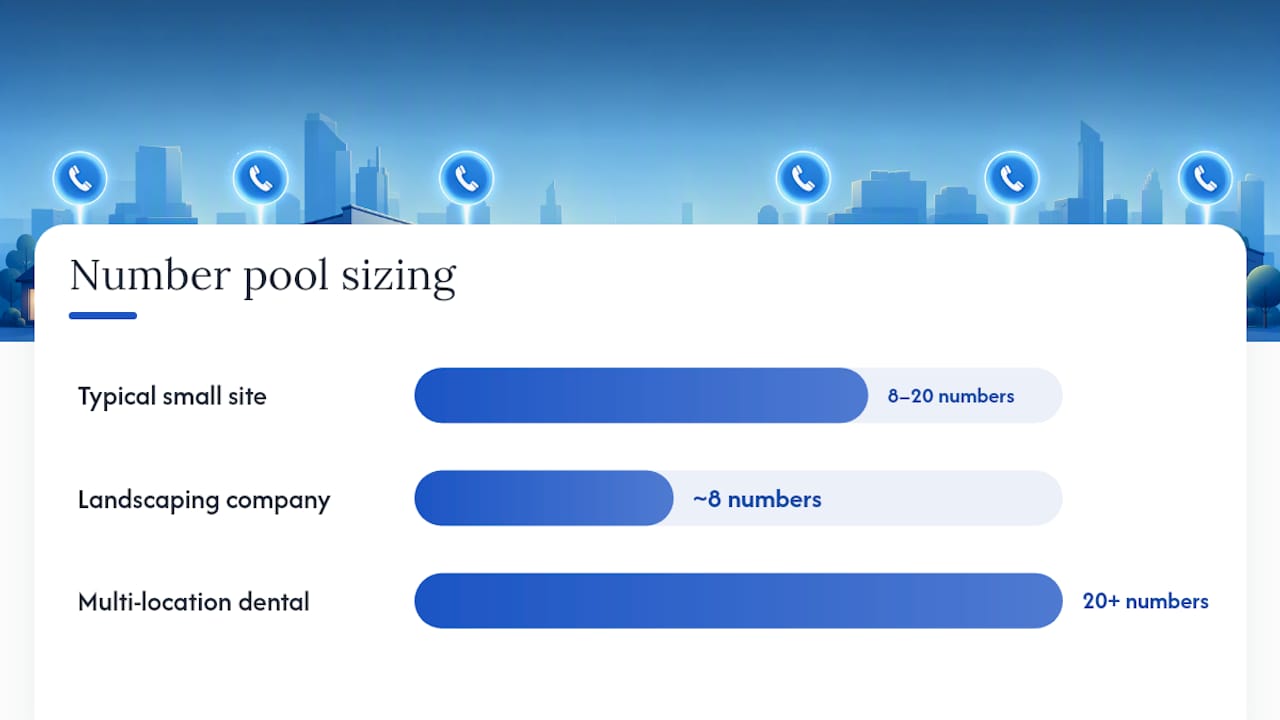
Pool sizing in practice: most small business sites do fine starting with 8 to 20 numbers, scaled to peak concurrent visitors and average session length. A landscaping company with modest traffic might run comfortably on 8 numbers. A multi-location dental practice running heavy paid search could need 20 or more.
Budget for three cost layers: a base subscription, a per-number fee, and per-minute telephony usage. Model your budget against expected qualified-call value, not raw call volume.
How to Set Up Dynamic Number Insertion on Your Website
DNI is the piece that makes web-based call tracking possible. A small JavaScript snippet reads a visitor's session data (UTM parameters, gclid, referrer) and swaps a static-looking phone number for one pulled from your tracking pool. The number stays mapped to that session, so a call placed ten minutes after landing on your site still traces back to the original source.
Here's how to install it correctly the first time:
- Place the snippet site-wide, either directly in your header/footer template or through Google Tag Manager, so it fires on every single page, not just your contact page.
- Load it asynchronously. A blocking script slows page speed, and a slow mobile page is one of the fastest ways to lose the click-to-call visitor you're trying to track in the first place.
- Target numbers with a consistent selector. Use one CSS class or data attribute across every instance of your phone number, so the script can find and replace all of them reliably.
- Update both the visible number and the tel: href. This is the single most common DNI failure: developers swap the text a visitor sees but leave the tel: link pointing at the old destination number, which breaks attribution the moment someone taps to call on mobile.
- Fix image-based numbers. If your phone number is baked into a logo or a graphic, the script can't find or replace it. Convert it to real text or add proper markup around an accessible text version.
- Handle single-page apps separately. React and Next.js sites need the DNI call re-fired on route changes, since there's no full page reload to trigger it naturally.
Watch your pool utilization once the script is live.
Pro Tip: If numbers stop swapping after a deploy, check your CDN or page cache first. A cached HTML snapshot served before the snippet was added will show the old static number indefinitely, and no amount of script debugging will fix a caching problem.

Other common culprits: console errors from a selector that no longer matches your markup, or UTM and gclid parameters getting stripped by a redirect or link shortener before the visitor ever lands on your site.
Setting Up Google Ads Call Forwarding and Conversion Import
Google Ads forwarding replaces your displayed number with a Google-provided one for anyone who clicked a paid ad, then reports the resulting call as a conversion. It's free and it's the fastest way to prove ad spend generates real calls, but scope matters: it only tracks calls tied to an ad click.
To set it up:
- Create a call conversion action inside your Google Ads account and enable call reporting.
- Connect your call-tracking platform's conversion export, or import call data manually if you're running Ads-only forwarding.
- Turn on auto-tagging so gclid parameters attach to your landing page URLs automatically.
Check a live landing page URL after a test ad click. If gclid isn't showing up in the address bar, keyword-level attribution won't work no matter how well your DNI script is configured.
If you need to see calls from organic search, Facebook, email, and referral traffic in one place, alongside your paid search calls, a dedicated platform integration will get you there. Ads forwarding alone can't.
Routing, Recording, and Consent Basics
Getting the number to ring is only half the job. Where it rings, and what happens to the recording, determines whether call tracking actually improves your close rate.
Common routing patterns:
- Simultaneous ring sends the call to multiple lines at once, useful for small teams where speed matters more than who answers.
- Round-robin rotates calls evenly across a sales team.
- Time-of-day routing sends calls to voicemail or an answering service outside business hours.
- Overflow routing catches calls when your primary line is busy, so you're not losing leads to a busy signal.
Recording and transcription turn every call into searchable, reviewable data, useful for training staff and scoring lead quality after the fact. Lock down access with user permissions so recordings aren't sitting open to your entire team.
One compliance note that's easy to skip: many states require disclosure when recording a call. A brief IVR message stating that calls may be recorded covers the basics, but confirm your state's specific consent requirements before you flip recording on.

Test and Verify Your Call Tracking Setup
Don't trust a setup until you've broken it on purpose. Run through this before calling the project done:
- Visit your site from at least three different sources (a paid ad, an organic search result, a direct visit) and confirm each shows a different tracking number.
- Place a real call from each source and check that the call record captures the UTM, gclid, or referrer data tied to that session.
- Tap the phone number on a mobile browser and confirm the tel: link actually dials the tracking number, not the old destination number.
- Confirm the recording, transcript, and conversion event all show up in your dashboard and, if connected, in Google Ads or your CRM.
Pro Tip: Keep a simple spreadsheet log of test calls, sources, and timestamps. When a client or manager asks "are we sure this is working," you'll have proof instead of a shrug.
After launch, check pool utilization weekly for the first month. Numbers getting reused faster than expected is the earliest warning sign you need to expand the pool.
What Forge Web Studio Checks Before Any Rollout
We've fixed enough broken DNI installs to know the failure pattern by heart: inconsistent phone number markup across templates, a Google Tag Manager container that was never actually published, or a single-page app that swaps content without ever re-triggering the script.
Our checklist starts with a markup audit, every phone number on the site pulled into one consistent format and class name, so a selector-based script can't miss one. Next comes a GTM container review to confirm the snippet fires on every route, not just the homepage. For React and Next.js builds, we hook the DNI call into the router's navigation events directly.
The highest-leverage move for most small businesses: put dynamic tracking on high-intent pages like contact and service pages first, and leave static numbers on print materials and Google Business listings where the source never changes anyway.
Call Tracking and Data Privacy Rules You Can't Skip
Call recordings and the metadata attached to them (names, phone numbers, transcripts) count as personal data under most privacy frameworks, which puts call tracking squarely inside the scope of laws like the GDPR for any business with European callers and the CCPA for California residents.
The consent requirement most guides mention is real, but it's not the whole picture. Under the GDPR, you also need a lawful basis for storing that recording, a defined retention period, and a way to delete a caller's data if they request it. That means your call-tracking platform's data retention settings matter as much as your IVR disclosure script. Leaving recordings stored indefinitely with no deletion process is a common gap.
The CCPA adds a related wrinkle: California residents have the right to know what personal data you've collected about them, including recorded calls, and the right to request deletion. If your business meets the CCPA's revenue or data-volume thresholds, that request has to be honorable within the law's response window, not just theoretically possible.
Practical steps that go beyond a basic disclosure message: set an explicit retention limit inside your call-tracking platform rather than leaving it on the default, restrict recording access to staff who actually need it, and document your process for handling a deletion request before you get one. None of this replaces legal counsel for your specific situation, but it's the layer most SMB setups skip entirely, and it's the layer regulators actually check.
Turning Call Data Into Better Marketing Decisions
Raw call counts tell you almost nothing on their own. The value shows up when you connect call source data to what happened after the call, whether it turned into a booked job, a closed sale, or a dead end.
Start by tagging call outcomes in your CRM or spreadsheet: qualified lead, booked appointment, sale closed, or not a fit. Once you have even a month of tagged outcomes, cross-reference them against the traffic source each call came from. You'll often find that the channel generating the most calls isn't the one generating the most revenue, a pattern that raw call-volume dashboards hide completely.
Listen to a sample of recorded calls every couple of weeks, not just the ones tied to complaints. Transcripts and recordings reveal the actual questions callers ask, which is often better keyword research than anything a search tool will give you. If callers keep asking about pricing before you mention it, that's a signal your landing page copy is missing information it should include upfront.
Review pool performance and source breakdowns on a set schedule, weekly for the first two months, then monthly once the setup stabilizes. Feed qualified-call data back into Google Ads as an offline conversion where the integration supports it, so your bidding optimizes toward calls that actually became business, not just calls that happened.
Getting Professional Help With Your Call Tracking Setup
Call tracking setup often stalls not because the concept is hard, but because the site's underlying code (inconsistent phone markup, a missing GTM container, an SPA that doesn't fire scripts on route changes) wasn't built with tracking in mind from the start.
That's the gap Forge-web-studio closes for Texas local businesses. Every site we build treats clear contact paths and trackable phone markup as a foundation requirement, not an afterthought bolted on later. If you're working with an existing site that's fighting you on DNI installation, our responsive website development service rebuilds the underlying markup so tracking scripts work the way they're supposed to the first time. And if the deeper issue is a site that was never built for lead generation in the first place, a website redesign fixes both problems at once.
Why Most Call Tracking Advice Skips the Hard Part
Most guides on this topic treat call tracking as a checkbox: install a script, provision a number, done. That framing undersells how much of the failure rate comes down to the site itself, not the tracking platform. A DNI script is only as reliable as the markup it's working against, and most small business sites weren't built with consistent phone number formatting in mind.
The conventional advice also oversells pool size as a set-it-and-forget-it number. Traffic patterns shift with seasonality and ad spend, and a pool sized correctly in January can be running hot by June. Check utilization on a schedule, not just when something breaks.
If you take one thing from this guide, prioritize the markup audit before you touch the tracking script. Fix the tel: links, standardize the CSS selectors, confirm the SPA hooks are in place. A perfectly configured DNI snippet pointed at inconsistent markup will still miss numbers, and you won't know it's happening until you're staring at a report that doesn't add up.
Frequently Asked Questions About Call Tracking Setup
Do I need a dedicated call-tracking platform, or is Google Ads forwarding enough?
Google Ads forwarding is enough if you only need to know whether a paid ad click turned into a call. Once you want to compare paid, organic, and offline sources in one place, a dedicated platform with DNI becomes necessary.
How many tracking numbers should I start with?
Most small businesses start with 8 to 20 numbers, sized to peak concurrent website visitors.
Why isn't my dynamic number insertion script swapping numbers?
The three most common causes are a cached page serving old HTML, an inconsistent CSS selector that no longer matches your markup, or a single-page app that isn't re-triggering the script on route changes.
Does call tracking work with Google Analytics and my CRM?
Most dedicated platforms support exporting call events into GA4 and importing call records into common CRM systems, though the exact integration depends on the platform and CRM you use.
Is it legal to record customer calls for call tracking?
Recording legality depends on your state's consent rules and, if you have callers in other jurisdictions, frameworks like the GDPR or CCPA. A brief IVR disclosure covers the basic consent requirement, but you also need a defined data retention and deletion process.
Sources
- About phone call conversions – Google Ads Help
- Dynamic Number Insertion (DNI) — Twilio docs
- How to set up call tracking (VeloCalls blog)