
Yes. When you write real questions with answer-first copy, FAQ pages still earn organic visibility, get pulled into AI Overviews, and cut support volume. But most FAQ pages fail because they're written for compliance checkboxes, not searchers. Fix that this afternoon with five moves.
Pull 5 to 10 real questions from support tickets or Google Search Central query data. Write each answer in 1 to 2 sentences, answer first, no throat-clearing. Match your visible on-page text exactly to any FAQPage JSON-LD you publish. Add one or two internal links from answers to the pages that actually convert. Then validate your schema before you ship it.
- Source questions from support logs and Search Console, not guesswork
- Lead every answer with the direct response, then one supporting sentence
- Keep visible text and JSON-LD markup word-for-word identical
- Link 1 to 2 answers to relevant service or product pages
- Skip promotional Q&As and check for duplicate FAQPage blocks from plugins
Pro Tip: Run a view-source check on any page with FAQ schema. If the rendered HTML doesn't show the same text as your JSON-LD, you're one crawl away from a mismatch flag.
Key Takeaways
FAQ pages improve SEO and AI-retrieval visibility only when the Q&A is genuine, visible, and structured so search engines and readers extract the same answer.
| Point | Details |
|---|---|
| Source questions from real data | Pull from support tickets, Search Console, and site search before writing a single answer |
| Write answer-first copy | Lead with the direct answer in sentence one, keep total length to 50-150 words |
| Match schema to visible text | JSON-LD must mirror rendered HTML exactly, and only one FAQPage block belongs per page |
| Place FAQs by volume and intent | Homepage snippets for objections, dedicated pages for 20+ questions, product pages for purchase-stage queries |
| Measure before declaring success | Give indexing and citation changes 4 to 12 weeks before judging results in Search Console |
| Forge-web-studio builds this in | Forge-web-studio drafts visible Q&A, adds matching JSON-LD, validates schema, and links answers to service pages as part of every site build |
Table of Contents
- Why FAQ Pages Still Matter for SEO and AI Overviews
- Where Should You Place Your FAQ Content?
- How Do You Find the Questions People Actually Ask?
- How Should You Write Answers That Actually Rank?
- Is FAQ Schema Still Worth Implementing?
- What UX and Accessibility Choices Make FAQs Work?
- How Often Should You Update and Measure FAQ Performance?
- How Forge-Web-Studio Builds FAQ Sections That Convert
- How Do Images and Video Improve FAQ Answers?
- How Should You Optimize FAQ Content for Voice Search?
- What Advanced Schema Options Go Beyond FAQPage?
- How Do You Localize FAQ Pages Across Languages and Regions?
- The Part Most Guides Get Wrong About FAQ Pages
- Get a FAQ Section Built the Right Way From Day One
- Sources
Why FAQ Pages Still Matter for SEO and AI Overviews
FAQ content works because it mirrors how people actually search. Someone typing "how much does a website redesign cost" isn't browsing, they're trying to get a specific number, and a well-built FAQ answers that in the first sentence instead of burying it in a paragraph about your company's mission. That format lines up almost exactly with Google's People Also Ask boxes and with how large language models pull short, self-contained answers into summaries.
Short, extractable answers get quoted. Answers that open with the direct response and stay self-contained are the ones AI Overviews tend to cite, and a pragmatic length target is 50 to 150 words depending on how complex the question is. Anything longer usually needs a supporting page, not a bloated FAQ entry.
The business case is straightforward:
- More qualified organic traffic from long-tail, question-based queries
- Fewer repetitive support tickets once common questions live on the page
- Better funneling, since each answer can point to a conversion page instead of dead-ending
A focused FAQ page that answers real customer questions reduces support load and lifts conversion when the answers link to the right product or service pages. That's the whole game: fewer wasted clicks, more resolved intent.
Where Should You Place Your FAQ Content?
Placement decides whether your FAQ gets read at all. Match the format to the volume of questions and where the reader is in their decision.
- Homepage FAQ snippet. Use this for the two or three objections that stop every visitor cold, like pricing range or turnaround time. Keep it to five questions max.
- Product or service page FAQs. Place these directly below the offer details to answer purchase-stage questions, like what's included or how scheduling works.
- Dedicated FAQ page. Reserve this for sites with 20+ questions spanning multiple topics, organized into categories so nothing gets lost.
- Blog post FAQs. Add these when a specific article generates its own cluster of follow-up questions that don't belong on a service page.
- Help center entries. Use these for deep, multi-step troubleshooting content that would clutter a sales-facing page.
Accordions save space on crowded pages, but fully visible answers tend to perform better for short lists since they remove a click and expose more text to crawlers immediately. The Ahrefs guide to FAQ pages documents this pattern across dozens of real examples: fewer, better-placed answers beat long undifferentiated lists almost every time.
How Do You Find the Questions People Actually Ask?
Start with your own data before you touch a keyword tool. Support tickets, live chat transcripts, and sales call notes contain the exact phrasing your customers use, and that phrasing usually beats anything you'd guess from a keyword report.
Once you have a working list, validate it against external signals:
- Pull query data from Google Search Central's structured-data documentation and your own Search Console impressions report to see what people are already searching to find you
- Check your internal site search logs for questions people typed when they couldn't find an answer on their own
- Scan People Also Ask boxes for your target terms to catch phrasing variations
- Browse relevant forums or community threads to see how people describe the same problem in their own words
- Run your shortlist through a keyword tool to confirm search volume and filter out anything too niche to matter
The Semrush FAQ guide recommends prioritizing real customer questions over invented ones, and organizing by category before you write a single answer. That order matters. Writing first and researching second is how you end up with a page full of questions nobody asks.
Pro Tip: Sort your support tickets by tag, then count frequency. The five most-repeated questions in any given month are your FAQ backbone, everything else is optional.
How Should You Write Answers That Actually Rank?
Answer-first is non-negotiable. Sentence one has to give the direct answer, no setup, no "great question." Sentences two and three add the context that makes the answer useful without making the reader hunt for it.
Length depends on complexity, but a workable range is 50 to 150 words. Below that, you risk sounding thin. Above it, you're writing a blog post disguised as an FAQ entry, and the structured implementation guidance from StickyFrog notes that answers meant for schema extraction should stay self-contained rather than depend on a "read more" click.
A few phrasing rules that consistently separate FAQs that rank from ones that don't:
- Write the question the way a real person would type or say it, not the way your product team names the feature
- Answer the literal question before adding nuance or exceptions
- Link out to a longer resource only after the core answer stands on its own
- Never end a schema-marked answer with a promotional line like "Call us today" — it breaks the self-contained pattern AI systems look for
- Avoid stacking multiple questions into one entry just to save space
One habit worth breaking: writing FAQ answers as mini sales pitches. "Our industry-leading team delivers unmatched results" answers nothing. "Most projects take 3 to 5 business days from kickoff to launch" answers the actual question. The second version is also the one likely to get pulled into a summary result, because it's specific enough to quote without editing.
Is FAQ Schema Still Worth Implementing?
Yes, but the payoff changed. FAQPage is a Schema built specifically to mark up question-and-answer pairs using a mainEntity array of Question and acceptedAnswer objects, and it's still valid markup you can publish today. What changed is the visible reward. Google retired the visible FAQ rich result for most sites by May 7, 2026, so you shouldn't expect the expandable snippet in classic search results anymore.
That doesn't make the markup pointless. FAQPage schema still reduces ambiguity for AI systems parsing your page, helping them extract question-answer pairs cleanly even without a visible rich result. Machine-readability didn't disappear, only the search-results real estate did.
| Implementation step | What to check |
|---|---|
| Visible Q&A first | Text on the page must match the JSON-LD word for word |
| One FAQPage block per page | Multiple blocks from plugins and manual code cause conflicts |
| No hidden or orphan schema | Every marked answer must appear in rendered HTML |
| Validate before publishing | Run Schema Markup Validator and a manual view-source check |
| Periodic audit | Recheck quarterly, especially after CMS or plugin updates |
The most common failure is duplication. WordPress plugins like Yoast's FAQ block auto-generate FAQPage markup, and if you also hand-code a JSON-LD block, you end up with two competing FAQPage entries on one page. Search Central's own structured-data documentation covers these constraints directly, and it's worth a read before you touch a plugin setting.
Pro Tip: Never mark up an answer that isn't visible somewhere on the rendered page. Hidden or promotional schema is one of the fastest ways to trigger a manual action, and it's not worth the risk for a rich result that mostly doesn't show anymore.
What UX and Accessibility Choices Make FAQs Work?
Structure decides whether people (and crawlers) can actually use your FAQ. For pages with more than 15 questions, break content into categories and add a simple search box inside the FAQ itself. For shorter lists, skip the accordion. Fully visible answers are more accessible and give crawlers immediate access to the text without relying on JavaScript rendering.
If you do use accordions, confirm the collapsed content still lives in the rendered HTML and that screen readers can access it via proper ARIA attributes. Content that only appears after a JavaScript click, with no accessible markup, is invisible to a meaningful share of both users and bots.
- Link 1 to 2 answers to conversion-relevant pages using specific anchor text, not "click here"
- Use anchor IDs on each question so you can link directly to a specific answer from other pages
- Confirm your FAQ index isn't blocked in robots.txt, especially on JavaScript-heavy sites
- Test with a screen reader at least once before launch, not after
Tools built specifically for this problem are worth a look too. Konvuno focuses on letting site visitors ask a question directly instead of scanning a long list, which solves the discoverability problem for FAQ pages that have grown past what a simple accordion can handle.
Pro Tip: If your FAQ page uses JavaScript-rendered accordions, fetch the page with a rendering tool, not just view-source, to confirm the answer text actually loads into the DOM.
How Often Should You Update and Measure FAQ Performance?
Treat your FAQ page as a living asset, not a one-time deliverable. Track impressions, queries, and click-through rate in Google Search Console for the specific FAQ URLs, plus click-through to whatever pages your answers link to. Watch support ticket volume too. A working FAQ should visibly reduce repeat questions within a couple of months.
- Check GSC query data monthly for new question phrasing you haven't covered yet
- Give indexing and citation changes 4 to 12 weeks before judging whether an update worked
- Run a full Q&A audit quarterly to retire outdated answers and add new ones
- Update immediately, not on a schedule, whenever pricing, policy, or product details change
How Forge-Web-Studio Builds FAQ Sections That Convert
Every FAQ section we build starts with the same question: what are people actually asking before they call? We pull that list from Google Search Console query data and existing support conversations, then write each answer to lead with the direct response, sized for mobile screens where most of our Texas clients' traffic lands.
The build order stays consistent across projects:
- Draft visible Q&A copy first, written in plain language a customer would use
- Add one clean FAQPage JSON-LD block that matches the visible text exactly
- Validate with Schema Markup Validator and a manual view-source pass
- Link 1 to 2 answers to the relevant service page or booking form
- Monitor Search Console and analytics for 6 to 8 weeks and adjust wording based on what actually gets queried
This is the same SEO-focused site architecture approach we use across service pages generally: answer first, structure second, schema last.
How Do Images and Video Improve FAQ Answers?
Text alone can't answer every question well. "How do I reset the filter" is a fundamentally visual instruction, and a short video or annotated image resolves it faster than three paragraphs of description ever will.

A few rules keep multimedia from working against your SEO instead of for it. Compress every image so it doesn't drag down page speed, since a slow FAQ page loses both users and crawl priority. Add descriptive alt text to every image, not for accessibility alone but because alt text gives search engines and AI crawlers another signal about what the answer actually covers. For video, include a text transcript directly below the embed. Transcripts get indexed and extracted the same way regular paragraph text does, while the video itself mostly doesn't.
Placement matters as much as the media itself. Put the image or video inside the answer, immediately after the opening sentence, not stacked above the text where it delays the direct answer. If a question is genuinely process-based, like "how do I set up my account," a short screen-recording paired with numbered steps in text outperforms either format alone.
One caution: don't let embedded video autoplay across an entire FAQ page. It slows load time across every answer on the page, not just the one with the video, and that's a page speed hit you don't need to take for a feature most users will scroll past anyway.
How Should You Optimize FAQ Content for Voice Search?
Voice queries are longer and more conversational than typed searches, and FAQ pages happen to be one of the few content formats already built in that shape. Someone typing "website cost" becomes "how much does it cost to build a small business website" when spoken aloud, and your FAQ questions should be phrased to match that fuller, natural pattern.
Write questions as complete sentences using who, what, when, where, why, and how, since that's the structure voice assistants parse best when matching a spoken query to a written answer. Keep the answer itself short and direct, ideally one or two sentences, because most voice assistants read back only the first portion of a matched answer before stopping.
A few practical adjustments:
- Phrase questions exactly as someone would say them out loud, not as a clipped keyword phrase
- Front-load the direct answer within the first sentence so a voice assistant can read it back cleanly
- Include local phrasing ("near me," city names) on service-based FAQ pages, since a large share of voice queries carry local intent
- Keep sentence structure simple. Voice assistants generally favor answers without nested clauses or jargon
FAQPage schema still plays a role here too. Structured Q&A pairs give voice assistants a cleaner target to parse than an unstructured paragraph buried in body copy, even without the visible rich result Google retired for most sites.
What Advanced Schema Options Go Beyond FAQPage?
FAQPage isn't the only structured-data type worth pairing with your FAQ content. When an answer actually walks someone through a multi-step process, like "how do I submit a warranty claim" or "how do I schedule a consultation," HowTo schema often fits better than a plain FAQ entry because it lets you mark up each individual step.
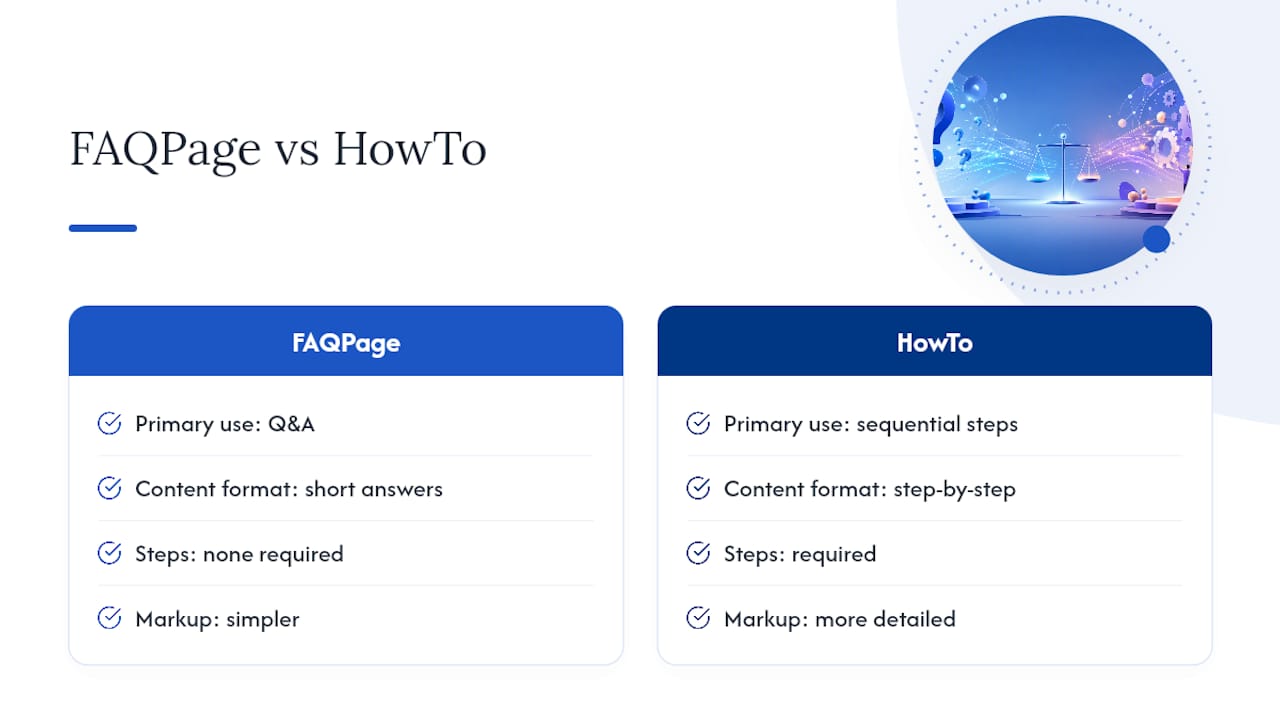
Don't force it, though. HowTo schema is meant for genuine sequential instructions, not general advice. If your answer is a single paragraph with no real steps, stick with FAQPage. Mixing schema types incorrectly, like wrapping a non-sequential answer in HowTo markup, creates the same kind of mismatch problem as hidden FAQ schema and risks a manual action for the same underlying reason: the markup claims something the content doesn't actually deliver.
For FAQ pages built around a specific service category, consider whether Service schema or LocalBusiness schema should sit alongside your FAQPage markup on the same page. These types aren't mutually exclusive. A service-page FAQ can carry FAQPage markup for its Q&A section while the page as a whole carries Service or LocalBusiness schema describing the offer itself. Layer them thoughtfully rather than picking one and ignoring the rest.
Whatever combination you choose, the same validation rule applies across every schema type: run it through Schema Markup Validator and confirm the marked-up content is genuinely visible in your rendered HTML before you publish.
How Do You Localize FAQ Pages Across Languages and Regions?
A translated FAQ page and a localized one are not the same thing. Direct translation moves the words into another language. Localization changes the actual questions, because people in different regions or language groups often ask about different things entirely, shaped by local regulations, payment norms, or service expectations.
Build region-specific FAQ sets rather than one master list translated everywhere. A shipping FAQ for a Texas-based service business, for example, might need a completely different question set for a Spanish-speaking customer base with different scheduling or payment preferences, not just a translated version of the English answers.
Technical structure matters just as much as the content itself:
- Use hreflang tags to point search engines to the correct language or region version of each FAQ page
- Keep FAQPage schema separate for each localized version, matching that page's own visible text exactly
- Avoid machine-translating schema answers without a native review pass, since awkward phrasing undermines the self-contained clarity that gets answers cited
- Localize examples and figures too, not just sentence structure. A pricing example in one currency confuses a reader expecting another
Skipping localization on FAQ content is a common gap even on otherwise well-built multilingual sites, and it's one of the easier fixes once you know to look for it.
The Part Most Guides Get Wrong About FAQ Pages
Most FAQ advice still treats schema as the goal instead of the byproduct. That's backward. The actual asset is a well-researched answer that resolves a real question in one or two sentences. FAQPage markup just makes that answer easier for a machine to lift out and reuse. Sites that write schema first and questions second end up with technically valid, functionally useless FAQ sections, dozens of Q&A pairs nobody searched for, wrapped in perfect JSON-LD.
The bigger shift is what Google's 2026 policy change actually signals. Losing the visible rich result stripped away the vanity reason to build FAQ pages, the little accordion snippet in the results. What's left is the real reason: AI systems still parse structured Q&A cleanly, and a page that answers a real question in plain language still earns its traffic, rich result or not. If your FAQ strategy depended on that snippet showing up in classic search, it was never really about serving the reader.
Prioritize the research step. A FAQ section built from five actual support tickets beats twenty invented questions every time, and no amount of schema polish fixes a page answering the wrong questions.
— Dylan
Get a FAQ Section Built the Right Way From Day One
If you've read this far, you know the gap between a technically valid FAQ page and one that actually earns traffic and reduces support calls. Closing that gap takes research most business owners don't have time to do between running the business itself. Forge-web-studio builds FAQ sections as a standard part of every site project, pulled from your actual customer questions and structured for mobile clarity from the start, not bolted on after launch.

We handle the whole workflow: sourcing real questions, writing answer-first copy, implementing matching schema, and linking answers straight to the pages that book jobs or close sales. That's the same process behind our responsive website builds for Texas service businesses, where a clear FAQ section is one of the fastest ways to cut down on repetitive phone calls asking things your website should already answer.
If your current site has a FAQ page that isn't pulling its weight, or none at all, start a website project with Forge-web-studio and we'll build one that's structured to convert from the first question down.