
Your Google Business Profile category is a label Google uses to decide which searches your business is eligible to appear in. The single most important action you can take right now: choose the most specific primary category that accurately describes what your business is, then add two to four focused secondary categories for genuine additional services.
That one decision carries more ranking weight than almost anything else on your profile. Complete profiles are much more likely to be considered reputable, and categories are the structured signal Google's algorithm and AI-driven local summaries use first to classify your business.
A few things to keep in mind before you start:
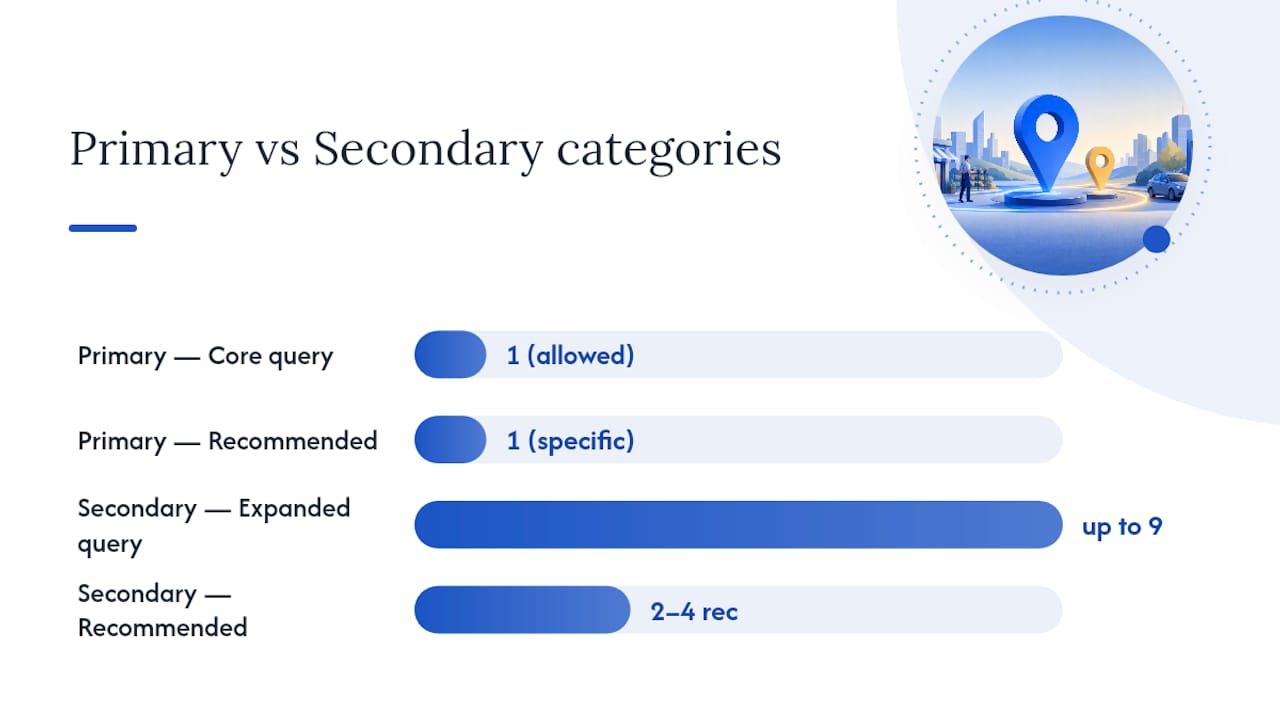
- Primary category: one only, controls your eligibility for core search queries
- Secondary categories: up to nine allowed; two to four is the practical sweet spot
- Taxonomy size: 4,039 categories as of March 2026, updated periodically by Google
- Audit cadence: check your categories quarterly and whenever you add a new service
Google updates its category taxonomy regularly. A category that didn't exist six months ago may now be the perfect fit for your business.
Key Takeaways
Your primary Google Business Profile category is the single most powerful ranking lever you control, and choosing the most specific accurate option is the one change that unlocks everything else.
| Point | Details |
|---|---|
| Primary category is the ranking lever | Choose the narrowest accurate label for what your business is, not what it offers on the side. |
| Secondary categories expand reach | Add 2–4 genuine additional services; avoid stacking more than 5 total categories. |
| Taxonomy has 4,039+ options | Use PlePer, Sunil Pratap's finder, or the API to confirm exact category names before applying them. |
| Quarterly audits catch new categories | Google updates the taxonomy regularly; a scheduled review prevents competitors from claiming better-fit categories first. |
| Forge-web-studio handles the full audit | Category selection, attribute activation, and testing are included in Forge-web-studio's local SEO service for Texas businesses. |
Table of Contents
- What Google Business Profile categories actually do
- How to choose the best primary and additional categories
- How to find the exact category name
- Rules, limits, and category-specific features you need to know
- Exactly how to add or change categories in your Business Profile
- Where to get the complete category list and how to stay current
- Quarterly category audit and live-testing checklist
- Why primary category alignment is the first thing we fix
- Your Google Business Profile, fully optimized
- Sources
What Google Business Profile categories actually do
A category is not a keyword. It is a classification signal that tells Google's algorithm which search queries your business is eligible to compete for in the local pack, Google Maps, and increasingly in AI-generated local summaries.
When someone searches "emergency plumber near me," Google doesn't scan your website first. It checks your primary category against its taxonomy, confirms you're geographically relevant, and then decides whether to surface you. That's why choosing a specific category over a generic one is Google's own official guidance, not just SEO practitioner advice.
Primary vs. secondary categories
The primary category is the single biggest ranking lever you control. It sets your eligibility ceiling. Secondary categories expand the range of related queries you can appear for, but they don't carry the same weight.
| Category type | Allowed count | Practical recommendation | Controls |
|---|---|---|---|
| Primary | 1 | 1 (most specific accurate label) | Core query eligibility |
| Secondary | Up to nine | 2–4 genuine additional services | Expanded query coverage |
A roofing contractor who sets "Roofing Contractor" as their primary category and adds "Gutter Cleaning Service" and "Siding Contractor" as secondaries will outperform a competitor who chose "Contractor" as their primary. The broader label competes in a crowded pool; the specific one signals exactly what the business does.

Categories and AI-driven search (GEO)
Generative Engine Optimization changes the stakes here. When Google's AI synthesizes a local answer, it pulls structured profile data, and your category is the first classification checkpoint. A mismatched or overly broad category means the AI may not include your business in a synthesized answer at all, even if your reviews and location are strong. Category selection now dictates how AI classifies your business for those zero-click, AI-generated responses.
How to choose the best primary and additional categories
The decision rule is simple: pick the narrowest accurate label for what your business is, not what it has or does on the side.
The core decision framework
- Write down your single most important service or business type. If someone asked "what kind of business is this?" in one phrase, what would you say?
- Search that phrase in the GBP category picker. Look for the most specific match available.
- Confirm the category exists in Google's API or a current third-party list. If it's not in the taxonomy, it doesn't exist.
- Add two to four secondary categories for genuine additional services only. "Genuine" means a customer could come to you specifically for that service, not just that you occasionally offer it.
- Avoid stacking more than five total categories unless your business genuinely operates across distinct service lines. Focus signals authority; sprawl dilutes it.
Industry-specific examples
- Restaurant: Primary: "Mexican Restaurant" (not "Restaurant"). Secondaries: "Taco Restaurant," "Catering Food and Drink Supplier" if catering is a real revenue line.
- Law firm: Primary: "Personal Injury Attorney" (not "Law Firm"). Secondaries: "Workers' Compensation Attorney," "Car Accident Lawyer."
- Home services: Primary: "HVAC Contractor" (not "Home Improvement Store"). Secondaries: "Air Conditioning Repair Service," "Heating Contractor."
- Med spa: Primary: "Medical Spa" (not "Beauty Salon"). Secondaries: "Laser Hair Removal Service," "Skin Care Clinic."
- B2B tech / SaaS: Primary: "Software Company" or "Internet Marketing Service." Secondaries: "Web Designer," "Marketing Agency."
Pro Tip: Match your primary category language to the H1 headings and service page titles on your website. If your site says "HVAC Contractor" and your GBP says "Air Conditioning Contractor," you're splitting your relevance signal. Aligning them tightens the connection Google draws between your profile and your site.
Testing candidate categories
Before committing to a new primary category, run a short visibility check. Search your target queries in an incognito window from your business's city. Note where you rank in the local pack. Make the category change, wait four to six weeks, and compare. Track impressions and calls in your Business Profile insights. That window is long enough to separate real movement from normal weekly noise.
How to find the exact category name
The category name you type into your profile must match Google's taxonomy exactly. "Plumbing Service" and "Plumber" are different entries. Here's where to find the right one.
Using the dashboard picker
- Open Google Business Profile and go to your profile.
- Click "Edit profile," then "Business information," then "Category."
- Start typing your business type. The picker autocompletes from the live taxonomy.
- Select the most specific match that accurately describes your business.
- The picker is the fastest method for most business owners and always reflects the current taxonomy.
The Google Business Profile API (for developers)
Developers can retrieve the full taxonomy programmatically using the categories.list endpoint:
GET https://mybusinessbusinessinformation.googleapis.com/v1/categories
The response returns each category's categoryId and displayName, and supports filters for regionCode and languageCode. This is the authoritative source for building category-selection tools or auditing profiles at scale. The categoryId is what you use in API update requests; the displayName is what appears in the dashboard.
Third-party tools that map the full taxonomy
- PlePer GBP Categories Tool: Maintains a downloadable, filterable list of all GBP categories with first/last-seen dates. Useful for tracking when new categories appear and for confirming exact display names.
- Sunil Pratap GBP Category Finder: Indexes the full taxonomy with country and language filters. The March 2026 snapshot lists 4,039 categories.
- Dalton Luka GBP Categories List: A reference article with common usage guidance organized by industry, useful for business owners who want a quick-scan list without API access.
Pro Tip: Always confirm your chosen category appears in PlePer or the API before finalizing it. The dashboard picker occasionally surfaces deprecated or region-limited categories that won't perform as expected globally.
Rules, limits, and category-specific features you need to know
Google's category system has hard rules and some behaviors that catch businesses off guard.
Official limits and verification
| Rule | Detail |
|---|---|
| Primary categories | Exactly 1 |
| Secondary categories | Up to nine |
| Changing primary category | May trigger re-verification |
| Visibility after change | Temporary dip possible (4–8 weeks) |
| Irrelevant categories | Can dilute ranking signals |
Changing your primary category is the highest-risk edit on your profile. Google documents that category changes can trigger re-verification, which may temporarily suppress your listing. Plan primary category changes during a slow business period, not before a peak season.
Category-specific profile features
This is where category selection pays dividends beyond ranking. Certain categories unlock profile features that are not available to others:
- Restaurants: Menu links, dish highlights, reservation buttons, dining attributes (outdoor seating, delivery, takeout)
- Hotels: Star ratings, amenity lists, check-in/check-out times, price range
- Health and beauty: Booking buttons (via integrated scheduling platforms), service menus
- Medical providers: Telehealth links, insurance information fields
- Retail: Product catalogs, in-store pickup labels
Category choices unlock attributes that are often high-conversion signals. A med spa that selects "Medical Spa" instead of "Beauty Salon" gains access to booking integrations and health-specific attributes that "Beauty Salon" simply doesn't offer.
Departments and co-located businesses
If your business has distinct departments (a hospital with a pharmacy, a car dealership with a service center), Google allows separate profiles for each department with their own categories. Each department profile must link to the parent location. For businesses that share an address but are genuinely separate entities, each gets its own profile. One physical location operating as one business gets one profile, one primary category.
Warning: Adding categories for services you don't primarily offer is a policy risk. A general contractor who adds "Electrician" and "Plumber" as categories without those being real service lines may trigger a policy review or see ranking dilution across all categories.
Exactly how to add or change categories in your Business Profile
On the web (desktop)
- Go to your Business Profile at business.google.com.
- Click "Edit profile."
- Under "Business information," select "Category."
- To change the primary category, click the existing one and type a new search term.
- To add a secondary category, click "Add another category" and search.
- Click "Save."
On mobile (Google Maps app)
- Open Google Maps and tap your profile photo, then "Your Business Profile."
- Tap "Edit profile," then "Business information."
- Tap "Category" and follow the same search-and-select flow.
- Tap "Save" when done.
Via the API
Use the categoryId values retrieved from categories.list in a PATCH request to the Business Information endpoint. Set the primaryCategory field for the primary and the additionalCategories array for secondaries. Changes made via API go through the same verification triggers as dashboard edits.
What to watch after a change
- Re-verification prompt: If Google asks you to re-verify, complete it promptly. Ignoring it can suspend your listing.
- Ranking shifts: Expect some movement in the first two to four weeks. Don't revert immediately.
- Local pack placement: Check your target queries weekly for four to six weeks post-change.
- Rollback: If visibility drops and stays down past eight weeks, revert to the previous primary category and give it another four-week window to recover before trying a different approach.
Where to get the complete category list and how to stay current
The taxonomy has over 4,000 entries and Google adds, removes, and renames categories without a public changelog. Staying current requires a deliberate process.
Authoritative sources
- Google Business Profile API (categories.list): The canonical source. Developers can pull the full list programmatically and diff it against a prior snapshot to catch changes.
- Google Business Profile Help: Official guidance on how categories work and how to edit them, but does not publish the full taxonomy list.
Third-party mirrors
- PlePer: The most commonly used tool for browsing the full taxonomy. Shows first-seen and last-seen dates per category, which helps identify newly added options.
- Sunil Pratap GBP Category Finder: Country and language filters make it useful for businesses operating in multiple markets.
- Dalton Luka's category list: A readable reference organized by industry, updated periodically.
Use these tools to confirm category names, not as a substitute for the dashboard picker when making actual changes.
Recommended audit cadence
Quarterly checks catch most taxonomy updates before competitors do. Beyond the scheduled cadence, run an unscheduled check whenever you add a new service line, enter a new market, or notice a competitor appearing for queries you should own. Document each audit in a simple spreadsheet: current categories, date checked, API version or tool used, and any changes made.
Pro Tip: When you find a new category that fits, snapshot your current rankings before switching. A before/after comparison over six to eight weeks gives you real evidence of whether the new category improved visibility, rather than a gut feeling.
Quarterly category audit and live-testing checklist
Run this workflow every quarter to keep your profile sharp.
Audit checklist
- Inventory current categories. Pull your existing primary and secondary categories from the dashboard or API.
- Map each category to a website page. Every category should correspond to a service page or landing page on your site. If there's no page, either create one or drop the category.
- Confirm categories against the current taxonomy. Check PlePer or the API to verify your categories still exist and haven't been renamed.
- Check for new niche categories. Search your core service types in the picker and in PlePer to see if a more specific option has been added since your last audit.
- Review attributes. Confirm all available attributes for your category are filled in. Missing attributes are missed conversion opportunities.
- Record baseline metrics before making any changes: impressions, search queries, calls, and direction requests from Business Profile insights.
Test plan template
| Element | Detail |
|---|---|
| Hypothesis | "Switching primary from [Broad] to [Specific] will increase impressions for [target query] within several weeks." |
| Control period | 4 weeks of baseline data before the change |
| Test window | 4 to 6 weeks post-change |
| KPIs | Impressions, calls, direction requests, local pack position |
| Data sources | Business Profile Insights, Google Search Console, call tracking |
| Rollback trigger | Sustained drop in impressions or calls beyond week 6 |
Keep changes to one variable at a time. If you change the primary category and add two new secondaries simultaneously, you won't know which move drove the result.
Pro Tip: Short-term ranking noise in weeks one and two is normal after any category change. The signal you're looking for is a sustained directional shift by week six. Reacting to week-one data is how businesses end up reverting good changes.
Why primary category alignment is the first thing we fix
At Forge-web-studio, category alignment is the first item on every local SEO audit. Not because it's the easiest fix, but because it's the one that determines whether everything else matters. A business with strong reviews, a fast website, and consistent citations still won't appear for its core queries if the primary category is off by even one level of specificity.
The pattern we see most often: a business owner selected a broad category during initial setup because it felt safe, and then never revisited it. Meanwhile, Google added a more specific option that competitors found and adopted. The gap compounds over months.
Correct category selection also unlocks the content alignment work that makes a profile genuinely competitive: matching service page language to category terms, activating the right attributes, and building the structured signal consistency that AI-driven local search rewards. None of that work lands properly if the primary category is wrong from the start.
Your Google Business Profile, fully optimized
Getting your categories right is step one. Forge-web-studio handles the full picture: category audit, attribute activation, a structured testing plan, and ongoing monitoring so you're not guessing whether a change helped.

Our local SEO service covers everything from primary category selection to city and service page architecture, making sure your Business Profile and your website send the same signal to Google. For Texas businesses that want a profile and a site working together, that alignment is what turns impressions into calls.
Ready to see what a properly optimized profile looks like? Browse our demo sites or get in touch to start with a category audit.
Sources
- Manage your business category - Google Business Profile Help
- Method: categories.list | Google Business Profile APIs | Google for Developers
- Google Categories and Attributes | Uberall
- Google Business Profile Categories - Full List (2026) - PlePer Tools