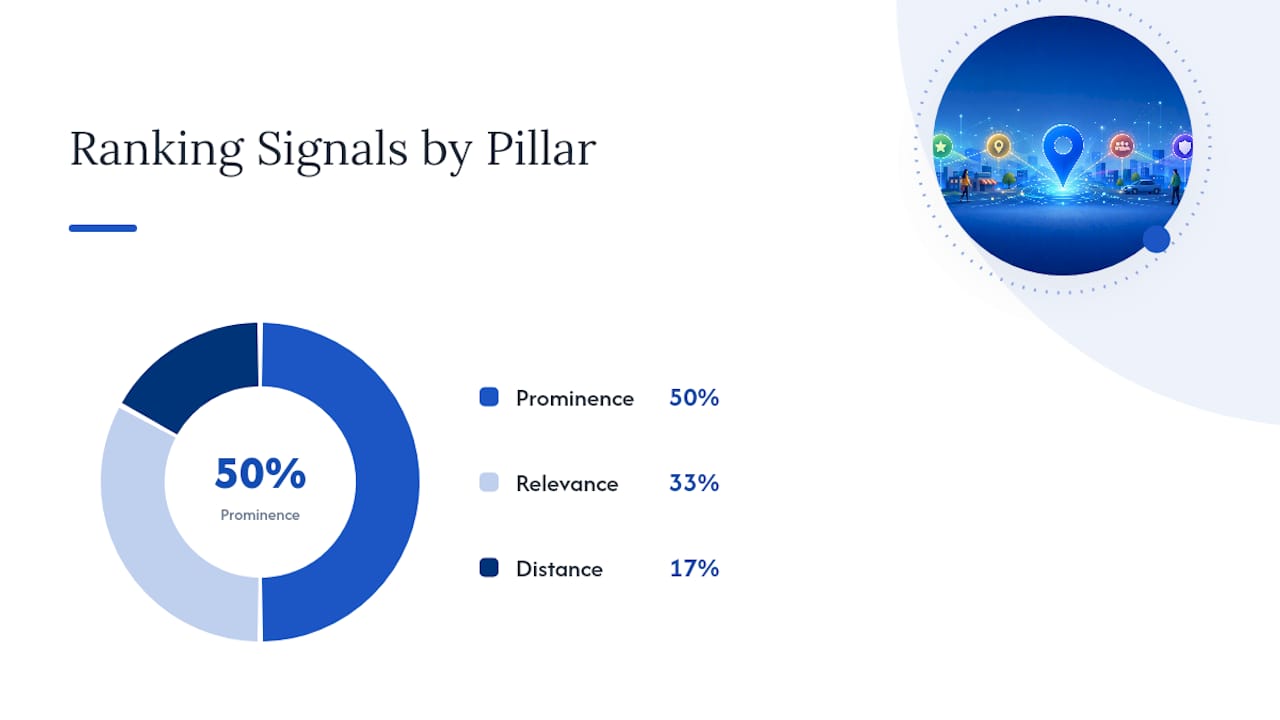
Google ranks Maps and Local Pack results on three pillars: relevance, distance, and prominence. That's straight from Google's own guidance, and everything else you'll read about local SEO is just tactics that feed one of those three buckets. You control two of them almost entirely. Distance is fixed by your address and the searcher's location, but relevance and prominence respond directly to what you do with your Google Business Profile, your reviews, and your website.
If you do nothing else this week, do these three things:
- Claim and fully verify your Google Business Profile, then fix your primary category.
- Match your business name, address, and phone number exactly across your website and top directories.
- Start asking recent customers for reviews, today, not next quarter.
Pro Tip: Don't chase every tactic at once. Fix your profile and citations first. Reviews and links compound over time, but a broken or unverified profile caps everything above it.
Key Takeaways
Google Maps rankings come down to relevance, distance, and prominence, and a complete Google Business Profile paired with a steady review system moves the two pillars you actually control.
| Point | Details |
|---|---|
| Three ranking pillars | Relevance, distance, and prominence, per Google's own local ranking guidance. |
| Fix your GBP first | Verification, primary category, and NAP accuracy are the highest-leverage, fastest fixes. |
| Reviews need recency | Volume matters, but consistent, recent reviews now carry comparable weight. |
| Website amplifies GBP | Local pages, schema markup, and mobile speed reinforce your profile's signals. |
| Get a professional audit | Forge-web-studio pairs local SEO fixes with fast, lead-focused website builds for Texas businesses. |
Table of Contents
- What Are the Google Maps Ranking Factors, Exactly?
- How Do You Optimize Your Google Business Profile for Maps?
- Which Website Signals Actually Support Your Maps Ranking?
- How Much Do Reviews Affect Google Maps Rankings?
- Why Do Citations and NAP Consistency Matter for Local Rankings?
- Do Backlinks Really Influence Google Maps Rankings?
- What Behavioral Signals Does Google Track for Maps?
- What Map-Specific Technical Issues Can Hurt Your Ranking?
- What's the Fastest Path to Ranking Higher on Google Maps?
- How Long Does It Take to See Google Maps Ranking Changes?
- A Quick Site and Conversion Audit Worth Running Today
- What Local Businesses Get Wrong (and Right) About Ranking on Maps
- Ready to Turn Maps Visibility Into Actual Leads?
- Sources
What Are the Google Maps Ranking Factors, Exactly?
Google's own documentation names three inputs: relevance, distance, and prominence. Understanding what each one actually measures tells you where to spend your time.
Relevance is how well your business profile matches what someone searched. A plumber who lists "Plumber" as the primary category and describes emergency drain service will out-rank a plumber who only wrote "Home Services" as their category, even if the second business has been open longer.
Distance measures how far your business is from the point of the search, or from the city/area implied in the query. This is the one pillar you genuinely can't optimize. You can't move your storefront to rank for a search happening three miles away, and that's exactly why the other two pillars matter so much: they're your only levers.
Prominence covers everything that signals a business is well known, well reviewed, and well linked. BrightLocal's local ranking factors research groups review signals, backlinks, on-page content, and citation consistency all under this pillar, alongside general offline reputation.
Here's how common signals map to each pillar:
| Signal | Primary Pillar | Why It Matters |
|---|---|---|
| Primary/secondary GBP category | Relevance | Tells Google exactly what you do |
| Services and products list | Relevance | Reinforces specific search matches |
| Business address / service area | Distance | Determines who sees you at all |
| Review count and rating | Prominence | Signals trust and popularity |
| Backlinks and local mentions | Prominence | Signals authority beyond your own claims |
| Citation consistency | Prominence | Confirms legitimacy across the web |
Pro Tip: Run a geo-grid scan, checking your rank from multiple points around your service area, before you optimize anything else. Geo-grid testing tells you whether you're proximity-limited (you only rank near your own doorstep) or relevance/prominence-limited (you rank poorly everywhere). Fixing your profile won't help much if distance is your real ceiling.
How Do You Optimize Your Google Business Profile for Maps?
Your Google Business Profile is the single biggest lever you control, and it's also where most businesses leave the most value on the table. WordStream's Maps SEO research points to a complete, actively maintained profile as the highest-leverage action available to any local business, full stop.
Start with verification. An unverified profile either doesn't show in the Map Pack at all or shows with reduced trust signals. Google verifies through a postcard, phone, email, or video depending on your business type and history. Get this done before touching anything else.
Once verified, work through this field-level checklist:
- Business name. Use your real, legal operating name exactly as it appears on your storefront and signage. No keyword-stuffing ("Bob's Plumbing Emergency 24/7 Drain Cleaning Austin") — Google's guidelines prohibit this and it can trigger a suspension.
- Primary category. Choose the single most specific option available. "Plumber" beats "Contractor." "Italian Restaurant" beats "Restaurant."
- Additional categories. Add every category that genuinely applies, but don't pad the list with anything you don't actually offer.
- Services and products. List each service individually with a short description. This is a direct relevance signal that's easy to overlook.
- Hours, including special hours. Wrong hours during a holiday cost you calls and trust.
- Phone number and website. Both must match your website and citations exactly.
- Attributes. Wheelchair accessible, women-led, outdoor seating, whatever applies. These feed niche searches you'd otherwise miss.
- Photos. Upload real photos of your storefront, team, and completed work, at least monthly.
- Posts and Q&A. Keep both active; an idle profile signals less activity than a maintained one.
The dos and don'ts here are simple but frequently ignored. Do pick the narrowest accurate category. Don't list a P.O. box or virtual office as your address if you're a storefront business. Do write real service descriptions instead of copying your homepage verbatim. Don't leave attributes and Q&A blank just because they feel optional.
Pro Tip: If you offer five services, list all five separately in the Services section rather than bundling them into one paragraph. Google's relevance matching works field by field, not paragraph by paragraph.
Which Website Signals Actually Support Your Maps Ranking?
Your website doesn't rank in the Map Pack directly, but it amplifies or undermines everything your GBP is telling Google. A complete local SEO setup that includes location-specific landing pages, structured data, and a fast mobile experience reinforces the relevance and prominence signals your profile is already sending.
Work through these on-site items:
- Build a unique page for each service and each location you serve, rather than one generic "Services" page trying to cover everything.
- Put your service and city in the H1, not buried in body text.
- Match your NAP (name, address, phone) on every page exactly as it appears on your GBP listing.
- Embed a live Google Map on your contact page, not just a static image.
- Add
LocalBusinessschema markup with your name, address, phone, hours, and service area coded into the page.
Speed matters more than most owners assume. Google's Core Web Vitals thresholds (specifically Largest Contentful Paint under 2.5 seconds) don't directly control Map Pack position, but a slow, non-mobile site tanks the click-through and call behavior that does feed prominence and personalization.
| On-Site Item | Effort Level | Primary Benefit |
|---|---|---|
| Unique location/service pages | Medium | Relevance matching |
| LocalBusiness schema markup | Low (developer task) | Trust and parsing accuracy |
| NAP consistency on-site | Low | Avoids conflicting signals |
| Mobile speed optimization | Medium to high | Behavioral signals |
Pro Tip: If you only have budget for one technical fix, implement LocalBusiness schema first. It's a low-effort, one-time developer task that clarifies exactly what Google is looking at, and a well-built responsive, local-first website makes that markup easy to maintain going forward.
How Much Do Reviews Affect Google Maps Rankings?
Reviews sit at the center of prominence, and the bar keeps rising. Consumer research on Maps ranking behavior shows people increasingly expect recent reviews, not just a high total count, and their minimum acceptable star rating has climbed over time. A profile with 200 reviews from three years ago reads weaker to today's searcher, and likely to Google, than one with 40 reviews from the last two months.
Volume still matters, but recency and response rate carry real weight too. A business that replies to reviews, especially negative ones, signals active management. Mentioning your service and city naturally in a reply ("Thanks for choosing us for your water heater repair in Round Rock") reinforces relevance without looking forced.
Build a review request habit around these practices:
- Ask within 24 to 48 hours of service completion, while the experience is fresh.
- Send the request by text or email with a direct link, not a generic "please review us" message.
- Respond to every review within a few days, positive or negative.
Two templates worth stealing:
- "Thanks for trusting [Business] with your [service] today. If you have 60 seconds, a quick review helps other [city] homeowners find us: [link]."
- "We noticed your visit last week. Would you mind sharing how it went? It really helps a small, local team like ours: [link]."
One warning: never gate reviews (asking happy customers to post publicly while routing unhappy ones to a private form) or pay for reviews. Google's guidelines treat both as policy violations, and the risk to your profile far outweighs the short-term boost.
Why Do Citations and NAP Consistency Matter for Local Rankings?
A citation is any online mention of your business name, address, and phone number, whether it's a directory listing, a chamber page, or a niche industry site. Inconsistent formatting, "St." on your website but "Street" on Yelp, or an old suite number still live on a directory, confuses Google's matching and quietly weakens Map Pack performance.
Audit your citations in this order:
- Google Business Profile itself (your source of truth).
- Bing Places, Apple Maps, and Facebook.
- Data aggregators and major directories like Yelp.
- Local chambers of commerce and niche industry directories.
Fix formatting mismatches as you find them: abbreviations, old phone numbers, and dead websites are the usual culprits. Do prioritize the handful of high-authority directories over dozens of low-value ones. Don't submit your business to spammy citation networks promising hundreds of links overnight; quality and consistency beat raw volume here.
Do Backlinks Really Influence Google Maps Rankings?
Generic backlinks matter less for Maps than they do for organic search. What moves prominence locally are links, and even unlinked mentions, from sources tied to your actual geography: a local newspaper write-up, a chamber of commerce directory, a supplier's "our partners" page, a sponsorship listing for a Little League team.
Quick wins worth chasing:
- Sponsor a local event or team in exchange for a website mention.
- Get listed on supplier or manufacturer "find a dealer" pages.
- Pitch a local reporter on a genuinely newsworthy angle (a grand opening, an anniversary, a charity drive).
- Join your local chamber of commerce for its member directory link.
One relevant local link from a city newspaper outweighs a dozen generic directory submissions.
What Behavioral Signals Does Google Track for Maps?
Google watches how people interact with your listing after they find it: click-through rate, clicks-to-call, requests for directions, and how long someone dwells on your profile before acting. These feed both prominence and personalization, meaning your listing can rank differently for a searcher who's called similar businesses before versus one who hasn't.
Track these signals through GBP Insights, Google Analytics event tracking on your site's call and contact buttons, and a call-tracking number if your budget allows it.
- Use recent, high-quality photos; listings with strong photo counts consistently get more clicks than text-only profiles, so consider partnering with Clear Focus Imaging for professional aerial photography and videography services.
- Write a clear call-to-action in your GBP description and Posts, phrasing that tells someone exactly what to do next, not just what you offer.
Pro Tip: Swap a passive photo caption like "Our storefront" for something action-oriented like "Call now for same-day appointments." Small wording changes on Posts and photo captions measurably shift click behavior.
What Map-Specific Technical Issues Can Hurt Your Ranking?
A few technical missteps quietly cap your visibility no matter how good your profile content is.
Pin placement accuracy comes first. A pin dropped on the wrong side of a highway or at an old address damages both proximity matching and trust. Verify it manually in your GBP dashboard rather than trusting the auto-placed default.

Service-area businesses (plumbers, mobile detailers, cleaning crews) face a real trade-off: hiding your address helps privacy but can reduce local trust signals compared to a visible storefront. Set your service area radius honestly; overstating it invites suspension.
Duplicate listings are a common, self-inflicted problem. Search your business name in Maps to check for old, unclaimed duplicates from a previous address or ownership.
- Search your exact business name and phone number in Maps.
- Flag any duplicate for removal through Google's support tools.
- Confirm your primary listing absorbs the reviews and photos where possible.
What's the Fastest Path to Ranking Higher on Google Maps?
Order matters here. Fixing your profile before your citations are consistent just means you're building on a shaky foundation.
- Claim and verify your Google Business Profile.
- Fix your primary category and business name formatting.
- Match NAP exactly across your website and top citations.
- Build or update location/service pages on your site.
- Add
LocalBusinessschema markup. - Launch a consistent review request workflow.
- Audit and correct citation listings.
- Earn two or three genuinely local links.
- Post to GBP and answer Q&A weekly.
- Run a geo-grid scan to measure movement and find your next bottleneck.
Quick wins (verification, category fixes, NAP corrections) often show up in days to a few weeks. Competitive movement against established rivals, especially from links and review growth, typically takes months of steady work rather than a single push. Test one major variable at a time so you know what actually caused the movement, and re-run your geo-grid scan monthly to track progress.
How Long Does It Take to See Google Maps Ranking Changes?
Expect a different timeline depending on how crowded your category is.
| Competition Level | Typical Timeline to Movement |
|---|---|
| Low (niche service, small town) | 2 to 4 weeks |
| Medium (common service, mid-size city) | 1 to 3 months |
| High (dense urban market, popular category) | 3 to 6+ months |
Owner-led work costs mostly time; an agency engagement typically runs as a monthly retainer for ongoing citation and review management, plus a one-time cost for GBP setup and site fixes. Track progress against rank position for your top three search terms, GBP call and direction-request counts, and review growth rate month over month.
A Quick Site and Conversion Audit Worth Running Today
A ranking boost is wasted if your site doesn't convert the extra visibility into calls or bookings. Check that your GBP category and services match the landing page you're sending that traffic to, that your LocalBusiness schema matches your contact page's NAP, and that your click-to-call button is visible without scrolling on mobile.
Simple fixes pay off fast: a sticky call button, a booking form above the fold, and a clear service-area statement all reduce the friction between a Maps click and an actual lead. Forge-web-studio's website review checklist walks through exactly this kind of audit.
Pro Tip: Check your site on your own phone, on mobile data, standing outside your building. If you can't find your own phone number in three seconds, neither can your customer.
What Local Businesses Get Wrong (and Right) About Ranking on Maps
Across the local businesses Forge-web-studio has worked with, the pattern repeats: verification plus a correct primary category plus a steady review habit tends to produce a measurable rank lift within a month or two, well before any link-building or content work kicks in. The businesses that stall are almost always the ones skipping the boring first step, an unverified or miscategorized profile, while chasing more advanced tactics.
One caution worth repeating: don't cut corners on Google's guidelines to speed things up. Fake reviews, review-gating, and keyword-stuffed business names get profiles suspended, and recovering a suspended listing takes far longer than doing it right the first time.
Ready to Turn Maps Visibility Into Actual Leads?
A well-optimized Google Business Profile only pays off if the website behind it can convert the traffic. Forge-web-studio builds mobile-first, lead-focused websites for Texas businesses in as little as three days to a week, with local SEO setup, schema markup, and click-to-call flows built in from day one, not bolted on later.

If you've already worked through the checklist above and your site still isn't converting Maps clicks into calls, that's usually a structural problem: slow load times, buried contact info, or a homepage that never mentions your service area by name. Forge-web-studio's local SEO services pair Google Business Profile optimization with the on-site fixes covered in this guide, so your profile and your website are finally telling Google, and your customers, the same story. Request a quote and get a straight answer on what's actually holding your ranking back.
Sources
- Google Business Profile Help — Understand how Google ranks local results
- Google's Local Algorithm and Local Ranking Factors — BrightLocal
- How to Rank in the Google Map Pack (Local 3-Pack): The Complete 2026 Guide · ProMapRanker