A restaurant reservation page has one job: turn a hungry person's phone tap into a confirmed table with zero back and forth. That means booking has to happen in one obvious, mobile-friendly step, and the form should only ask for details your staff will actually use that night.
The essential fields are short: name, phone and email, party size, date, time, seating preference, and any special request. Beyond that, you're adding friction for no operational payoff.
For availability, you have two real options. A real-time booking widget shows open slots instantly and works best once you have steady volume and staff who trust the system. A request-style form, where a host confirms manually, suits smaller restaurants or those still shaping their booking policy.
Whichever you choose, close the loop immediately:
- Confirm the reservation on-screen and by email the moment it's submitted
- Send a reminder 24 to 48 hours ahead by text or email
- Give guests a direct link to modify or cancel without calling
- State your cutoff time for same-day requests, if you're using a request form
Key Takeaways
A restaurant reservation page succeeds when it captures only operationally useful fields, resolves in one mobile-friendly flow, and confirms bookings through clear, timely messaging that reduces no-shows.
| Point | Details |
|---|---|
| Keep fields operational | Collect only name, contact, party size, date, time, and notes staff will actually use. |
| Match slots to turnover | Size time intervals around your real table turnover, not arbitrary 30-minute defaults. |
| Confirm and remind twice | Send an instant confirmation, then a reminder 24 to 48 hours before the booking. |
| Use deposits selectively | Reserve card authorizations for large parties or peak slots, not every booking. |
| Build custom when it matters | Forge-web-studio delivers mobile-first reservation pages with local SEO and fast launch timelines. |
Table of Contents
- What Fields Belong on a Restaurant Reservation Form?
- Does Your Reservation Page Work on a Phone?
- Should You Use a Booking Widget or a Request Form?
- How Do You Stop No-Shows Before They Happen?
- When Should a Restaurant Hire a Web Studio for This?
- Does Your Reservation Form Need Multiple Languages?
- What Booking Data Should You Be Tracking?
- What actually matters when you build this page
- Get a Reservation Page Built Around Your Restaurant, Not a Template
- Sources
What Fields Belong on a Restaurant Reservation Form?
Every field on your reservation form should map to something a host, server, or kitchen actually does with it. Name and party size are obvious. Phone and email are less interchangeable than they look: email is for the paper trail (confirmations, receipts, marketing opt-ins), while a phone number lets your host text a guest when their table runs behind. Skip one and you lose a communication channel when it matters most.
Party size and time-slot length are connected in a way a lot of owners miss. If your average table turns in 75 minutes, a booking widget that only offers slots every 30 minutes on the hour is going to create gaps or double bookings. Align your slot intervals with your actual turnover, not a generic default.
A reservation form template built for restaurants typically includes seating preference, occasion, and dietary or allergy notes, and for good reason: a "window seat, anniversary, nut allergy" note is the difference between a table that's ready and a table that isn't.
- Name and party size (required, drives table assignment).
- Phone and email (required, covers both instant texts and written confirmations).
- Date, time, and duration expectations (required, drives slot allocation).
- Seating preference and occasion (optional, improves the experience).
- Dietary restrictions or allergies (optional but strongly encouraged, protects guest safety).
- Accessibility needs or promo code (optional, adds personalization without slowing checkout).
Pro Tip: Only ask for a field if someone on your team will read and act on it before the guest arrives. A field nobody checks isn't data collection, it's just friction you added by accident.
Collect what you use, and say why you're asking. A one-line note like "We ask about allergies so the kitchen can prepare safely" builds trust instead of suspicion.
Does Your Reservation Page Work on a Phone?
Most guests will find your restaurant reservation page on a phone while deciding where to eat in the next hour, so mobile isn't a secondary experience, it's the primary one. That means a single-column layout, large tappable buttons, and date and time pickers that don't force someone to zoom in and stab at tiny text.
Progressive disclosure keeps the form short without cutting fields you need. Show name, party size, date, and time first. Reveal seating preference, occasion, and dietary notes only after the basics are filled in, and pre-fill smart defaults like "today" or a default party size of two.
Accessibility is not optional polish. Visible labels (not just placeholder text that vanishes on click), proper ARIA attributes, full keyboard navigation, and sufficient color contrast let guests using screen readers or motor-impairment devices book without a phone call. A responsive, mobile-first build handles most of this at the foundation level rather than as an afterthought.
- Single-column form, no side-by-side fields that wrap awkwardly on small screens
- Buttons sized for a thumb, not a mouse cursor
- Visible phone number and a link to your Google Business profile for instant reassurance
- Date and time pickers that default to the next available slot
Trust signals matter more than owners expect. A visible phone number, real reviews, and an active Google Business presence tell a first-time visitor this is a real, responsive restaurant before they even reach the form.
Track where guests abandon the form field by field. If half your traffic drops at the phone number field, that's a signal worth acting on, not ignoring.
Should You Use a Booking Widget or a Request Form?
The integration decision comes down to how much manual work you're willing to do versus how much control you want over your own booking data.
A live booking widget embedded on your site shows real-time availability and confirms instantly, cutting out the back-and-forth of phone calls or unread emails. OpenTable's reservation management tools show how far this category has moved: modern platforms handle guest profiles, waitlists, and even voice AI for phone bookings, on top of straightforward table booking.
Request-style forms still make sense for smaller operations or restaurants without dedicated host staff. You lose instant confirmation, but you gain full manual control over every seating decision. If you go this route, publish a clear cutoff time (no requests after, say, 4 p.m. for same-day dining) so guests aren't left waiting on a message nobody saw during dinner service.
Discovery-focused integrations widen your reach beyond your own website. Reserve with Google lets diners book directly from a Google Search result or Maps listing, and OpenTable's network spans tens of thousands of restaurants and has seated over a billion diners, which is exactly why appearing there matters for visibility.
- Live widget: best when you want automated, always-on booking and have the volume to justify it.
- Request form: best for lower volume or when you need a human reviewing every reservation.
- Channel integrations (Reserve with Google, OpenTable): best for discoverability, but route everything into one inbox or host system so nothing double-books.
Prioritize owning the direct booking relationship if branding and guest data matter most to you. Prioritize channel reach if you're still building awareness.
How Do You Stop No-Shows Before They Happen?
No-shows are rarely a mystery. They happen when a guest books, forgets, and never hears from you again until the table sits empty. Fixing that starts with communication timing, not willpower.
- Send an immediate confirmation the second the booking is submitted, both on-screen and by email.
- Follow with a reminder 24 to 48 hours before the reservation.
- Use text messages for the final nudge, since SMS gets read faster than email in the hours before a booking.
- Include a direct link in every message so guests can modify or cancel without a phone call.
- State your cancellation policy plainly on the form and again in the confirmation, not buried in fine print.
For large parties or peak Friday and Saturday slots, a deposit or credit card authorization is a proven way to cut no-shows, since a guest with money on the line shows up. The trade-off is friction. Some diners hesitate at a card request for a casual dinner, so reserve deposits for the bookings where the financial risk of an empty table is highest.
Pro Tip: Keep a simple guest history log, even a spreadsheet works, tracking who's canceled or no-showed before. A guest with three no-shows in two months might need a deposit requirement the next time they book.
When Should a Restaurant Hire a Web Studio for This?
Building a basic booking widget takes an afternoon. Building a reservation page that actually fits your seating chart, integrates with your point-of-sale system, meets accessibility standards, and converts well on mobile takes real front-end work.
Hire a studio when you need custom UX beyond a generic embed, when you're integrating multiple systems (POS, Google Business, email marketing), or when your current page's mobile conversion is quietly costing you bookings every week. Forge-web-studio builds these pages directly into full restaurant websites, with mobile clarity and lead flow built in from the first draft rather than bolted on afterward.
A reservation page isn't a feature you add to a restaurant website. It's the single moment where a browsing visitor either becomes a booked guest or closes the tab. Treat it like the most important five seconds of the entire site.
- Rapid launch timelines, often days rather than months, compared to a DIY widget setup that still needs custom styling to match your brand.
- Mobile-first layouts and simplified booking flows built for the way people actually search for dinner.
- Local search optimization so the restaurant shows up when someone nearby searches "reservations near me."
- Ongoing maintenance options so the page keeps working as your menu, hours, or seating layout change.
Budget-wise, a custom build costs more upfront than a free widget embed, but it pays back in fewer abandoned bookings and less manual admin.
Does Your Reservation Form Need Multiple Languages?
If your restaurant sits in a neighborhood with a mixed customer base, tourists, international students, multilingual families, a reservation form in English only quietly turns away guests before they ever pick up the phone. Multi-language support isn't about translating your whole menu online. It's about making sure the five or six form fields between a hungry visitor and a confirmed table are in a language they're comfortable using.
The simplest approach is a language toggle at the top of the page that switches field labels, button text, and confirmation messages, without changing the underlying data structure your host system receives. A guest who selects Spanish should still generate the same clean booking record your staff sees in English: name, party size, date, time, and notes.
Confirmation and reminder messages deserve the same treatment. A guest who books in their preferred language but gets a reminder text in a language they don't read well is more likely to forget the reservation entirely, which defeats the purpose of sending reminders in the first place.
You don't need every language under the sun. Look at your actual walk-in and phone reservation patterns, most restaurants find two or three languages cover the vast majority of demand, and build from there. Adding options nobody uses just adds maintenance overhead with no return.
What Booking Data Should You Be Tracking?
A reservation page generates a steady stream of operational data, and most restaurants let it disappear into a booking log nobody reviews. That's a missed opportunity, because patterns in your reservation data tell you things a nightly headcount never will.
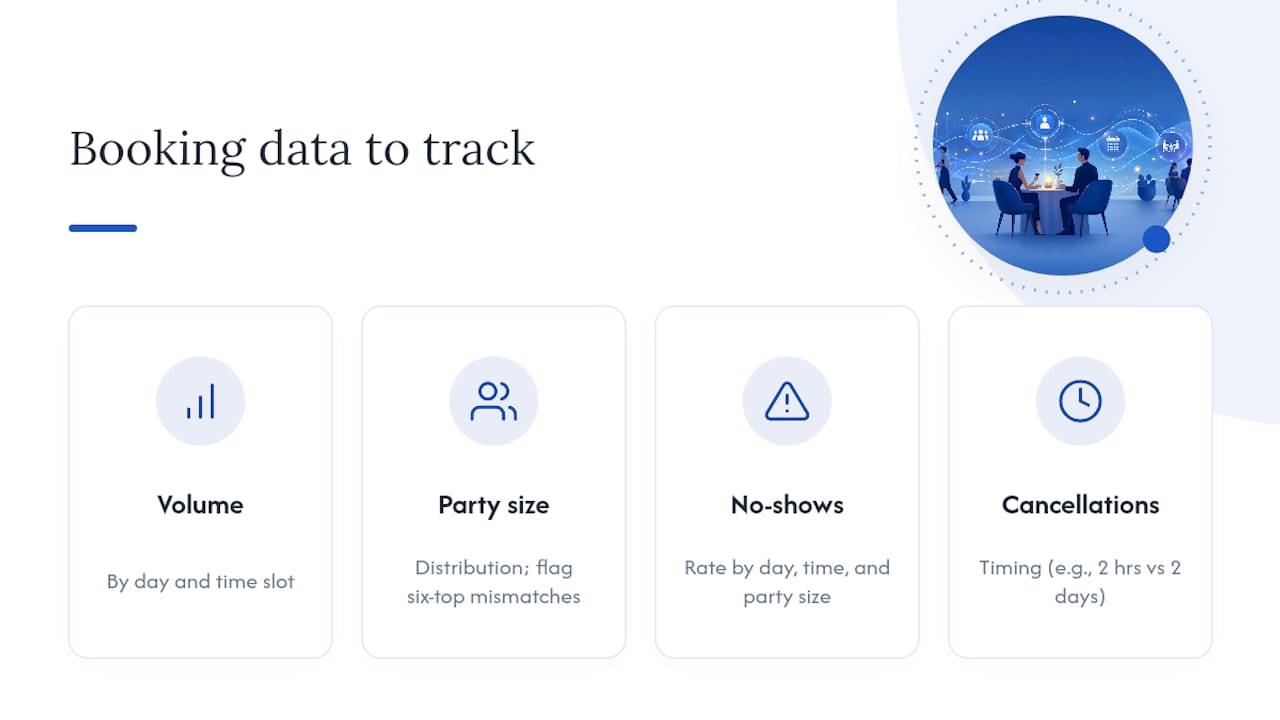
Track booking volume by day and time slot first. Look at party-size distribution too. A restaurant that keeps getting six-tops booked into four-person tables has a form problem, not a luck problem.
No-show rates deserve their own report, broken out by day, time, and party size, since that's exactly the data that tells you where a deposit policy would pay for itself versus where it would just annoy regulars. Cancellation timing matters as well. Guests who cancel two hours before their booking cost you more than guests who cancel two days out, because there's no time to refill the slot.
Most booking widgets and reservation management platforms include some reporting out of the box. If yours doesn't, even a simple weekly export into a spreadsheet, tagged by day, time, party size, and outcome, gives you enough to spot trends within a month. The goal isn't a dashboard for its own sake. It's catching the Tuesday-night gap or the six-top mismatch before it costs you another month of empty tables.
What actually matters when you build this page
Most advice on restaurant reservation pages focuses on picking the "best" booking platform, as if the software is the hard part. It isn't. The hard part is deciding what data you actually need and building a form short enough that a hungry person finishes it before they get distracted and call a different restaurant instead.
The conventional wisdom oversells automation and undersells clarity. A live widget with confusing time-slot logic converts worse than a simple request form with a clear cutoff time and a fast human response. Technology doesn't fix a form that asks for too much, too early.
If you're deciding where to spend your effort first, spend it on trimming the form to operationally necessary fields and making the mobile experience fast. Everything else, deposits, multi-language toggles, analytics dashboards, matters, but it matters less than whether a guest on their phone can book a table in under thirty seconds.
Get a Reservation Page Built Around Your Restaurant, Not a Template
Forge-web-studio builds reservation pages as part of a full restaurant website, not as a bolted-on widget you have to configure yourself. That's the practical difference: instead of wrestling with a generic embed that doesn't match your seating chart or your brand, you get a mobile-first booking flow designed around how your restaurant actually turns tables.

Every build focuses on the fundamentals covered here: short forms that capture only what your staff uses, clear confirmation flows, accessible design, and local search visibility so nearby diners find you before they find someone else. Forge-web-studio typically launches sites within a week, far faster than the usual agency timeline, which matters if your current page is quietly losing bookings every day it stays unfixed.
Browse the demo gallery to see real examples, or start with a website review to find out exactly where your current reservation flow is losing guests.