
Building a small business website in 2026 costs widely varying amounts depending on your build path, which is the most important cost driver.
Here's the fast version of what you're looking at:
- DIY SaaS builders (Wix, Squarespace): typically low initial and ongoing subscription costs
- Self-hosted WordPress.org (DIY with Elementor): moderate initial and ongoing costs
- Freelance designer/developer: significant one-time expense with additional yearly costs for hosting and maintenance
- Boutique agency build: high upfront cost plus annual maintenance fees
- Small eCommerce (Shopify or WooCommerce): setup and ongoing platform fees vary widely depending on features
Professional small business sites built by freelancers or agencies often involve moderate to high one-time costs and ongoing expenses, with exact amounts varying by project scope.
Pro Tip: Budget a 10–20% contingency on top of your quoted project cost. Plugin renewals, payment processor fees, and analytics subscriptions are the line items that most consistently surprise first-time site owners.

Table of Contents
- What does a small business website cost at a glance?
- What are you actually paying for?
- Which build path fits your budget and goals?
- What does year two actually cost to run a website?
- How do you build a realistic website budget?
- How do you save money without creating problems later?
- A real rapid-launch budget: what Forge-web-studio delivers in 3–7 days
- What does website compliance actually cost?
- Going beyond basic compliance: advanced accessibility costs
- What do live chat and chatbot features actually cost?
- Key Takeaways
- The budget mistake most owners make
- Forge-web-studio builds Texas business websites that actually generate leads
- Useful sources
What does a small business website cost at a glance?
| Build path | Typical one-time cost | Typical annual recurring | Best for | Timeline to launch |
|---|---|---|---|---|
| DIY SaaS builder (Wix, Squarespace) | $0–$300 setup | $200–$600/year | Solo operators, simple brochure sites | Hours to days |
| Self-hosted WordPress.org + Elementor | $100–$800 setup | $200–$600/year | Tech-comfortable owners, growth-focused sites | Days to 2 weeks |
| Freelance designer | $2,000–$8,000 | $600–$2,400/year | Well-scoped projects, mid-budget owners | 2–6 weeks |
| Boutique agency | $6,000–$35,000 | $2,000–$8,000/year | Strategy-led builds, integrations, local SEO | 4–12 weeks |
| Small eCommerce (Shopify) | $1,000–$15,000+ | $300–$1,000/year | Product-based businesses, online stores | 1–8 weeks |
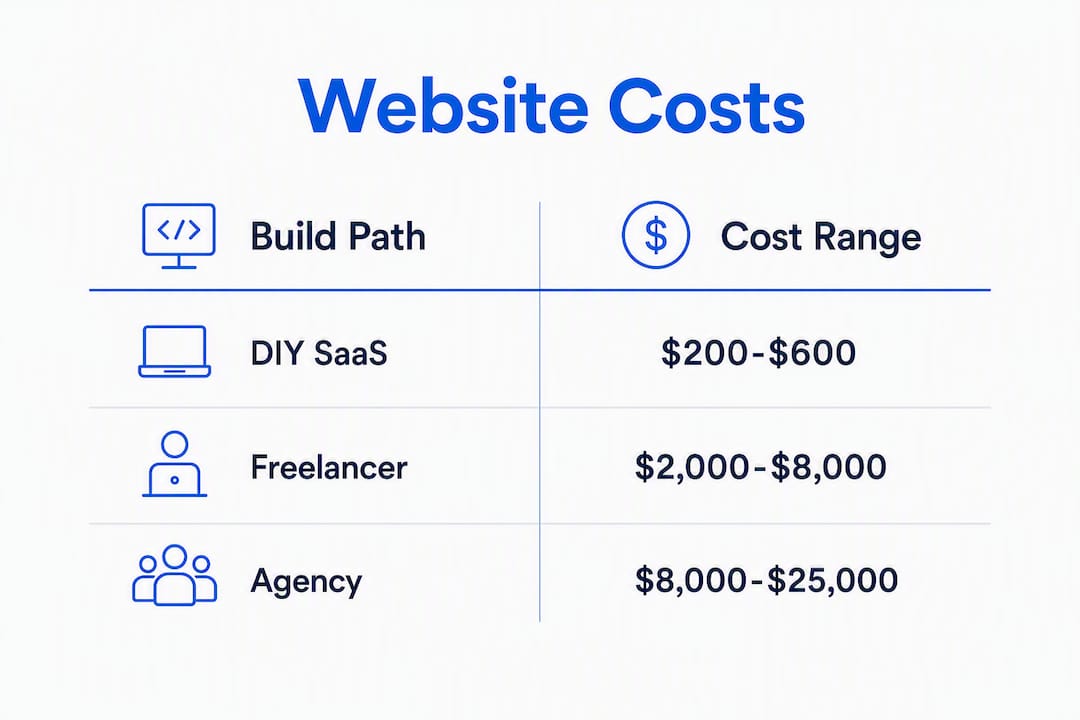
DIY SaaS builders typically run $15–$50 per month for a basic business plan, while managed eCommerce tiers can push $300/month or higher. That subscription never stops, which matters more than the low entry price.
Three quick scenarios to calibrate your expectations:
- Mid-range freelancer site — A 5-page WordPress site with a custom design, basic SEO setup, and contact form. Total year one: $3,000–$6,000 all-in.
What are you actually paying for?
Every website budget breaks into the same core line items, even if the numbers look wildly different across build paths.
Domain name: Typically $10–$20/year through registrars like GoDaddy, Namecheap, or Google Domains. Premium or exact-match domains can run hundreds or thousands. Many small-business sites land in the $145–$640+ per year range for basic running costs before any development fees.
Hosting: Shared hosting is the cheapest entry point, followed by managed WordPress hosting, VPS, and cloud/scalable options. Costs scale with traffic, storage, and support level. Managed WordPress hosting tends to be the sweet spot for most small businesses: faster performance, automatic backups, and less DIY troubleshooting.
SSL and security: SSL certificates are often bundled with hosting plans. Standalone certificates or premium security monitoring add cost, especially for eCommerce sites handling payment data.
CMS and page builder: WordPress.org itself is free. Elementor's free version covers basic layouts; the Pro version runs around $59–$99/year. Wix and Squarespace bundle hosting and CMS into one subscription. Shopify charges a monthly platform fee on top of transaction costs.
Premium themes and plugins: A quality WordPress theme costs $40–$100 one-time or $50–$200/year for a subscription. Plugins for forms, SEO (like Yoast or Rank Math), caching, and security add up fast. A typical WordPress site runs 10–20 plugins, and several will have annual renewal fees.
Custom design and development: This is where costs diverge sharply. A freelancer building a custom WordPress theme charges $1,(Removed incomplete/out-of-context figure)–$5,000 for design alone. Agency design and development together often start at $6,000 and climb based on complexity, number of pages, and integrations.
Content creation: Professional copywriting commonly runs $50–$150/hour. Photography for a local business can cost $(Removed incomplete/out-of-context figure)–$2,(Removed incomplete/out-of-context figure) or more for a half-day shoot. Video adds considerably more. Content is often the largest non-technical line item in a first-year budget, and most owners underestimate it.
SEO setup: Basic on-page SEO (title tags, meta descriptions, schema markup, Google Search Console setup) is often included in professional builds. Local SEO setup, including Google Business Profile optimization and citation building, typically runs $300–$1,(Removed incomplete/out-of-context figure) as (Removed incomplete fragment)time setup fee.
Analytics and marketing tools: Google Analytics 4 is free. Google Search Console is free. Paid tools like Semrush, Ahrefs, or Hotjar add $50–$200/month depending on plan. Most small businesses start with free tools and upgrade when they have traffic worth analyzing.
| Line item | Low | Median | High | When costs spike |
|---|---|---|---|---|
| Domain | $10/yr | $15/yr | $20/yr+ | Premium/exact-match domains |
| Hosting | $59–$99/year | $50–$200/year | — | Managed, high-traffic, or cloud |
| SSL/security | $0 | $50/yr | $300/yr | eCommerce, PCI compliance |
| CMS/page builder | $0 | $99/yr | $300/yr | Premium builders or Pro plans |
| Themes/plugins | $0 | $200/yr | $600/yr | Multiple premium plugin renewals |
| Design & development | $0 (DIY) | $4,000 | $35,000+ | Custom builds, complex integrations |
| Content (copy + photos) | $0 (DIY) | $1,000 | $8,000+ | Professional photography, video |
| SEO setup | $0 | $500 | $2,000 | Local SEO, technical audits |
| Analytics tools | $0 | $0 | $2,400/yr | Paid platforms at scale |
Pro Tip: The real plugin trap is renewal stacking. A form builder, an SEO plugin, a backup plugin, a security scanner, and a caching plugin each renew annually. Add them up before you commit to a WordPress build and you may find a managed SaaS builder is cheaper over three years.
Which build path fits your budget and goals?
DIY SaaS builders: Wix and Squarespace
Wix and Squarespace are the fastest path to a live site. You pick a template, drag in your content, and publish. No server management, no plugin updates, no developer needed.
The tradeoff is the subscription. You pay every year, forever, whether you touch the site or not. Wix's business plans run roughly $17–$35/month; Squarespace's comparable plans are $23–$65/month. Neither platform lets you export your site cleanly if you want to move later, which is the single biggest long-term risk.
Best for: Service businesses that need a simple 5-page site, want to launch in a weekend, and don't plan to scale into complex integrations or heavy SEO campaigns.
Pros:
- Lowest barrier to entry
- Hosting, SSL, and security included
- No technical maintenance
Cons:
- Subscription cost never ends
- Limited customization ceiling
- Vendor lock-in with no clean export
Self-hosted WordPress.org with Elementor
WordPress.org powers roughly 43% of all websites on the internet, and for good reason. The software is free. You own your files. You can move hosts, hire any developer, and extend the platform with thousands of plugins.

Elementor is the most widely used drag-and-drop page builder for WordPress, with a free tier and a Pro version that unlocks advanced widgets and theme building. A self-hosted WordPress site built with Elementor gives you near-agency-level design control at a fraction of the cost, if you're willing to manage it yourself.
First-year costs for a DIY WordPress build: $100–$(Removed incomplete/out-of-context figure) for hosting, domain, and a premium theme or Elementor Pro. Ongoing: $200–$600/year. The hidden cost is your time, which is real and should be counted.
Best for: Tech-comfortable owners who want flexibility, plan to grow, and are willing to handle updates and backups themselves or hire someone occasionally.
Pros:
- Full ownership and portability
- Massive plugin ecosystem
- Lower long-term cost if self-managed
Cons:
- You handle security, updates, and backups
- Plugin conflicts are a real maintenance burden
- Steeper learning curve than SaaS builders
For a direct comparison of these two approaches, WordPress vs. Wix breaks down the tradeoffs in detail.
Freelance designers and developers
Freelancers are often the best value when the scope is well-defined and you can manage the project yourself. A clear brief, a fixed page count, and agreed deliverables keep costs predictable.
Typical freelance rates for a 5-page small business site: $2,000–$8,000 depending on experience, location, and complexity. Texas-based freelancers often price in the $2,000–$6,000 range for a standard brochure site. Hourly rates vary widely, from $50/hour for newer freelancers to $150/hour or more for specialists.
Best for: Owners with a clear scope, a mid-range budget, and the bandwidth to review work and provide feedback on a 2–6 week timeline.
Pros:
- More customization than SaaS builders
- Direct communication with the builder
- Flexible scope and phased payment options
Cons:
- Quality varies significantly
- No built-in ongoing support after launch
- Scope creep risk without a detailed SOW
Boutique agency builds
Agencies bring strategy, project management, design, development, and often SEO under one roof. That coordination has a price. Most boutique agencies in Texas and across the U.S. start at $6,000 for a basic site and commonly charge $15,000–$35,000 for a fully custom build with integrations, content, and local SEO.
The fee is justified when you need a site that functions as a lead-generation machine, not just a digital business card. Agencies also typically offer ongoing maintenance retainers, which removes the burden of managing the site yourself.
Best for: Businesses with a real marketing budget, complex feature requirements, or a need for ongoing strategy and managed growth.
Pros:
- Comprehensive strategy and execution
- Ongoing managed support available
- Higher accountability and project structure
Cons:
- Highest upfront cost
- Longer timelines (4–12 weeks typical)
- Overkill for simple brochure sites
eCommerce: Shopify and WooCommerce
eCommerce adds a meaningful cost layer on top of any standard build. Small business brochure sites typically run $1,500–$4,000+, while eCommerce sites start at $1,000 and commonly reach $5,000 or much higher depending on catalog size and integrations.
Shopify is the dominant SaaS eCommerce platform. Plans start at $39/month and climb to $105/month for the standard tier. Transaction fees apply unless you use Shopify Payments. WooCommerce on WordPress is free to install but requires hosting, security, and plugin management.
Advanced eCommerce setups with inventory systems, custom shipping logic, and third-party integrations push costs significantly higher. Budget for payment gateway setup, product photography, and ongoing inventory management as separate line items.
The most common eCommerce budget mistake is treating the platform fee as the total cost. Shopify at $39/month is $468/year before you pay for a theme, apps, a developer, photography, or transaction fees. A realistic first-year eCommerce budget for a small store runs $5,000–$15,000 when you count everything.
What does year two actually cost to run a website?
Most owners nail the build budget and then get surprised by what it costs to keep a site running. Websites have three cost phases: initial build, hosting and apps, and ongoing maintenance, and the third phase is where budgets most often go sideways.
Hosting: Costs vary by type. Shared hosting is the cheapest option. Managed WordPress hosting delivers better performance and support at a higher price. VPS and cloud hosting scale with traffic and offer more control. Typical hosting and app expenses for small businesses run $15–$150/month.
Maintenance plans: Professional maintenance covers plugin updates, WordPress core updates, security scans, uptime monitoring, and monthly backups. DIY maintenance costs only your time. Ad hoc support (hiring someone when something breaks) is unpredictable. Monthly retainers give you predictable costs and faster response times. A solid website maintenance plan is worth pricing out before you launch, not after something breaks.
Security and backups: Standalone security plugins like Wordfence or Sucuri add $100–$(Removed incomplete/out-of-context figure)/year. Offsite backup services add another $50–$200/year. Managed hosting plans often bundle these.
Premium plugin renewals: Budget $200–$600/year for a typical WordPress site with 3–5 premium plugins.
Professional email: Google Workspace runs $6–$18/user/month. Microsoft 365 is comparable. A single-user plan adds $72–$216/year.
Content and marketing: Blog posts, social content, and email campaigns are ongoing costs most owners forget to budget. Professional copywriting, even at a modest pace of one post per month, adds $600–$1,800/year.
| Maintenance model | Annual cost estimate | What's included |
|---|---|---|
| DIY (self-managed) | $200–$600 | Hosting, domain, plugin renewals only |
| Ad hoc professional support | $600–$2,400 | Hosting + occasional developer hours |
| Monthly maintenance retainer | $1,800–$6,000 | Hosting, updates, backups, security, support |
How do you build a realistic website budget?
A solid budget starts with goals, not features. Before you price anything, answer three questions: What does this site need to do? Who will maintain it? What's the realistic timeline?
- Define your primary goal. Lead generation, eCommerce, local search visibility, and brand credibility each drive different feature requirements and cost levels.
- Pick your build path. Use the comparison table above. Your technical comfort, timeline, and budget ceiling narrow this quickly.
- List must-have features. Contact form, booking system, product catalog, live chat, Google Maps embed, multilingual support. Each adds cost.
- Estimate line items. Use the tables in this guide as a starting framework. Get at least three vendor quotes for any professional build.
- Add a 10–20% contingency. Hidden recurring costs like plugin renewals, payment processor fees, and analytics subscriptions consistently catch owners off guard.
- Separate build cost from run cost. Year one is always the most expensive. Build a separate line for year-two-and-beyond recurring costs.
Deliverables to request in any proposal or SOW
When you hire a freelancer or agency, these items should appear explicitly in the scope of work:
- Wireframes or site map before design begins
- Design mockups (desktop and mobile) for approval
- CMS setup and admin training
- On-page SEO setup (title tags, meta descriptions, schema)
- Google Analytics 4 and Google Search Console installation
- Contact form and lead capture setup
- Speed and performance optimization
- Final file handoff and source code access
- 30-day post-launch support window
Use the website review checklist to audit any proposal before you sign.
Sample budget template
| Budget category | DIY build | Freelancer build | Agency build |
|---|---|---|---|
| Domain | $15 | $15 | $15 |
| Hosting (year 1) | $10–$20 | $40–$100 | $40–$100 |
| Design & development | $0 | $4,000 | $10,000–$20,000+ |
| Content (copy + photos) | $0 | $1,000 | $3,000 |
| SEO setup | $0 | $500 | $1,000 |
| Plugins/tools | $200 | $300 | $0 (included) |
| Contingency (15%) | $50 | $1,000 | $2,000 |
| Year 1 total | — | $2,000–$8,000 | $10,000–$20,000+ |
How do you save money without creating problems later?
Smart cost-cutting moves
- Start with a template — A premium WordPress theme or a Wix template costs $50–$100 and gives you a professional foundation. Custom design from scratch is worth it at scale, not at launch.
Vendor red flags that cost you later
- Vague deliverables. Any proposal that says "website design and development" without a page count, feature list, or revision limit is an open invitation to scope creep.
- No source file handoff. If a vendor won't give you the design files, theme files, or CMS credentials at project end, you're renting your own website.
- Indefinite hourly rates. Hourly billing without a cap or milestone structure means you have no ceiling on cost.
- No testing or backup plan. A professional build includes cross-browser testing, mobile testing, and a staging environment. If it's not in the SOW, it probably won't happen.
- Locked proprietary platforms. Some vendors build on platforms with no export option. If you ever want to leave, you start from zero.
Pro Tip: Before signing any contract, ask one question: "If I want to move this site to a different host or developer in two years, what files and credentials will you hand over?" The answer tells you everything about how much control you'll actually have.
A real rapid-launch budget: what Forge-web-studio delivers in 3–7 days
Here's what a concrete small business website budget looks like when mapped to a real scope. This example reflects a 5-page brochure site with local SEO setup, built for a Texas service business using Forge-web-studio's rapid-launch approach.
Sample project: 5-page service business site
| Line item | Cost |
|---|---|
| Design and development (5 pages, mobile-first) | $1,500–$3,000 |
| Domain (year 1) | $15 |
| Hosting setup (first year, managed) | $40–$100 |
| Local SEO setup (Google Business, on-page, schema) | $300–$1,000 |
| Speed optimization and performance tuning | Included |
| Contact/booking form and lead flow setup | Included |
| Google Analytics 4 + Search Console setup | Included |
| 30-day post-launch support | Included |
| Total (year 1) | $2,000–$8,000 |
Timeline: rapid launch vs. custom project
| Milestone | Rapid launch (3–7 days) | Custom project (4–8 weeks) |
|---|---|---|
| Discovery and brief | Day 1 | Week 1 |
| Design mockups | Day 1–2 | Week 2–3 |
| Development and content | Day 2–5 | Week 3–5 |
| Review and revisions | Day 5–6 | Week 5–6 |
| SEO and analytics setup | Day 6 | Week 6–7 |
| Launch | Day 7 | Week 7–8 |
Forge-web-studio's small business web design process is built around mobile-first layouts, clear contact paths, and Google Business integration from day one. Every build includes speed optimization and trust signals, not as add-ons, but as part of the standard scope.
Speed to launch matters more than most owners realize. A site that goes live in a week and starts capturing leads beats a "perfect" site that launches in three months. The rapid-launch model forces scope discipline, which is usually a feature, not a limitation.
For Texas service businesses specifically, the local business website package includes city and service page architecture designed to rank in local search, not just look good.
What does website compliance actually cost?
Legal and compliance requirements add real costs that most website cost guides skip entirely. In the U.S., two areas matter most: accessibility under the Americans with Disabilities Act (ADA) and privacy law compliance.
ADA compliance: The ADA does not explicitly cover websites in every case, but federal courts have increasingly ruled that business websites must be accessible to users with disabilities. The Web Content Accessibility Guidelines (WCAG) 2.1 Level AA is the accepted standard. Basic compliance review and remediation for a small business site typically costs $(Removed incomplete/out-of-context figure)–$3,000 depending on the number of pages and current state of the site. Ongoing compliance monitoring tools like accessiBe or AudioEye run $49–$199/month for automated overlays, though these are not a substitute for genuine remediation.
Privacy policy and terms of service: A generic template from a service like Termly or iubenda costs $0–$200/year. A lawyer-drafted privacy policy tailored to your business and state runs $(Removed incomplete/out-of-context figure)–$2,000. If you collect email addresses, run ads, or sell products, you need a real privacy policy, not a copy-paste template.
Cookie consent: If your site uses analytics or advertising cookies, a cookie consent banner is required under California's CCPA for businesses meeting certain thresholds. Consent management platforms like Cookiebot or OneTrust offer small-business plans starting at $0–$50/month.
PCI compliance: Any site processing credit card payments must meet Payment Card Industry Data Security Standards. Shopify and Stripe handle most of this at the platform level, but self-hosted eCommerce stores may need a PCI compliance scan, which runs $100–$300/year through providers like SecurityMetrics.
Budget $(Removed incomplete/out-of-context figure)–$3,000 for initial compliance setup and $200–$2,400/year for ongoing monitoring, depending on your site's complexity and the tools you use.
Going beyond basic compliance: advanced accessibility costs
Basic ADA compliance gets you to WCAG 2.1 Level AA. Going further, toward AAA compliance or proactive inclusive design, costs more but serves a broader audience and reduces legal exposure.
Advanced accessibility work includes:
- Manual accessibility audits: A certified accessibility specialist conducting a full manual audit of a 10–20 page site typically charges $2,000–$8,000. Automated tools miss roughly 30–40% of real accessibility issues, so manual review matters for any site with significant traffic.
- Screen reader optimization: Ensuring your site works correctly with NVDA, JAWS, and VoiceOver requires testing across multiple assistive technologies. This is usually part of a manual audit but can be scoped separately.
- Keyboard navigation testing: Every interactive element, form, modal, and menu must be operable without a mouse. Fixing keyboard navigation issues in an existing site can run $(Removed incomplete/out-of-context figure)–$2,000 depending on complexity.
- Captioning and transcripts for video: If your site includes video content, captions and transcripts are required for WCAG compliance. Professional captioning services charge $1–$3 per minute of video.
- Ongoing monitoring: Accessibility is not (Removed incomplete fragment)time fix. Sites change, and new content can introduce new issues. Ongoing monitoring through tools like Deque's axe or Level Access runs $1,000–$5,000/year for small business plans.
For most small businesses, the practical path is: start with an automated audit using a free tool like WAVE or axe DevTools, fix the flagged issues, then budget for a professional manual review every 12–18 months.
What do live chat and chatbot features actually cost?
Customer support features are increasingly expected on small business websites, and they add a real line item to your budget.
Live chat: Platforms like Tidio, Intercom, and Zendesk Chat offer small-business plans. Tidio's free plan covers basic live chat with limited conversations. Paid plans start at $29–$59/month. Intercom's entry-level plan runs $74/month. The real cost of live chat is not the software; it's the staffing. Someone has to respond. If you can't staff chat during business hours, a chatbot is a more practical choice.
AI chatbots: Tools like Tidio's Lyro AI or Drift's chatbot can handle common questions automatically. Tidio's AI tier starts at around $29/month. More sophisticated chatbot platforms with custom conversation flows and CRM integration run $100–$(Removed incomplete/out-of-context figure)/month. Custom-built chatbots integrated with your booking system or inventory can cost $2,000–$10,000 to develop.
Booking and scheduling widgets: For service businesses, a scheduling tool like Calendly, Acuity, or Square Appointments often replaces the need for live chat. Calendly's free plan covers basic scheduling; paid plans run $10–$16/user/month. These integrations typically cost $0–$(Removed incomplete/out-of-context figure) to set up on a professionally built site.
Helpdesk and ticketing: If you need a full support ticket system, Freshdesk offers a free plan for small teams. Paid plans start at $15/agent/month. Most small businesses don't need this level of infrastructure at launch.
For a typical small business site, budget $0–$100/month for customer support features, depending on whether you use a free live chat tier or a paid AI chatbot. Factor in setup costs of $200–$1,000 if you want the tool integrated cleanly with your CRM or booking system.
Key Takeaways
The build path you choose determines roughly 80% of your total small business website cost, and the run-phase costs in years two and beyond are where most owners get surprised.
| Point | Details |
|---|---|
| Build path drives total cost | DIY SaaS builders cost $200–$600 year one; agency builds run $6,000–$35,000 before recurring costs. |
| Content is the hidden budget item | Professional copy, photography, and video often exceed the development cost for first-year budgets. |
| Add a 10–20% contingency | Plugin renewals, payment fees, and compliance tools consistently exceed initial estimates. |
| Year-two costs are real | Hosting, maintenance, plugin renewals, and security add $600–$6,000/year depending on your model. |
| Forge-web-studio rapid launch | A 5-page Texas business site with local SEO and mobile-first design launches in 3–7 days for $2,000–$8,000 year one. |
The budget mistake most owners make
The conventional wisdom on website budgets goes like this: pick the cheapest option that covers your needs, then upgrade later. It sounds sensible. It usually isn't.
The problem is that "upgrade later" almost always means "rebuild from scratch later." A Wix site can't be migrated cleanly to WordPress. A WordPress site built on a cheap theme with 30 poorly chosen plugins becomes a maintenance nightmare that costs more to fix than to replace. The cheapest option at launch is frequently the most expensive option over three years.
What actually matters is matching the build path to your growth trajectory, not your current budget. A service business that expects to grow from 5 to 50 clients in 18 months should not launch on a SaaS builder with no SEO flexibility. A solo consultant who needs a simple contact page and a portfolio does not need a $15,000 agency build.
The other thing most guides won't say plainly: content is where small business owners consistently underinvest. A beautifully built site with weak copy and stock photos will underperform a modest template with genuine photography and clear, specific messaging. Every dollar spent on real content, written by someone who understands your customer, returns more than the equivalent dollar spent on design polish.
The run phase deserves the same attention as the build phase. A site that launches well and then goes unmaintained for 18 months will have outdated plugins, security vulnerabilities, and declining search rankings. Budget for maintenance before you launch, not after something breaks.
Forge-web-studio builds Texas business websites that actually generate leads
Most web design options leave you choosing between a cheap DIY tool with a subscription that never ends and an agency that takes three months and $20,000 to deliver. Forge-web-studio is a different route: a strategy-led studio that launches mobile-first, lead-ready websites for Texas businesses in 3–7 days, at a fraction of typical agency pricing.

Every build includes mobile-first layout, clear contact paths, Google Business integration, speed optimization, and local SEO setup from day one. No add-on fees for the basics. No three-month timeline for a 5-page site. The full service catalog covers rapid builds, landing pages, redesigns, and monthly maintenance for Texas local businesses across industries.
If you're ready to move from budget planning to an actual site, request a quote or browse the demo gallery to see what a rapid-launch build looks like for your industry. The next step is a quick conversation, not a long sales process.
Useful sources
- Small Business Website Cost: $150 to $10,000+ Pricing Guide: Detailed cost ranges for builder, freelancer, and agency paths with first-year totals
- How much does a small business website cost? — Elementor blog: Platform plan ranges, SaaS builder tradeoffs, and the contingency recommendation.
- How much does a website cost? — Forbes Advisor: The three-phase cost framework (build, hosting/apps, maintenance) with monthly ranges.
- How much does a website cost — GoDaddy resources: Conservative baseline figures for domain and hosting running costs.
- Small Business Websites for Local Businesses — Forge-web-studio: Overview of rapid-launch packages and deliverables for Texas local businesses.
- Small Business Web Design — Forge-web-studio: Mobile-first design approach, lead flow, and Google Business integration details.