
The single best way to stop form spam is a layered, invisible-first defense: a hidden honeypot field, a time-to-submit check, rate limiting at the edge, server-side validation, and a spam classifier working together, with CAPTCHA held back as a tie-breaker rather than the front door. Done right, this combination blocks the vast majority of automated junk without making a real customer jump through hoops, and it keeps your lead form doing its actual job: converting visitors into calls and emails.
TL;DR:
- Honeypot fields, server-side validation, and rate limiting can block 50 to 75 percent of automated spam without user disruption.
- Modern attackers use headless browsers, CAPTCHA-solving farms, and endpoint bypasses, making single defenses ineffective.
- Combining multiple layered defenses, such as timing checks, IP reputation, and silent rejection, offers the best spam prevention-to-lead ratio.
- CAPTCHA should be reserved for uncertain cases as it can cost 1 to 5 percent of conversions and is increasingly bypassed.
- Implementing a simple, well-named honeypot and basic rate limiting provides high ROI for small businesses, especially when paired with content security policies.
Table of Contents
- What Form Spam Looks Like Today and Why Single Fixes Fail
- Layered Defenses: What Each One Catches and Where to Set the Bar
- The Implementation Checklist Developers Can Ship This Sprint
- Testing, Monitoring, and Tuning Without Killing Real Leads
- Practitioner Notes: Gotchas and Quick Wins
- Using Content Security Policy to Stop Injection-Based Spam
- When to Bring in a Third-Party Anti-Spam Plugin or Service
- Giving Users a Way to Flag What Slips Through
- Why JavaScript Challenges Still Earn a Place in the Stack
- Why Email Verification Still Matters for Form Spam
- What Behavioral Signals Can (and Can't) Tell You
- Where to Go Deeper on Each Layer
- What Actually Moves the Needle, and What's Overrated
- Sources
What Form Spam Looks Like Today and Why Single Fixes Fail
Not all form spam comes from the same place, and that's the first thing most site owners get wrong. Drive-by bot traffic is dumb and cheap: scripts crawl the web looking for <form> tags and fire generic submissions at scale, hoping something sticks. Manual or semi-manual spam is different. It's a person, sometimes paid through a click farm, filling out your form to plant a link, harvest an auto-reply, or test whether your inbox forwards to a real human.
A single defense fails because it's built for one type of attacker, not both. Modern bypass techniques make this worse:
- Headless browsers (Puppeteer, Playwright) execute JavaScript, so simple "no JS, no submit" tricks don't work anymore.
- CAPTCHA-solving farms pay humans a fraction of a cent to clear image challenges in bulk, which is part of why CAPTCHA-as-sole-defense is losing ground.
- Direct endpoint posts skip your form entirely and hit the submission URL straight from a script, bypassing any client-side check that isn't also enforced on the server.
There's also a tradeoff every defense choice touches: privacy and accessibility. Behavioral trackers collect mouse and keystroke data that some users won't want logged, and any hidden field or visual challenge has to stay usable for screen readers and keyboard navigation. Fixing the bot problem while breaking the form for legitimate users isn't a fix.
Layered Defenses: What Each One Catches and Where to Set the Bar
Think of this as a funnel, not a wall. Each layer filters out a slice of bad traffic before the expensive stuff (a human reviewer, a paid classifier) ever gets involved.
- Honeypot field. A form input that's hidden from human eyes with CSS, not
display:nonealone, but off-screen positioning orvisibility:hiddencombined witharia-hidden, so screen readers skip it too. Bots that auto-fill every input on the page fill it in; real visitors never see it. Server-side, reject any submission where that field isn't empty. This single trick catches 50 to 75% of automated drive-by bot traffic at effectively zero cost to legitimate users. - Time-to-submit checks. Record a timestamp when the form renders, then compare it to the submission time. A human needs at least a few seconds to read a form and type an answer. Reject anything under 1 to 2 seconds as an almost-certain script. Do this with a signed token so a bot can't just forge a slower timestamp.
- Rate limiting and IP reputation. Cap submissions per IP, something like 3 per hour is a reasonable starting rule, and enforce it at the edge (your CDN or WAF) rather than in application code, where it's slower and easier to route around.
- AI classifiers and spam-filtering services. This is the heavyweight signal. Services like Akismet analyze content and metadata patterns across a huge base of submissions; they're not infallible, but they carry real weight because of scale, having filtered hundreds of billions of spam submissions across millions of sites. Use the classifier's output as a score, not a hard yes/no gate.
- CAPTCHA (Turnstile, hCaptcha, reCAPTCHA). Reserve this for borderline cases. Independent estimates put CAPTCHA effectiveness against current bot tooling around 80%, and it can cost you 1 to 5% of conversions from users who abandon the challenge. That's too expensive to spend on every visitor.
Pro Tip: Never let any single layer trigger an instant, visible rejection. Combine scores from all five and only escalate to a visible challenge when the combined signal is genuinely ambiguous.
The current consensus among practitioners building these systems is that stacking cheap, invisible layers first and saving CAPTCHA for the gray zone gets you the best ratio of spam blocked to leads preserved.
The Implementation Checklist Developers Can Ship This Sprint
This is the part you can hand to whoever owns the form code today.
Client side:
- Add a honeypot input with a name that doesn't scream "trap" (
user_notesbeatshoneypot_field) and hide it with off-screen CSS, notdisplay:none, so it stays out of assistive-tech traps. - Set
tabindex="-1"andautocomplete="off"on that field so keyboard users tab past it cleanly. - Record a render timestamp in a hidden input the moment the form loads.
- Include a signed token or nonce alongside the timestamp so a bot can't spoof a "slow" submission by editing raw form fields.
Server side:
- Reject immediately if the honeypot field isn't empty.
- Validate the signed timestamp; reject submissions under your minimum threshold.
- Check the request against your rate limit and IP reputation rules.
- Compute a combined spam score from timing, honeypot, rate data, and classifier output.
- For submissions that score as obvious bots, don't return an error. Return a normal 200 OK with a fake "thanks, we got it" response. This silent rejection pattern keeps the bot from learning which layer caught it, which makes it harder for the operator to adapt and try again.
Integration notes: if you're layering in Turnstile, hCaptcha, or reCAPTCHA as your tie-breaker, verify the token server-side, never trust a client-side "passed" flag alone, and always have a fallback path in case the third-party verification service times out. If your form submits via JSON or AJAX rather than a standard POST, double-check that the honeypot field and timestamp actually travel with the payload. It's an easy field to accidentally strip out during a fetch() rewrite.
Pro Tip: Test your own honeypot by filling it in manually and submitting. If your form doesn't silently reject you, the trap isn't wired to your validation logic yet, it's just decoration.
Good forms don't just block spam, they also collect the right information from real leads. If you haven't looked at your form fields lately, it's worth a pass through general contact form best practices while you're in the code anyway.
Testing, Monitoring, and Tuning Without Killing Real Leads
Every threshold above is a starting point, not a fixed rule. The way you find the right numbers for your traffic is sampling.
Every week, pull 50 flagged submissions and label them by hand: real lead, obvious bot, or ambiguous. That false-positive rate tells you whether your classifier threshold is too aggressive. If you're rejecting real customers, loosen it. If obvious spam is sliding through, tighten it.
A simple three-bucket routing model works well for most sites:
| Spam score | Action | Notes |
|---|---|---|
| — | Accept automatically | Low risk, no friction |
| — | Flag for manual review | The gray zone; check daily |
| — | Route to spam queue | Silent rejection, don't notify sender |
These score bands are illustrative starting points from layered defense frameworks, not universal law. Tune them against your own traffic.
Track four numbers over time: spam acceptance rate (bad stuff that got through), false-positive count (good leads you blocked), conversion lift or drop after each change, and an audit of your silently-rejected submissions so you can catch a misconfigured rule before it costs you a month of leads. If your form feeds directly into a sales pipeline, this monitoring loop matters just as much as the lead generation flow itself, since a broken filter quietly starves the pipeline without ever throwing an error.
Practitioner Notes: Gotchas and Quick Wins
The most common honeypot failure isn't the field itself, it's naming it something like
honeypotorbot_trap. Sophisticated scrapers read your field names and skip anything that looks like a trap on sight.
Three mistakes show up constantly on real client sites. First, poorly named honeypot fields, as above. Second, forgetting the trap field entirely when a form gets rebuilt as a JSON/AJAX submission, since it's easy to leave out of a new payload schema. Third, hiding the field with display:none, which some screen readers and form autofill tools handle inconsistently, versus off-screen positioning paired with aria-hidden="true", which is safer for accessibility.
The highest-ROI move for most small business sites: ship a honeypot, server-side silent rejection, and basic edge rate limiting in one sprint. That combination alone handles most of the noise.
Pro Tip: If you're getting targeted, persistent spam campaigns rather than random bot noise, or you're protecting a high-volume signup or payment flow, that's usually the point to bring in outside help rather than keep patching it yourself.
Using Content Security Policy to Stop Injection-Based Spam
Form spam isn't always about junk leads. Sometimes it's an attempt to inject a script or a malicious link through an unvalidated input field, which then executes when an admin views the submission in a dashboard. A Content Security Policy header is your backstop against that specific failure mode.
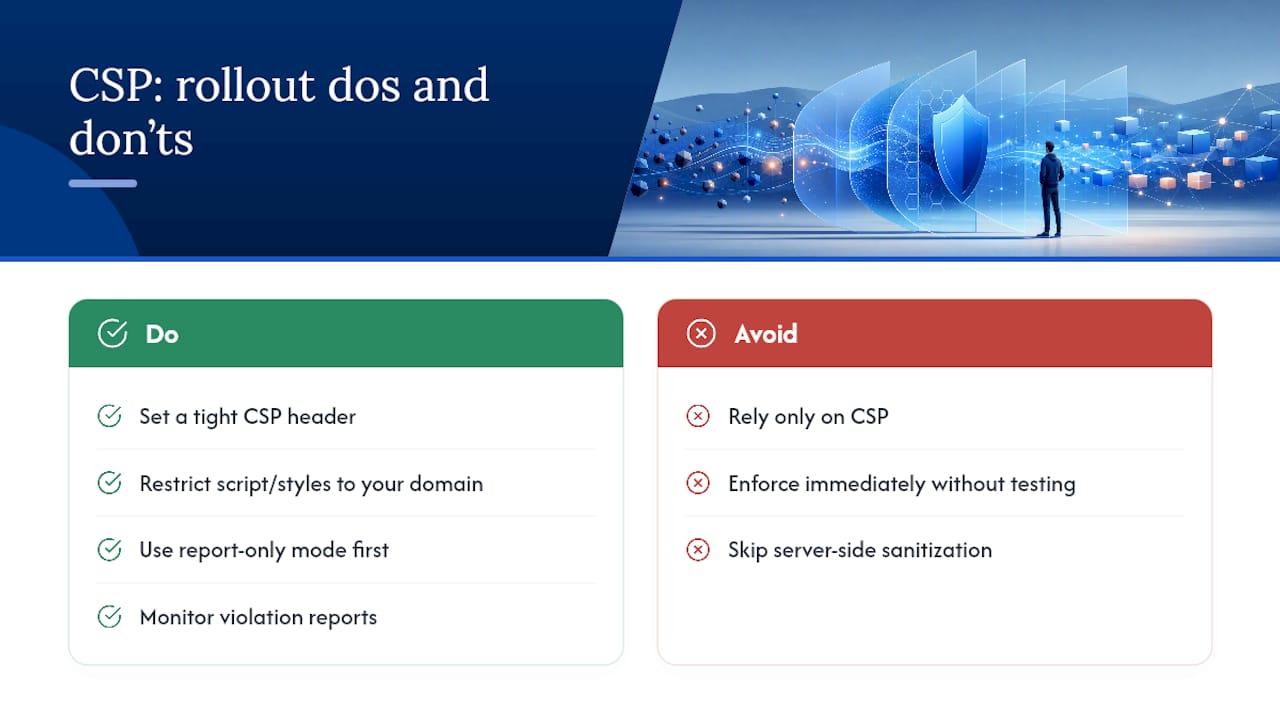
CSP tells the browser exactly which sources are allowed to run scripts, load styles, or fetch resources on your page. A tight policy, something like restricting script-src to your own domain and blocking unsafe-inline, means that even if a spammer manages to sneak a <script> tag through a poorly sanitized form field, the browser refuses to execute it when that submission gets rendered anywhere on your site.
This doesn't replace form validation, it backs it up. Server-side input sanitization should already be stripping HTML and script tags from anything a form field accepts before it ever touches a database. CSP is what saves you when a sanitization rule has a gap you haven't found yet. Most modern hosting platforms and CDNs let you set CSP headers without touching application code, which makes it one of the cheaper security wins available to a small site.
The tradeoff is testing time. A policy that's too strict can break legitimate third-party widgets, embedded maps, or analytics scripts, so roll it out in report-only mode first and watch the violation reports before enforcing it for real.
When to Bring in a Third-Party Anti-Spam Plugin or Service
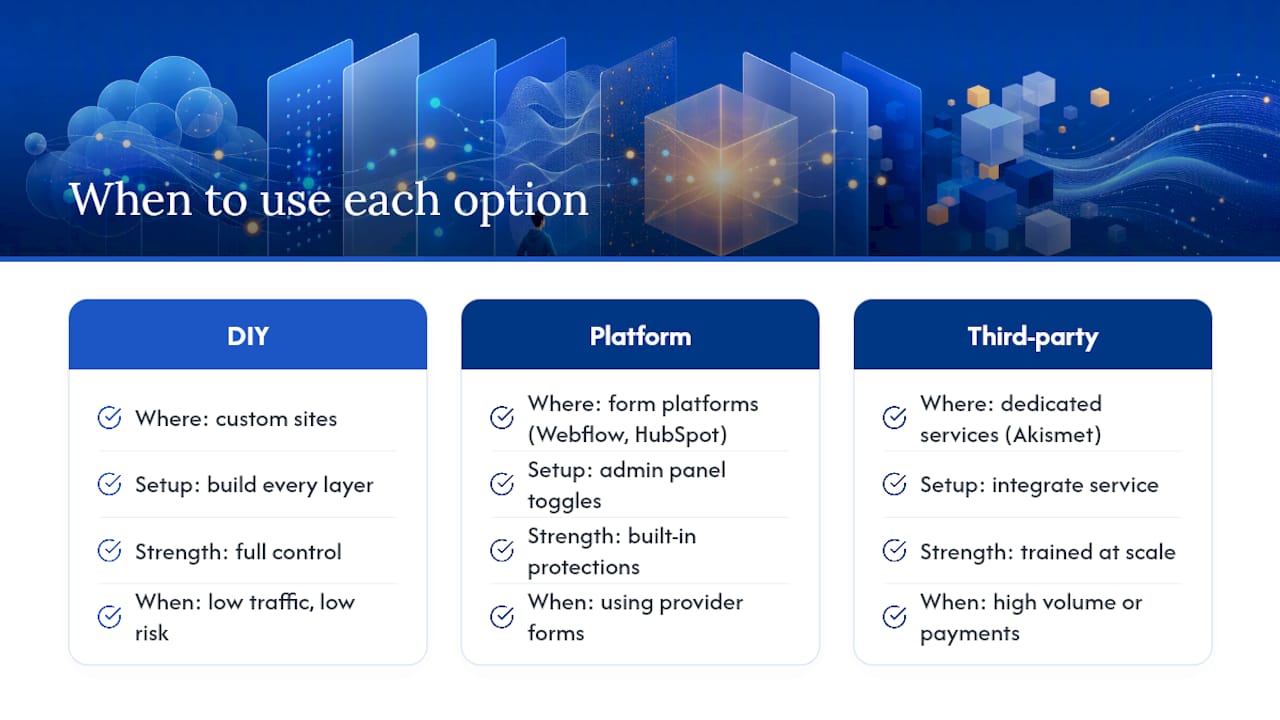
Building every layer yourself works, but it's not always the fastest path. A third-party service like Akismet exists specifically because content-and-metadata spam filtering benefits from scale that a single site can't replicate on its own; it's trained on patterns across a massive base of submissions, which is exactly why its reported accuracy stays high even against spam techniques that are new to your specific site.
For teams running on a form platform rather than custom code, most major providers already expose spam controls in their admin panel. Platforms like Webflow bundle built-in spam prevention settings directly into form settings, and HubSpot's form tools include toggle-able protections like domain blocking and gibberish detection that don't require touching a line of code.
The decision point is volume and risk. A low-traffic contact form on a local service business site probably doesn't need a paid classifier on top of a honeypot and rate limiting, the marginal spam that gets through is a nuisance, not a threat. A high-volume signup flow, a payment form, or anything feeding directly into automated email sequences is a different story: one gap there can mean thousands of junk accounts or a damaged sender reputation. That's the point where paying for a dedicated service earns back its cost fast.
Giving Users a Way to Flag What Slips Through
No filter catches everything, and the submissions that do slip through are valuable data if you build a way to hear about them. A simple "report as spam" action on submissions inside your admin dashboard, even something as basic as a button that flags an entry and logs it, gives you a running feed of exactly what your automated layers are missing.
This matters more than it sounds like it should. The submissions your team flags by hand are the ones your classifier scored as legitimate, which means they're the most useful examples for tightening your threshold. Feed those flagged entries back into your weekly sampling review, and you're closing the loop between what a human catches and what the system should have caught on its own.
If your form handles inbound leads for a sales or support team, it's worth giving the people who actually read submissions an easy way to flag garbage without filing a ticket with IT. A dropdown reason code (obvious bot, promotional spam, harassment, unclear) attached to that report button turns a nuisance click into a small dataset you can review monthly alongside your other spam metrics.
Why JavaScript Challenges Still Earn a Place in the Stack
A JavaScript-based challenge checks something a real browser does automatically but a lightweight script often skips: executing client-side code, evaluating a small computational puzzle, or confirming that certain DOM events fired before submission is allowed. It's a lighter-weight cousin of a full CAPTCHA, and it works well as a filter for the cheapest class of bots, the ones sending raw HTTP requests without a real browser engine behind them.
The catch is that headless browsers like Puppeteer and Playwright execute JavaScript just fine, so this layer alone won't stop a well-built scraper. Where it earns its place is in combination: pair a JS challenge with your timing check and honeypot, and you've raised the cost of attacking your form from "write a five-line script" to "spin up a full headless browser," which prices out a meaningful share of low-effort spam operations without ever showing a real visitor a challenge screen.
Why Email Verification Still Matters for Form Spam
Requiring a confirmed email address before a submission counts as a lead does two things at once. It filters out the bots and disposable-email spam that never bother completing a confirmation step, and it improves the quality of the leads that do make it through, since a real person who confirms their email is more likely to actually respond when your team follows up.
The tradeoff is friction. A confirmation step adds a delay between submission and lead, and some legitimate visitors won't click through, particularly on a contact form where the expectation is an immediate reply. This technique fits best on signup and newsletter forms where a delayed confirmation is normal user behavior, and fits worse on a "call me back today" lead form where speed is the whole point. Match the technique to the form's actual job rather than applying it everywhere by default.
What Behavioral Signals Can (and Can't) Tell You
Mouse movement and keystroke timing analysis look at how an input was actually produced, not just what was typed. A real person's cursor wanders, hesitates, and moves in slightly imperfect arcs; a script that programmatically sets a field's value does none of that. Keystroke dynamics work similarly, measuring the timing between characters, since a script fills a text field instantly while a person types with natural, uneven pacing.
These signals are powerful but they're not something most small business sites need to build in-house. They require client-side tracking code, a scoring model trained on real usage patterns, and ongoing tuning, which puts them firmly in "enterprise anti-fraud" territory rather than "contact form on a local business site." Where they do show up for smaller teams is bundled inside a third-party fraud or bot-detection service, where the behavioral model is already built and you're just consuming a risk score. If you're evaluating a service that offers this, treat the behavioral score the same way you'd treat a classifier score: one more input into your combined threshold, not a standalone gate.
Where to Go Deeper on Each Layer
For hands-on setup, Auth0's honeypot guide and the Straycode practical guide cover field-level implementation details, including React and JSON payload edge cases. For classifier and content filtering, Akismet's documentation is the fastest path to a working integration. For the full layered framework and routing thresholds referenced above, see the Splitforms defense-layer breakdown.
What Actually Moves the Needle, and What's Overrated
Most advice on this topic treats CAPTCHA as step one. That's backwards, and the evidence backs up why: it's the layer with the worst cost-to-catch ratio, worth roughly 80% effectiveness against current bot tooling while taxing your conversion rate on every single visitor, spam or not. A honeypot costs you nothing in UX and catches more than half your problem for free. That ordering alone is the biggest mistake I see teams make.
The other overrated idea is treating any single signal as a verdict. A classifier score, a timing check, an IP reputation flag, none of them should trigger a hard block on their own. Combine them into one score and let that score decide, because a fast, legitimate power user shouldn't get blocked just because they filled out your form in under two seconds.
If you're shipping this yourself, the honeypot and silent server-side rejection go in first. They're cheap, they're invisible, and they'll clear out most of your noise before you've spent a dollar on anything else. Everything after that is tuning, not building.
— Dylan
Ready to bake spam protection straight into a new build instead of bolting it on later? Forge Web Studio's website development service sets up layered form defenses as part of every project, so your lead forms stay clean and fast from launch day.
Sources
- Akismet — how to stop contact form spam
- Auth0 — Honeypots: simple bot trap
- Splitforms — Form Spam Protection: 8 defense layers tested (2026)
- IBM — commentary on CAPTCHA effectiveness and UX costs
- Predax — Form spam in 2026: why bots still get through reCAPTCHA